Publish package to the Maven Central Repository and GitHub Packages
Distributed global ID generation service, ID generation is divided into two modes:
- segment
- snowflake
How to use see the following introduction.
- JDK 11
- MySQL8
- Maven 3.8.5
Run the sql script to create the database and tables:
DROP DATABASE IF EXISTS `uidgenerator`;
CREATE DATABASE `uidgenerator` ;
use `uidgenerator`;
DROP TABLE IF EXISTS mxsm_allocation;
CREATE TABLE `mxsm_allocation` (
 `id` bigint NOT NULL AUTO_INCREMENT COMMENT '主键ID',
 `biz_code` varchar(128) COLLATE utf8mb4_general_ci NOT NULL COMMENT '业务编码(用户ID,使用业务方编码)',
 `max_id` bigint NOT NULL DEFAULT '1' COMMENT '最大值',
 `step` int NOT NULL COMMENT '步长',
 `description` varchar(255) COLLATE utf8mb4_general_ci DEFAULT '' COMMENT '说明',
 `create_time` timestamp NOT NULL COMMENT '创建时间',
 `update_time` timestamp NOT NULL ON UPDATE CURRENT_TIMESTAMP COMMENT '更新时间',
 PRIMARY KEY (`id`),
 UNIQUE KEY `biz_code_index` (`biz_code`) USING BTREE
) ENGINE=InnoDB DEFAULT CHARSET=utf8mb4 COLLATE=utf8mb4_general_ci;
DROP TABLE IF EXISTS mxsm_snowfalke_node;
CREATE TABLE `mxsm_snowfalke_node` (
 `id` bigint NOT NULL AUTO_INCREMENT COMMENT '主键ID',
 `host_name` bigint NOT NULL COMMENT 'IP地址',
 `port` int NOT NULL DEFAULT '1' COMMENT '端口',
 `deploy_env_type` enum('ACTUAL','CONTAINER') COLLATE utf8mb4_general_ci DEFAULT 'ACTUAL' COMMENT '部署环境类型',
 `description` varchar(255) COLLATE utf8mb4_general_ci DEFAULT '' COMMENT '说明',
 `create_time` timestamp NOT NULL COMMENT '创建时间',
 `update_time` timestamp NOT NULL ON UPDATE CURRENT_TIMESTAMP COMMENT '更新时间',
 PRIMARY KEY (`id`),
 UNIQUE KEY `mix_index` (`host_name`,`port`) USING BTREE
) ENGINE=InnoDB DEFAULT CHARSET=utf8mb4 COLLATE=utf8mb4_general_ci;
Step 1:Download binary package
It can be downloaded from the latest stable release page rain-server-1.0.1-SNAPSHOT.tar.gz
tar -zxvf rain-server-1.0.1-SNAPSHOT.tar.gz
cd rain-server-1.0.1-SNAPSHOT/
Step 2:Modify conf/application.properties
Modify the database-related configuration in the application.properties configuration:
spring.datasource.url=jdbc:mysql://ip:port/uidgenerator?useUnicode=true&characterEncoding=utf-8
spring.datasource.username=xxx
spring.datasource.password=xxxxx
Tips: make sure the database address, name, port number, username, and password are correct.
Step 3:Start server
sh bin/start.sh
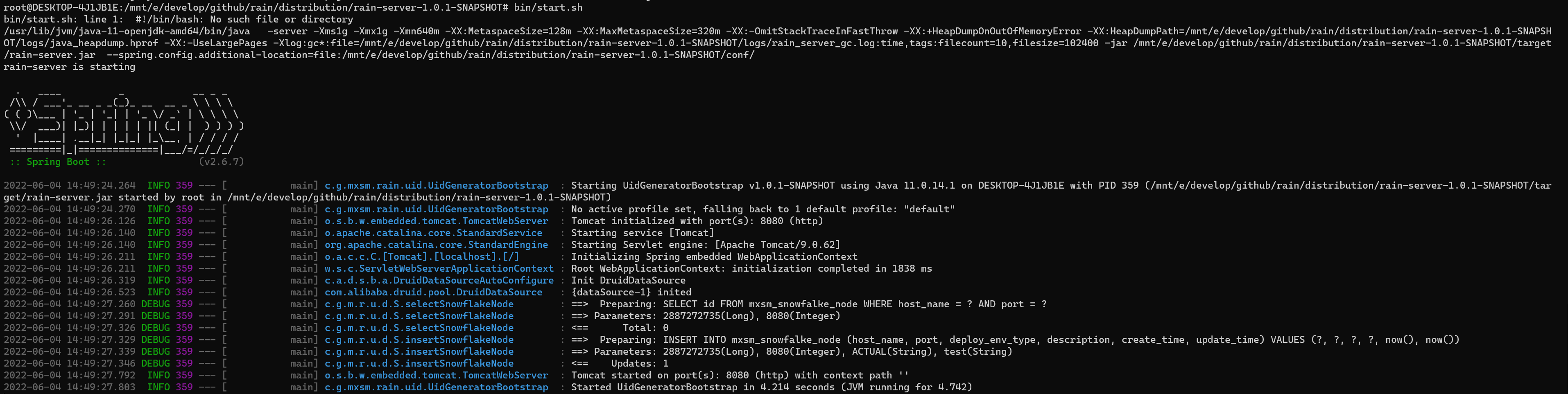
Modify conf/application.properties
| config | default value | explain |
|---|---|---|
| mxsm.uid.segment.threshold | 40 | In cache mode, when the local cache threshold is lower than or equal to 40%, the segment filling will be loaded to the database, and the value ranges from 0 to 100 |
| mxsm.uid.segment.cache-size | 16 | Number of cached segments to load by default in cache mode |
The size of threshold and cache-size affects the frequency of segment obtained from the data. If cache-size is set too large, it will cause a waste of UID when the project is stopped for maintenance. But the cache-size is large enough that bizCode is loaded in memory before it can continue serving in the event of a database crash。
Modify conf/application.properties :
| config | default value | explain |
|---|---|---|
| mxsm.uid.snowflake.timestamp-bits | 41 | The number of bits of timestamp for the snowflake algorithm |
| mxsm.uid.snowflake.machine-id-bits | 10 | The number of bits in the machine id of the snowflake algorithm |
| mxsm.uid.snowflake.sequence-bits | 12 | The number of bits in the snowflake algorithm sequence number |
| mxsm.uid.snowflake.container | false | Whether the deployment is containerized |
| mxsm.uid.snowflake.time-bits-second | false | timestamp Whether it is in seconds |
| mxsm.uid.snowflake.epoch | 2022年05月01日 | timestamp The relative time in the format yyyy-MM-dd and before the current time |
timestamp-bits、machine-id-bits、sequence-bits三个位数和加起来要等于63。
maven client dependence:
<dependency>
 <groupId>com.github.mxsm</groupId>
 <artifactId>rain-uidgenerator-client</artifactId>
 <version>${latest version}</version>
</dependency>
example:
UidClient client = UidClient.builder()
 .setUidGeneratorServerUir("http://172.29.250.21:8080") //设置服务地址
 .setSegmentNum(10) //设置获取的segment数量
 .setThreshold(20) //设置阈值
 .isSegmentUidFromRemote(false) //设置是否直接从服务器通过Restful接口的方式获取
 .build();
long uid = client.getSegmentUid("mxsm");
long uidRemote = client.getSegmentUid("mxsm", true);
long snowflake = client.getSnowflakeUid();
Step 1: clone code
git clone https://github.com/mxsm/rain.git
cd rain
Step 2:Modify application.properties in rain-uidgenerator-server
spring.datasource.url=jdbc:mysql://ip:port/uidgenerator?useUnicode=true&characterEncoding=utf-8
spring.datasource.username=xxx
spring.datasource.password=xxxxx
Step 3:maven package server
mvn clean package -DskipTests=true
Step 4:Start server
java -Xms1g -Xmx1g -jar ./rain-uidgenerator-server/target/rain-uidgenerator-server-1.0.1-SNAPSHOT.jar
TODO