NPM Version Bower Build Status Coverage Status Dependency Status devDependency Status
Gretro (grétrou, グレトロ) is a JavaScript graphic library for retro CG.
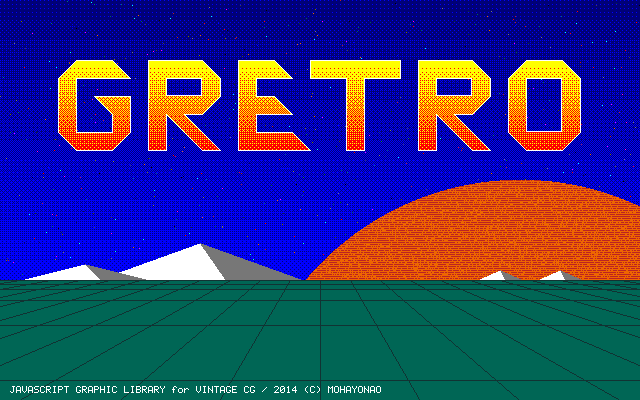
- 16 colors chosen from available 4096 colors
- 16 default tile patterns and 16 custom tile patterns
- drawing in pixels, no anti aliasing
- plugin architecture for extending gretro.Canvas
$ bower install gretro
<script src="/path/to/gretro.js"></script>
% npm install gretro
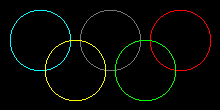
var canvas = new gretro.Canvas(220, 110);
canvas
 .stroke(13).circle( 40, 40, 30)
 .stroke( 7).circle(110, 40, 30)
 .stroke(10).circle(180, 40, 30)
 .stroke(14).circle( 75, 70, 30)
 .stroke(12).circle(145, 70, 30);
var gretroCanvas = new gretro.Canvas(640, 400).draw(fn);
var canvas = document.getElementById("canvas");
var context = canvas.getContext("2d");
var imageData = context.createImageData(640, 400);
imageData.data.set(gretroCanvas.toRGBA());
context.putImageData(imageData, 0, 0);
draw directly to the html-canvas
var canvas = document.getElementById("canvas");
var context = canvas.getContext("2d");
var imageData = context.getImageData(0, 0, 640, 400);
new gretro.Canvas(640, 400, imageData.data).draw(fn);
context.putImageData(imageData, 0, 0);
use node-png npm install png
var Png = require("png").Png;
var fs = require("fs");
var png = new Png(new Buffer(gretroCanvas.toRGB()), 640, 400, "rgb");
var png_image = png.encodeSync();
fs.writeFileSync("./image.png", png_image.toString("binary"), "binary");
new Canvas(width:int=640, height:int=400, buffer:Uint8Array=null) : Canvas
getColor(index:int) : intsetColor(index:int, rgb:int) : CanvasgetTile(index:int) : intsetTile(index:int, pattern:int) : Canvas
fill(color:[int|array|function]) : CanvasnoFill() : Canvasstroke(color:[int|array|function]) : CanvasnoStroke() : Canvas
clear() : Canvasclip(x1:int, y1:int, x2:int, y2:int) : CanvasnoClip() : Canvasmask(mask:[Uint8Array|Canvas]) : CanvasnoMask() : Canvas
arc()(NOT IMPLEMENTED YET)circle(cx:int, cy:int, r:int) : Canvasellipse(cx:int, cy:int, rx:int, ry:int) : Canvasline(x1:int, y1:int, x2:int, y2:int) : Canvaspoint(x:int, y:int) : Canvaspolygon(vtx:array) : Canvasquad(x1:int, y1:int, x2:int, y2:int, x3:int, y3:int, x4:int, y4:int) : Canvasrect(x:int, y:int, width:int, height:int) : Canvastriangle(x1:int, y1:int, x2:int, y2:int, x3:int, y3:int) : Canvas
clone() : Canvascopy(x1:int, y1:int, x2:int, y2:int) : Canvaspaste(cnv:Canvas, x:int, y:int) : Canvas
toMask() : Uint8ArraytoRGB() : Uint8ArraytoRGBA(alpha:int=255) : Uint8ArraytoIndexedColor() : Uint8Array
You can use 16 colors on a canvas. It is possible to select from 4096 colors.

canvas
 .setColor(0, 0x44dd77).setColor(1, 0x22aa88)
 .fill(1).rect(20, 20, 60, 60);

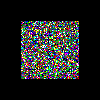
set a function that returns a calculated color number instead of a color number.
canvas
 .fill(function(x, y) {
 return 16 * Math.random();
 }).rect(20, 20, 60, 60);
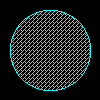
A tile is a 4 x 4 dot pattern with 2 colors that is used to express gradation in generally.
Set array that contains color1, color2 and tile-index instead of a color number.
canvas.fill([ color1, color2, tileIndex ]);

TileIndex 16-31 are customizable.
canvas
 .setTile(16, 0x4a12)
 .stroke(13).fill([ 0, 13, 16 ])
 .circle(50, 50, 40, 40);
/* 1 2 4 8
 □しろいしかく ■しかく □しろいしかく □しろいしかく = 2
 ■しかく □しろいしかく □しろいしかく □しろいしかく = 1
 □しろいしかく ■しかく □しろいしかく ■しかく = a
 □しろいしかく □しろいしかく ■しかく □しろいしかく = 4
 0x */
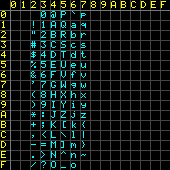
plugin to draw a text
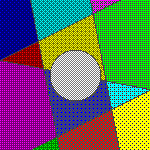
plugin to paint a region
- Fork (https://github.com/mohayonao/gretro/fork)
- Create a feature branch (
git checkout -b my-new-feature) - Commit your changes (
git commit -am 'add some feature') - Run test suite with the
gulp traviscommand and confirm that it passes - Push to the branch (
git push origin my-new-feature) - Create new Pull Request
Gretro is available under the The MIT License.