
This is the command line generator for the BezelKit Swift package.
Running this script standalone will fail as it attempts to copy the bezel.min.json into the /Resources directory (which does not exist).
To use this repo script it is aimed to be run from the BezelKit repo directory.
You can generate new bezel data for additional devices using the index.js NodeJS script located in the Generator folder.
- iOS/iPadOS runtime installed on your macOS machine to get the simulator.
- NodeJS installed to run the script.
- All requirements for running a simulator, opening an Xcode project, etc.
Recommendation: Install it on a macOS VM so as not to interfere with your personal Xcode setup.
All devices (pending, problematic, and completed) are stored within the apple-device-database.json file.
The file is sectioned into a few areas:
-
devices: These are the completed, and computed device identifiers and their names and bezel size. This is broken into three categories -
iPad,iPhone, andiPod. -
pending: The script uses the
pendingobjects to decide which simulators to boot and fetch bezel sizes from. They are to be inserted as:"pending" : { "identifier" : { "name" : "Simulator name" } } "pending" : { "iPhone16,2" : { "name" : "iPhone 15 Pro Max" } }
-
Success & Failure:
- If the simulator lookup succeeds, the simulator data is moved to the
devicesobject. - If the simulator lookup fails, the simulator identifier and object data is moved to the
problematicobject.
- If the simulator lookup succeeds, the simulator data is moved to the
cd ./Generator
node index.jsIf you'd like to update or extend the list of device bezel sizes, you can easily do so by:
-
Adding to
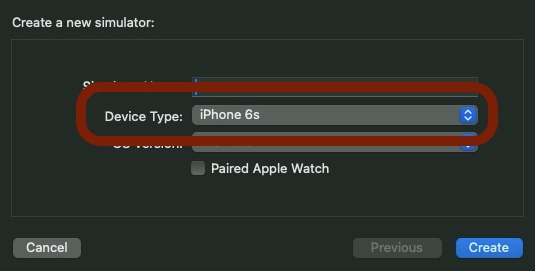
pendingobject: Add more devices and their identifiers to the existing JSON file. Make sure the friendly names in the JSON match the "Device Type" from theCreate New Simulatorscreen in Xcode."pending" : { "iPhone8,1" : { "name" : "iPhone 6s" } }
-
Problematic Simulators: If any simulators are listed under the
problematickey, they are automatically moved into pending the next time the script is run.
By following these steps, you can continually update and maintain the device bezel data.
Once the script completes and updates the bezel.min.json for the actual package, pending and problematic keys are deleted, and the JSON is minified.
Contributions are more than welcome. If you find a bug or have an idea for an enhancement, please open an issue or provide a pull request.
Please follow the code style present in the current code base when making contributions.
Note: any pull requests need to have the title in the following format, otherwise it will be rejected.
YYYY-mm-dd - {title}
eg. 2023年08月24日 - Updated README file
I like to track the day from logged request to completion, allowing sorting, and extraction of data. It helps me know how long things have been pending and provides OCD structure.
The BezelKit package is released under the MIT licence. See LICENCE for more information.