仿SDWebImage(探究原理)
###一、代码结构分析图
分析图
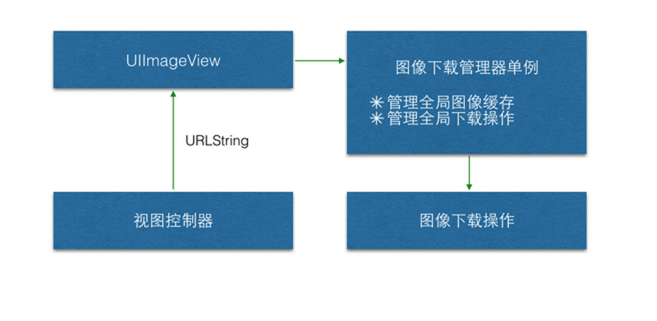
###二、首先自定义NSOperation操作,我的下载操作是在main方法中进行处理的,而SDWebImage是在start方法中进行处理,自定义回调block块
@interface WebImageOperation ()
@property (copy, nonatomic) NSString *url;
@property (copy, nonatomic) void(^finishedBlock)(UIImage *img);
@end
@implementation WebImageOperation
+ (instancetype)webImageOperationWithURL:(NSString *)url finishedBlock:(void(^)(UIImage *img)) finishedBlock {

 WebImageOperation *webOp = [[self alloc] init];
 webOp.url = url;
 webOp.finishedBlock = finishedBlock;

 return webOp;
}
//执行的时候会调用main方法
- (void)main {

 if (self.isCancelled) return;
 NSAssert(self.finishedBlock != nil, @"没有传递block值");

 [NSThread sleepForTimeInterval:1.5];
 UIImage *img = [UIImage imageNamed:self.url];
 if (self.isCancelled) return;

 //将数据保存至沙盒
 NSData *imgData = UIImageJPEGRepresentation(img, 0.7);
 [imgData writeToFile:self.url.appendDocumentPath atomically:YES];

 [[NSOperationQueue mainQueue] addOperationWithBlock:^{
 self.finishedBlock(img);
 }];

}
- (void)start {
 [super start];
}
###三、创建下载管理器(单例)
@interface WebImageManager ()
@property (strong, nonatomic) NSOperationQueue *downloadQueue;
@property (strong, nonatomic) NSMutableDictionary *opCache;//操作缓存
@property (strong, nonatomic) NSMutableDictionary *imgCache;//图片缓存
@end
@implementation WebImageManager
- (NSMutableDictionary *)imgCache {
 if (_imgCache == nil) {
 _imgCache = [[NSMutableDictionary alloc] init];
 }
 return _imgCache;
}
- (NSMutableDictionary *)opCache {
 if (_opCache == nil) {
 _opCache = [[NSMutableDictionary alloc] init];
 }
 return _opCache;
}
- (NSOperationQueue *)downloadQueue {
 if (_downloadQueue == nil) {
 _downloadQueue = [[NSOperationQueue alloc] init];
 }
 return _downloadQueue;
}
+ (instancetype)shareWebImage {

 static id obj;
 static dispatch_once_t onceToken;
 dispatch_once(&onceToken, ^{
 if (obj == nil) {
 obj = [[self alloc] init];
 }
 });

 return obj;
}
- (void)webImageOperationWithURL:(NSString *)url finishedBlock:(void(^)(UIImage *img)) finishedBlock {

 //操作重复判断
 if (self.opCache[url] != nil) {
 NSLog(@"重复操作,请等待。。。");
 return;
 }

 //图片缓存
 if ([self checkChche:url]) {
 finishedBlock(self.imgCache[url]);
 return;
 }

 //下载操作(下载结束从缓冲池中移除)
 WebImageOperation *downloadOp = [WebImageOperation webImageOperationWithURL:url finishedBlock:^(UIImage *img) {
 finishedBlock(img);
 [self.opCache removeObjectForKey:url];
 }];

 //执行下载
 [self.opCache setObject:downloadOp forKey:url];
 [self.downloadQueue addOperation:downloadOp];


}
//判断缓存是否存在
- (BOOL)checkChche:(NSString *)url {

 //图片缓存
 if (self.imgCache[url] != nil) {
 NSLog(@"从缓存中加载");
 return YES;
 }

 //沙盒缓存
 NSData *imgData = [NSData dataWithContentsOfFile:url.appendDocumentPath];
 if (imgData != nil) {
 NSLog(@"从沙盒中加载");
 [self.imgCache setObject:[UIImage imageWithData:imgData] forKey:url];
 return YES;
 }

 return NO;
}
- (void)cancelWebImageOpWithURL:(NSString *)url {

 WebImageOperation *downloadOp = self.opCache[url];
 if (downloadOp == nil) return;

 [downloadOp cancel];
 [self.opCache removeObjectForKey:url];
}
@end
###四、创建UIImageView的子类WebImageView封装下载操作
@interface WebImageView ()
@property (copy, nonatomic) NSString *currentURL;
@end
@implementation WebImageView
- (void)setWebImage:(NSString *)url {
 //一个还没下载完,就开始下载另外一个
 if (![url isEqualToString:self.currentURL]) {
 [[WebImageManager shareWebImage] cancelWebImageOpWithURL:self.currentURL];
 }
 self.currentURL = url;

 [[WebImageManager shareWebImage] webImageOperationWithURL:url finishedBlock:^(UIImage *img) {
 self.image = img;
 }];
}
@end
###五、在UITableViewController中通过WebImageView中的setWebImage提供的方法即可设置下载的图片
- (UITableViewCell *)tableView:(UITableView *)tableView cellForRowAtIndexPath:(NSIndexPath *)indexPath {

 AppInfo *app = self.appList[indexPath.row];

 AppCell *cell = [tableView dequeueReusableCellWithIdentifier:@"AppCell" forIndexPath:indexPath];

 cell.nameLabel.text = app.name;
 **cell.downloadLabel.text = app.download;//调用此方法即可。**
 [cell.iconView setWebImage:app.icon];

 return cell;
}