当你需要一些定制内容的公章或私章图片,刚好你又懂点Java基础知识,那么你可以使用这个工具。
圆形公章:




椭圆公章:






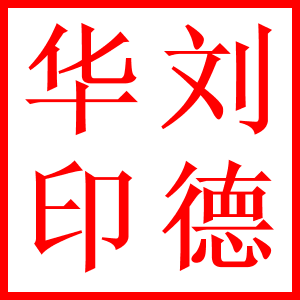

import cn.localhost01.seal.SealUtil;
import cn.localhost01.seal.configuration.SealCircle;
import cn.localhost01.seal.configuration.SealConfiguration;
import cn.localhost01.seal.configuration.SealFont;
import java.awt.*;
import java.io.IOException;
public class Main {
 public static void main(String[] args) throws Exception {
 /**
 * 印章配置文件
 */
 SealConfiguration configuration = new SealConfiguration();
 /**
 * 主文字
 */
 SealFont mainFont = new SealFont();
 mainFont.setBold(true);
 mainFont.setFontFamily("楷体");
 mainFont.setMarginSize(10);
 /**************************************************/
 //mainFont.setFontText("欢乐无敌制图网淘宝店专用章");
 //mainFont.setFontSize(35);
 //mainFont.setFontSpace(35.0);
 /**************************************************/
 //mainFont.setFontText("ZHITUWANG CO.LTDECIDDO SH NANNINGSHI");
 //mainFont.setFontSize(20);
 //mainFont.setFontSpace(15.0);
 /**************************************************/
 mainFont.setFontText("欢乐无敌制图网淘宝店专用章");
 mainFont.setFontSize(25);
 mainFont.setFontSpace(12.0);
 /**
 * 副文字
 */
 SealFont viceFont = new SealFont();
 viceFont.setBold(true);
 viceFont.setFontFamily("宋体");
 viceFont.setMarginSize(5);
 /**************************************************/
 //viceFont.setFontText("123456789012345");
 //viceFont.setFontSize(13);
 //viceFont.setFontSpace(12.0);
 /**************************************************/
 viceFont.setFontText("正版认证");
 viceFont.setFontSize(22);
 viceFont.setFontSpace(12.0);
 /**
 * 中心文字
 */
 SealFont centerFont = new SealFont();
 centerFont.setBold(true);
 centerFont.setFontFamily("宋体");
 /**************************************************/
 //centerFont.setFontText("★");
 //centerFont.setFontSize(100);
 /**************************************************/
 //centerFont.setFontText("淘宝欢乐\n制图网淘宝\n专用章");
 //centerFont.setFontSize(20);
 /**************************************************/
 //centerFont.setFontText("123456789012345");
 //centerFont.setFontSize(20);
 /**************************************************/
 centerFont.setFontText("发货专用");
 centerFont.setFontSize(25);
 /**
 * 抬头文字
 */
 SealFont titleFont = new SealFont();
 titleFont.setBold(true);
 titleFont.setFontFamily("宋体");
 titleFont.setFontSize(22);
 /**************************************************/
 //titleFont.setFontText("发货专用");
 //titleFont.setMarginSize(68);
 //titleFont.setFontSpace(10.0);
 /**************************************************/
 titleFont.setFontText("正版认证");
 titleFont.setMarginSize(68);
 titleFont.setMarginSize(27);
 /**
 * 添加主文字
 */
 configuration.setMainFont(mainFont);
 /**
 * 添加副文字
 */
 configuration.setViceFont(viceFont);
 /**
 * 添加中心文字
 */
 configuration.setCenterFont(centerFont);
 /**
 * 添加抬头文字
 */
 //configuration.setTitleFont(titleFont);
 /**
 * 图片大小
 */
 configuration.setImageSize(300);
 /**
 * 背景颜色
 */
 configuration.setBackgroudColor(Color.RED);
 /**
 * 边线粗细、半径
 */
 //configuration.setBorderCircle(new SealCircle(3, 140, 140));
 configuration.setBorderCircle(new SealCircle(3, 140, 100));
 /**
 * 内边线粗细、半径
 */
 //configuration.setBorderInnerCircle(new SealCircle(1, 135, 135));
 configuration.setBorderInnerCircle(new SealCircle(1, 135, 95));
 /**
 * 内环线粗细、半径
 */
 //configuration.setInnerCircle(new SealCircle(2, 105, 105));
 configuration.setInnerCircle(new SealCircle(2, 85, 45));
 //1.生成公章
 try {
 SealUtil.buildAndStoreSeal(configuration, "C:\\Users\\localhost01\\Desktop\\公章.png");
 } catch (IOException e) {
 e.printStackTrace();
 }
 //2.生成私章
 SealFont font = new SealFont();
 font.setFontSize(120).setBold(true).setFontText("诸葛孔明");
 SealUtil.buildAndStorePersonSeal(300, 16, font, "印", "C:\\Users\\localhost01\\Desktop\\私章.png");
 }
}
通过SealUtil\src\Main.java文件来进行配置各种参数,不断调整,达到你需要的效果!
本身这个小工具是我接的一个外包活儿,但是最后价格没谈拢,我就没卖了。
最后吐槽一下那个需求方,接下活儿时,报价是1K,做好人家却反悔只出300。
好吧,高雅的程序员就算是免费开源,也不会低价贱卖! o(∩_∩)o 哈哈