
Microservice framework for node.js to make container-based microservice web applications and APIs more enjoyable to write. Micro is based on koa.js, allowing you to use all the features that koa has.
Make microservice reachable
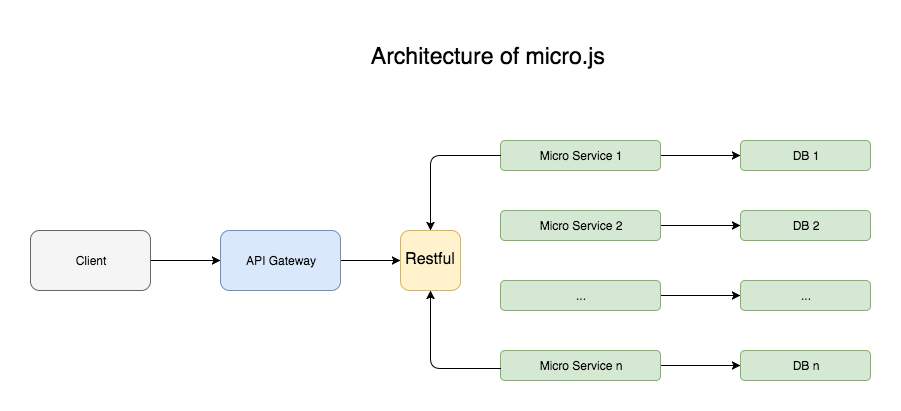
- Deploying microservices with docker containers, using docker stack deploy and docker swarm
- Transferring the data between the services via JSON strings and RESTful API
- Every single serivice has it's own database
- API Gateway serves as the controlling unit, which controls the whole system.You can do some universal works like auth or log
- Using docker deploy to manage containers and services
- Easily Integrated with koa middlewares
please visit docker doc
ATTENTION: docker swarm and docker-compose is also needed.
Microless requires node v7.6.0 or higher for ES2015 and async function support.
$ npm install microless --save
The example shows the ability to start a python container using microless, you can get the source code in folder example
from flask import Flask
app = Flask(__name__)
@app.route("/")
def hello():
 html = "<h3>Hello {name}!</h3>"
 return html.format(name="world")
if __name__ == "__main__":
 app.run(host='0.0.0.0', port=80)
This program will run a python server at port 80.
# Use an official Python runtime as a parent image
FROM python:2.7-slim
# Set the working directory to /app
WORKDIR /app
# Copy the current directory contents into the container at /app
ADD . /app
# Install any needed packages specified in requirements.txt
RUN pip install Flask
# Make port 80 available to the world outside this container
EXPOSE 80
# Run app.py when the container launches
CMD ["python", "app.py"]
This Dockerfile defines a image which can start a python server at port 80.
Save as docker-compose.yml
version: "2"
services:
 web:
 image: 'example_web'
 build: .
 ports:
 - "4000:80"
This compose file starts a python container called web with exposed port 4000, which uses the above Dockerfile.
For more details please visit docker docs.
// import microless
const Micro = require('microless');
// config restful api routers
const routers = {
 '/': {
 method: 'get' // define the request method
 }
}
var micro = new Micro({
 name: 'test', //project name
 compose: {
 src: './docker-compose.yml' //docker compose file
 dockerfile: '.'
 },
 // router to microservice
 modems: {
 // name in docker compose files
 web: {
 configs: routers,
 }
 },
 server: {
 port: 3001
 }
});
This will run the service in a docker container named 'example_web_1'.
Then the project will run at port 3001.
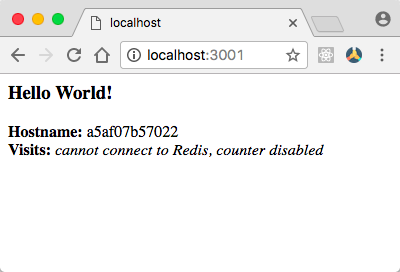
When you visit http://locahost:3001, you will see the result from python programs, every single request from http://locahost:3001 will automatically router to the right microservice.
Compose defines the src of file docker-compose and dockefile
 compose: {
 src: './docker-compose.yml', //default is './docker-compose.yml'
 dockerfile: '.' //dockerfile directory, default is .
 }
Modems mainly defines the router to microservice. Every single request from http://locahost:3001 will automatically router to the right microservice, so your router configs in the microless must as same as the router defined in the microservice.
For example, if you define a container called web in docker-compose.yml, you must write web as a key in modems like this:
 modems: {
 web: {
 configs: routers
 },
 a: {
 configs: aRouters
 },
 ...
 }
A symbol config is like this:
 const routers = {
 '/': {
 //called when route ends
 afterRoute: function(ctx, next, response) {
 ctx.body = response.body;
 },
 method: 'get'
 },
 '/shit/:id': {
 //called when route ends
 afterRoute: function(ctx, next) {
 ctx.body = 'shit api 0.1, params=' + JSON.stringify(this.params);
 },
 method: 'get'
 }
 }
There are two attributes that router config has:
method: required, defines a http request methodafterRoute: optional, called when route ends, you can handle the result from microservice and display it in other way.when you use this attribute, you must writectx.body = xxx, otherwise you would see a blank page.
P.S. The router follows the koa-router.
Currently, microless has three error handling methods when modem to a microservice:
 modems: {
 web: {
 configs: routers,
 //called when modem on error
 onError: function(ctx, next, error) {
 ctx.body = error;
 },
 //called when method not supported
 methodNotSupported: function(ctx, next, error) {
 },
 //called when route not found
 routeNotFound: function(ctx, next, error) {
 }
 }
 }
onError: optional, called when modem on error.methodNotSupported: optional, called when method not supported.routeNotFound: optional, called when route not found.
Server just has one attribute:
port: required, defines the main port of the service.
onSuccess: optional, called when successfully exectuing docker-composeonError: optional, called when exectuing docker-compose failed
A complete start code is like this:
const Micro = require('../src');
const routers = {
 '/': {
 //called when route ends
 afterRoute: function(ctx, next, response) {
 ctx.body = response.body;
 },
 method: 'get'
 },
 '/shit/:id': {
 //called when route ends
 afterRoute: function(ctx, next) {
 ctx.body = 'shit api 0.1, params=' + JSON.stringify(this.params);
 },
 method: 'get'
 }
}
var micro = new Micro({
 name: 'test',
 compose: {
 src: './docker-compose.yml',
 dockerfile: '.'
 },
 modems: {
 web: {
 configs: routers,
 //called when modem on error
 onError: function(ctx, next, error) {
 ctx.body = error;
 },
 //called when method not supported
 methodNotSupported: function(ctx, next, error) {
 },
 //called when route not found
 routeNotFound: function(ctx, next, error) {
 }
 }
 },
 server: {
 port: 3001
 },
 //called when successfully exectuing docker-compose
 // onSuccess: function() {
 // },
 //called when exectuing docker-compose failed
 onError: function(error) {
 console.log(error);
 }
});
Enjoy your microservice with docker and nodejs :)
For more visit author's website: ivydom