
2013 Johnny Chan - https://jchanvfx.github.io/
Compatibility: Silhouette v5.2 and up
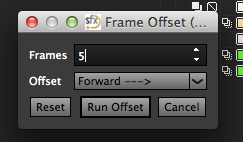
This script can frame offset your Shapes and Layers will a simple click of a button
Go to the scripts folder of your Silhouette installation. Finding the Scripts Location.
WINDOWS:
go to C:\Program Files\SilhouetteFX\Silhouette v5.1\resources\scripts.
LINUX
go to /opt/SilhouetteFX/silhouette v5.1/resources/scripts.
MacOSX
go to /Applications/Silhouette v5.x, right-click on Silhouette and select Show Package Contents.
A new Browser window will open.
In the new Browser window, go to Contents/Resources/scripts.
Copy the script you downloaded to the "actions" folder
Restart Silhouette and you should have a menu name "ChantasticVFX"