This example Mule project shows how to stream a large CSV file into a database by splitting the file into smaller chunks. A custom Message Processor is used to split the CSV file by a predefined number of rows. Those chunks are then sent to a VM Queue and distributed to batch flows. Each batch flow inserts data using bulk mode through a batch commit into a MySQL database. Errors with records are caught and written to a file.
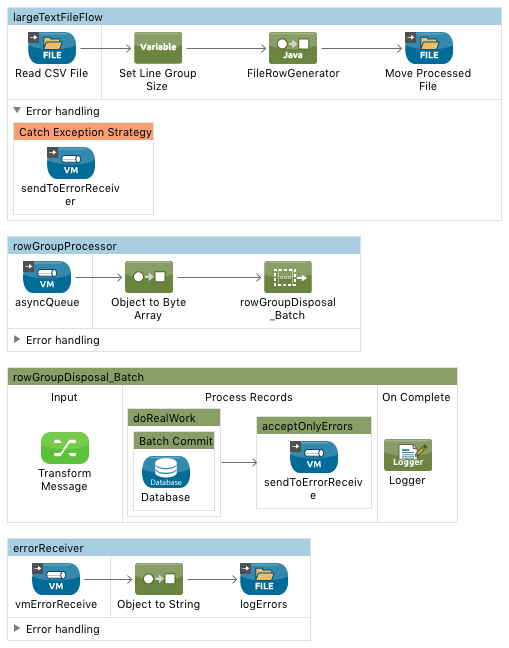
- Custom Message Processor
- VM Queue
- Batch Flow
- Batch Commit
- DataWeave
- Choice Exception
- Setup database table with SQL Script under Resources
- Modify the 'mule-app.properties' file with your database credentials and folders the application will use to find the CSV file and where to drop the file after processing.
- In the application, set the number of rows to split the file by in the 'Set Line Group Size' component.
- Run the project.
- Drop the example CSV file into the folder where the application is pointed to.