

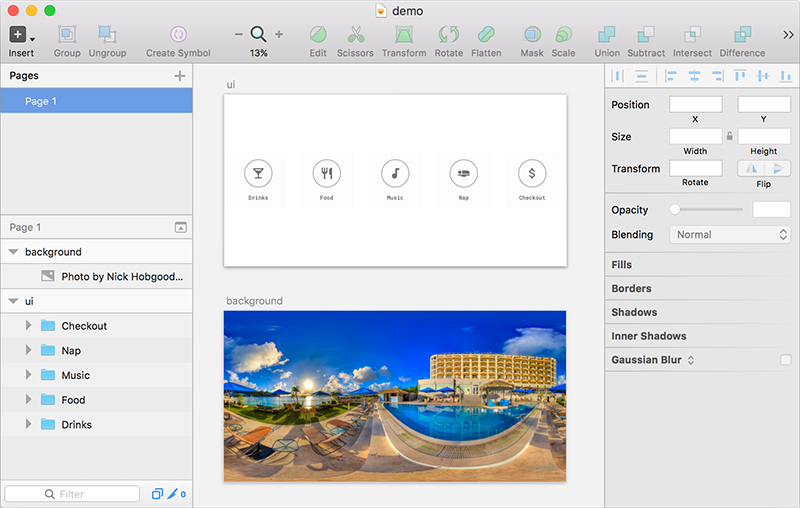
It works on a Sketch file like this
And turns it into VR like this

Demo: https://www.youtube.com/watch?v=lJ7aFtqsAUU
##Installation:
- Download Zip and Extract it. There’s a demo sketch file and a SketchToVR.sketchplugin.
- Double click on SketchToVR.sketchplugin. Sketch will install the plugin.
##Export your mocks with the plugin
- Open the demo Sketch file. The "background" artboard is a 360° photo. The "ui" artboard is the interface on top of the photo. In order to be seamless, the 360° photo you use should be equirectangular. There are some examples on Flickr. The one in my file is from Nick Hobgood.
- Go to Plugins > Sketch to VR > Export. The export may be slow due to the size of the 360° photo.
##View your mocks in VR
- The exported folder will be used to run A-Frame, an open-source Web VR library developed by MozVR. It needs a local server to work (simply opening the HTML page will not work). I recommend the SimpleHTTPServer by Scott Garner. Right click on the exported folder and choose SimpleHTTPServer. Use click & drag to navigate.
- To preview on your phone with a Cardboard, there are a few options. If you own a website, just upload this folder to your website and access the URL from your phone. Or you can use Chrome port forwarding to open localhost:8000 on your phone (initial page load may be slow due to the size of the 360° photo). Tap on the bottom right Cardboard icon to switch to VR mode!
##Troubleshooting
- If you use your own sketch files, make sure to name your artboards "background" and "ui".
- If you get a system prompt dialog while using SimpleHTTPServer, choose Allow.
- If you get some console errors and can’t see anything on the web page, restart the browser.
- If you created your own photo / UI, you may need to go into the index.html file to adjust the dimension of the images. Read more about A-Frame.
##Credits:
- Code structure borrowed from: https://github.com/Raureif/sketch-click-dummy
- Photo from demo template file: https://www.flickr.com/photos/globalvoyager/27869867466/
- SimpleHTTPServer: http://www.scottmadethis.net/interactive/simpleserver/