
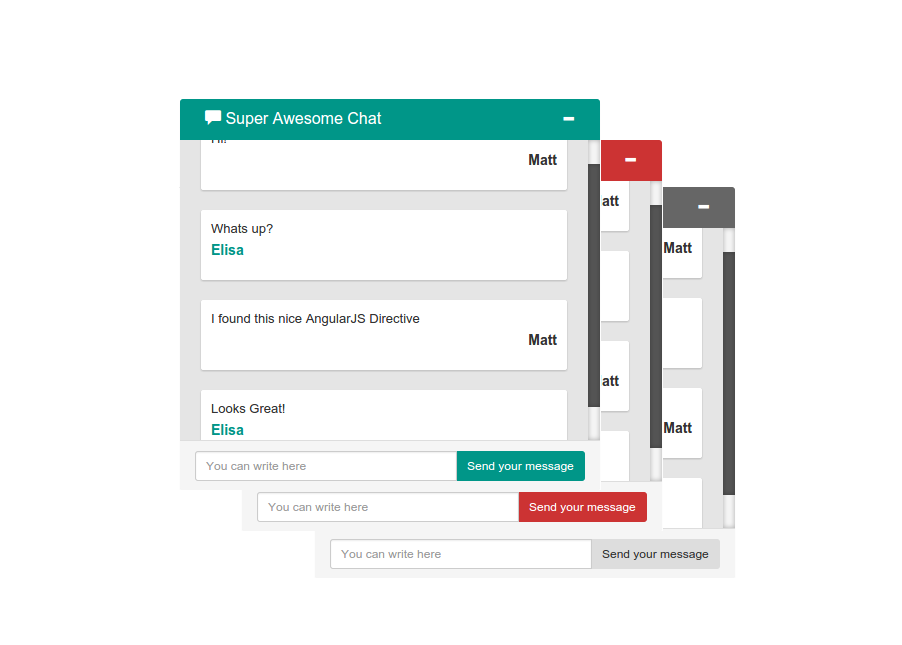
An AngularJS+Bootstrap Simple Chat Directive
"dependencies": {
 "angularjs": "~1.3.8",
 "bootstrap": "~3.3.1",
 "angularjs-scroll-glue": "~0.0.1"
}
bower install --save angular-bootstrap-simple-chat
<!-- Dependencies -->
<link rel="stylesheet" href="bower_components/bootstrap/dist/css/bootstrap.min.css">
<script src="bower_components/angularjs/angular.js"></script>
<!-- Simple Chat -->
<link rel="stylesheet" href="bower_components/angular-bootstrap-simple-chat/src/css/style.css">
<script src="bower_components/angular-bootstrap-simple-chat/src/scripts/index.js"></script>
angular.module('app', ['irontec.simpleChat']);
/** VIEW **/
<irontec-simple-chat
 messages="vm.messages"
 username="vm.username"
 input-placeholder-text="You can write here"
 submit-button-text="Send your message"
 title="Super Awesome Chat"
 theme="material"
 submit-function="vm.sendMessage"
 visible="vm.visible"
 expand-on-new="vm.expandOnNew">
</irontec-simple-chat>
/** CONTROLLER **/
angular.module('app').controller('Shell', Shell);
function Shell() {
 var vm = this;
 vm.messages = [
 {
 'username': 'username1',
 'content': 'Hi!'
 },
 {
 'username': 'username2',
 'content': 'Hello!'
 },
 {
 'username': 'username2',
 'content': 'Hello!'
 },
 {
 'username': 'username2',
 'content': 'Hello!'
 },
 {
 'username': 'username2',
 'content': 'Hello!'
 },
 {
 'username': 'username2',
 'content': 'Hello!'
 }
 ];
 vm.username = 'username1';
 vm.sendMessage = function(message, username) {
 if(message && message !== '' && username) {
 vm.messages.push({
 'username': username,
 'content': message
 });
 }
 };
 vm.visible = true;
 vm.expandOnNew = true;
}
- messages: array of messages to show. Message Format: {username: 'username', content: 'My message'}
- username: username of the user using the app
- input-placeholder-text: String, text in the input placeholder
- title: String, text in the chat top title
- theme: String, theme used for the chat
- submit-function: Function in the controller to be launched on the new message submit. It receives two params: message & username
- visible: Boolean, controls visibility on the page (required)
- First, add the themes stylesheet to your index.html
<link rel="stylesheet" href="bower_components/angular-bootstrap-simple-chat/src/css/themes.css">
- Define the theme you will use with the theme property
- List of themes:
- irontec
- material