用于设置操作系统的局域网设置的Node模块(Node >= v7.6), 支持 Windows、macOS, 后续会支持 Linux
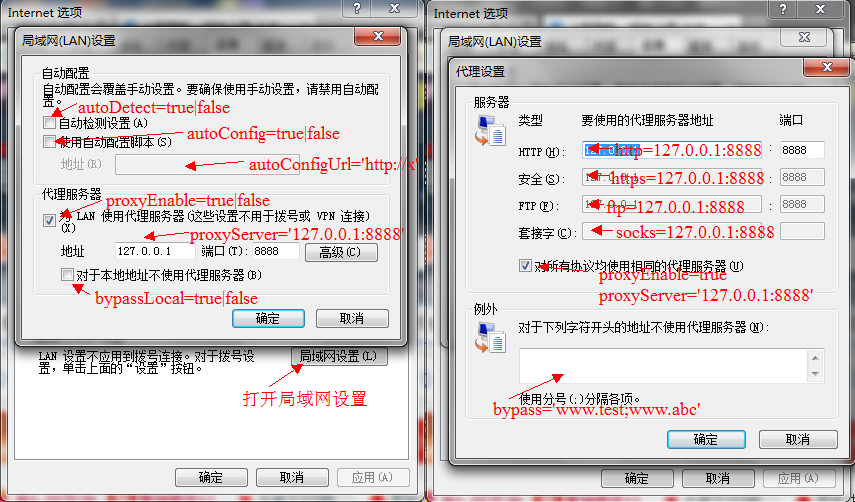
npm i --save lan-settings
const lan = require('lan-settings');
// 获取设备的所有可用 NetworkServices (macOS Only)
lan.listNetworkServices()
 .then(console.log.bind(console, '获取成功: '))
 .catch(console.log.bind(console, '获取失败: '));
// 获取当前局域网设置信息,如果err非空,表示获取失败
lan.getSettings()
 .then(console.log.bind(console, '获取成功: '))
 .catch(console.log.bind(console, '获取失败: '));
 // output:
 // { autoDetect: false,
 // autoConfig: false,
 // autoConfigUrl: '',
 // proxyEnable: true,
 // proxyServer: '127.0.0.1:8888',
 // bypassLocal: false,
 // bypass: '' }
// 自动检测设置
lan.setSettings({
 autoDetect: true
})
 .then(console.log.bind(console, '设置成功'))
 .catch(console.log.bind(console, '设置失败: '));
// 开启并这种PAC脚本
lan.setSettings({
 autoConfig: true,
 autoConfigUrl: 'http://127.0.0.1:50011'
})
 .then(console.log.bind(console, '设置成功'))
 .catch(console.log.bind(console, '设置失败: '));
// 开启并设置统一的代理服务器,开启本地代理白名单
lan.setSettings({
 proxyEnable: true,
 proxyServer: '127.0.0.1:8888',
 bypassLocal: true
})
 .then(console.log.bind(console, '设置成功'))
 .catch(console.log.bind(console, '设置失败: '));
// 高级设置,对http、https、ftp、socks分别设置不同的代理,并设置白名单域名前缀
lan.setSettings({
 proxyEnable: true,
 proxyServer: 'http=127.0.0.1:8888;https=127.0.0.1:8889;ftp=127.0.0.1:8890;socks=127.0.0.1:8891',
 bypassLocal: false,
 bypass: 'www.test;www.abc'
})
 .then(console.log.bind(console, '设置成功'))
 .catch(console.log.bind(console, '设置失败: '));


// 重置到修改前的设置
lan.reset()
 .then(console.log.bind(console, '设置成功'))
 .catch(console.log.bind(console, '设置失败: '));
const lan = require('lan-settings');
// 获取设备的所有可用 NetworkServices (macOS Only)
lan.listNetworkServices(function(err, services) {
 console.log(err ? '获取失败' : '获取成功');
 console.log(services);
});
// 获取当前局域网设置信息,如果err非空,表示获取失败
lan.getSettings(function(err, settings) {
 console.log(settings);
 // output:
 // { autoDetect: false,
 // autoConfig: false,
 // autoConfigUrl: '',
 // proxyEnable: true,
 // proxyServer: '127.0.0.1:8888',
 // bypassLocal: false,
 // bypass: '' }
});
// 自动检测设置
lan.setSettings({ autoDetect: true }, function(err) {
 console.log(err ? 'Fail' : 'Success');
});
// 开启并这种PAC脚本
lan.setSettings({
 autoConfig: true,
 autoConfigUrl: 'http://127.0.0.1:30001/'
}, function(err) {
 console.log(err ? 'Fail' : 'Success');
});
// 开启并设置统一的代理服务器,开启本地代理白名单
lan.setSettings({
 proxyEnable: true,
 proxyServer: '127.0.0.1:8888',
 bypassLocal: true
}, function(err) {
 console.log(err ? 'Fail' : 'Success');
});
// 高级设置,对http、https、ftp、socks分别设置不同的代理,并设置白名单域名前缀
lan.setSettings({
 proxyEnable: true,
 proxyServer: 'http=127.0.0.1:8888;https=127.0.0.1:8889;ftp=127.0.0.1:8890;socks=127.0.0.1:8891',
 bypassLocal: false,
 bypass: 'www.test;www.abc'
}, function(err) {
 console.log(err ? 'Fail' : 'Success');
});
// 重置到修改前的设置
lan.reset(function(err) {
 console.log(err ? 'Fail' : 'Success');
});
lan.listNetworkServices([cb]):
获取设备的所有可用 NetworkServices
cb(err) 为可选回调函数,如果重置失败,则err不为空; (macOS only)
若不传入回调函数, 则返回 Promise 对象;
[ 'iPhone USB', 'Ethernet', 'Wi-Fi', 'Bluetooth PAN', 'Thunderbolt Bridge' ]
lan.getSettings([cb, networkservice]):
获取当前局域网设置信息
其中 cb(err, settings) 为可选回调函数,如果出错err不为空,否则settings为当前系统局域网设置信息;
若不传入回调函数, 则返回 Promise 对象;
{
 autoDetect: true, // 是否开启自动检查设置
 autoConfig: true, // 是否开启pac脚本
 autoConfigUrl: 'http://127.0.0.1:50011', // pac脚本的url
 proxyEnable: true, // 是否开启代理设置
 proxyServer: '127.0.0.1:8888', // 代理服务器ip和端口,如果使用高级设置,可能返回 `htt=127.0.0.1:8888;https=127.0.0.2:8889`等
 bypassLocal: true, // 是否启用对本地地址不使用代理
 bypass: 'www.test;www.abc' // 高级设置里面的白名单信息
}
lan.setSettings(settings, [cb, networkservice]):
设置局域网信息
settings如上,如果为null表示清空并关闭所有局域网设置项,cb(err) 为可选回调函数,如果设置失败,则err不为空。
若不传入回调函数, 则返回 Promise 对象;
lan.reset(cb[, networkservice]):
将局域网设置重置到修改前
cb(err) 为可选回调函数,如果重置失败,则err不为空。
若不传入回调函数, 则返回 Promise 对象;