Welcome to ai-commit-message! 🚀 Transform your git commit experience with AI-powered commit messages. Whether you're using "ai commit message" or "git ai", our tool ensures your commit messages are meaningful and follow the Conventional Commits format.
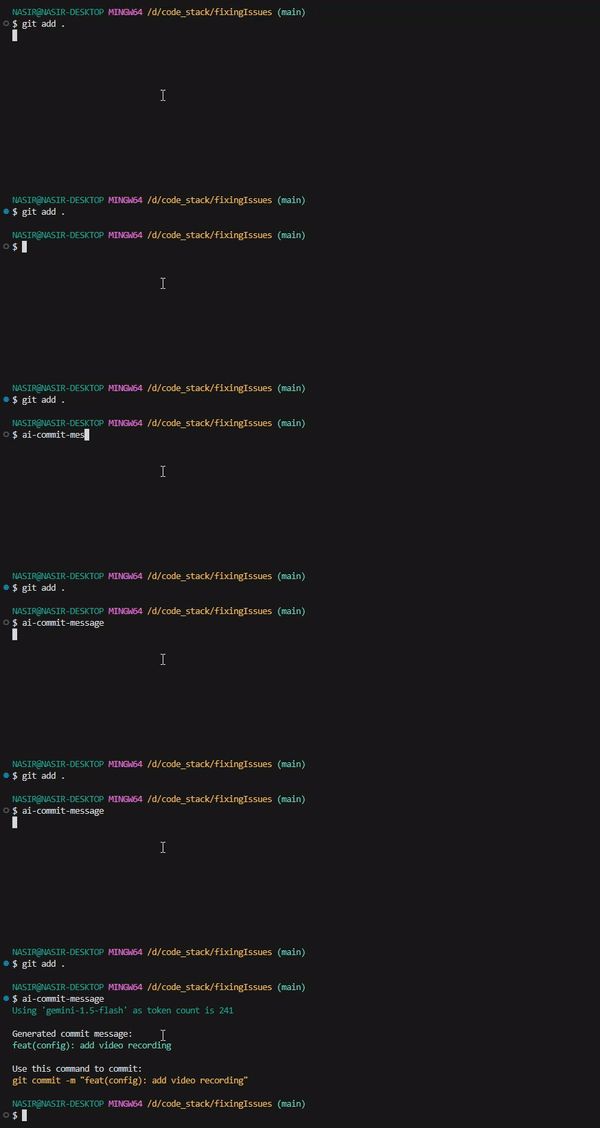
- 🧠 AI-Powered: Generate insightful commit messages with "ai commit".
- 🎯 Conventional Commits: Adheres to the Conventional Commits standard.
- 🚀 Auto-Commit: Use "ai commit message" to auto-commit your changes.
- ⚡ Fast & Lightweight: Experience seamless integration with "git ai".
- 🔐 Secure: Manage your API keys securely.
- 🎨 Beautiful CLI: Enjoy a colorful command-line interface.
npm install -g ai-commit-message
-
Obtain your Gemini API key from Get a Gemini API key.
-
Configure the API key for "ai commit message":
ai-commit-message config <your-api-key>
Alternatively, set the GEMINI_API_KEY environment variable:
export GEMINI_API_KEY=<your-api-key>
# Stage your changes first
git add .
# NOW, Generate a commit message
ai-commit-message
ai-commit-message -c
Commands:
 config <key> Configure Gemini API key
 generate [options] Generate commit message
 help [command] display help for command
- Verifies you're in a git repository.
- Checks for staged changes.
- Sends the diff to Gemini Pro API using gemini-1.5-flash-8b.
- Generates a conventional commit message.
- Displays the message or auto-commits (with -c flag).
- Utilizes the gemini-1.5-flash-8b model for generating commit messages.
- Implements Conventional Commits specification.
- Built with modern ES modules.
- Handles errors gracefully.
- Secure configuration management using
conf.
@google/generative-ai- Google's Gemini AI API.commander- CLI framework.simple-git- Git operations.conf- Configuration management.chalk- Terminal styling.
- Node.js >= 18.0.0
- Git installed and configured
- Gemini API key for "ai commit message"
Contributions are welcome! Feel free to:
- 🐛 Report bugs
- 💡 Suggest features
- 🔧 Submit PRs
MIT License - feel free to use "ai commit message" in your projects!
Made with ❤️ and powered by 🤖 and gemini-1.5-flash-8b