Read files from scientific_python folder in alphabetical order and try to understand how all prints
and asserts work.
This repository has a structure of a Python package with some additional files.
scientific_pythonfolder represents top level package of the same name. This package contains several sub-packages and modules. You can start witha_introsub-package and read its modules one by one in alphabetical order. All modules can be used as separate modules and scripts without package installationbinfolder contains scripts that can be used after package installation. Now they are used for testingdocfolder is used for documentation. Now it contains only MS Word file with course annotation (in Russian)misccontains some additional course materials, e.g. sample Python project and staff related toJuyternotebooks used in class:sample_projectis an example of basic Python project withsetup.py, a package and a subpackage, tests and a script. Students can use it as a base for their course projectsjupyter_notebookscontains notebooks and other files used in class sorted by dateshare_jupytercontains littleDockerproject that runs my classJupyterserver and exposes notebookHTMLcopies to the world on sai.homb.it
setup.pyis used to install this packagerequirements.txtfile contains Python dependencies of the projectvirtualenv_activation.shis a sample shell script (for *nix systems only) that can be used to activatevirtualenvand install the package. Use it by typing. virtualenv_activation.shorsource virtualenv_activation.sh. For exit virtualenv typedeactivateDockerfileanddocker-compose.ymlfiles can be used to run the project insideDockercontainer.gitignoreand.gitattributesaregitfiles.dockerignoreis just a link to.gitignore, it used to prevent load garbage into Docker container.travis.ymlis aTravisconfiguration file.Travisis a continuous integration (CI) system used to test this project with various Python versions, 2.7 and 3.5+ are supported
Remember to use Python 3, 3.6 and later is good enough in 2018. You can check python version typing in console python3 --version or import sys; print(sys.version) in Python itself
- Anaconda Python distribution is a good choice for scientific Python programming on every platform. It includes a lot of pre-compiled numerical and scientific packages and
condapackage manager where you can find even more packages, likeastropyorscikit-learn - Official Python distribution: good on Windows or macOS when you'd like to build your environment from scratch
Instead of official Python distribution I recommend to use Homebrew package manager, install it and type brew install python
Probably you already have Python 3, check its version before start. If you haven't use your package manager
iOS doesn't have any application to use for scientific programming. The best choice is Pythonista paid application that can run and edit Python 3.6 code and supports numpy package, but doesn't support scipy and other useful packages
PyDroid 3 looks good
- Spyder: the scientific Python development environment, if you have Anaconda, you probably have Spyder
- Visual Studio Code (do not be confused with Visual Studio, they are two different products): a powerful source code editor. GitHub has integrated web-based Visual Studio Code called GitHub Codespaces
- IDLE: a simple Python source code editor. It is a part of Python standard library, so if you have Python, you probably have IDLE
- PyCharm: a powerful Python IDE (integrated development environment). PyCharm is closed source product, but Community edition is free to use and every student or professor can ask for a free professional version
- Jupyter Notebook: not an editor in the usual sense, but powerful web-based tool for running Python (among with other language) code for data analysis. You can run Jupyter server on your own hardware or try it on Azure Notebooks or Google Colab
- Almost all popular interlanguage code editors supports Python
- Learn Python in Y minutes: short and deep language tutorial. This tutorial has Russian version
- Official Python tutorial
- A Byte of Python: a free handbook with initial language tutorial, there is an unofficial but still good Russian translation
- Practical Python for astronomers
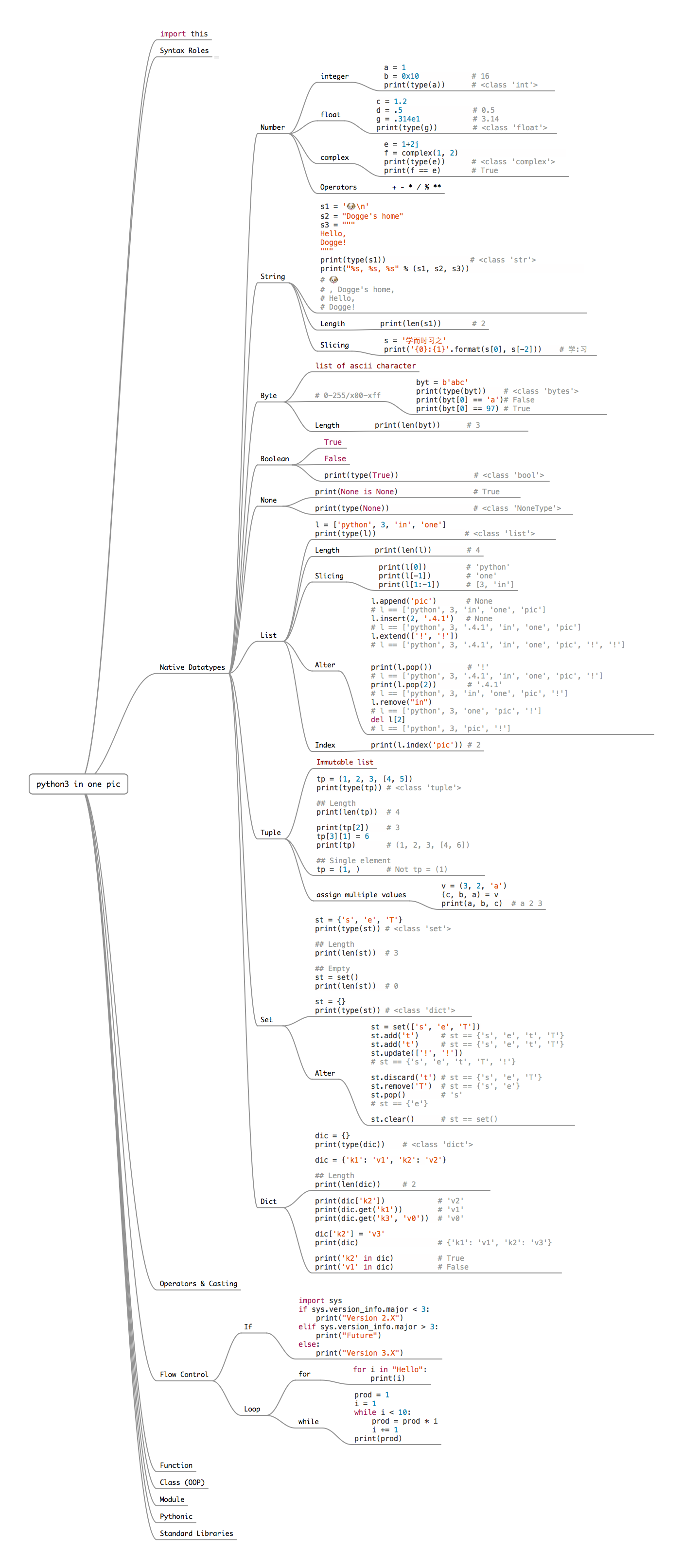
- Python 3 in one picture: print it and enjoy
- Comprehensive Python Cheatsheet
- Use of Python programming language in astronomy and science
- WTF Python: non-obvious language features
- Zen of Python or just run
import thisin Python - Official documentation
- Python code style guide
Use some version control system. Git is a good choice, see some tutorials:
- GitHowTo — good course on command line Git, Russian version
- Git Book — official online Git handbook, Russian version
- GitHub Tutorials — official tutorial of https://github.com
- Bitbucket tutorials — official tutorial of https://bitbucket.com, another public Git hoster
- Version Control with Git — Coursera course by Atlassian (Bitbucket owner)
- A Quick Introduction to Version Control with Git and GitHub — paper in Computational Biology
Classes had place in classroom 48 of Sternberg Astronomical Institute MSU at 9:00 on Wednesdays from September to December 2018. Records of on-line translations of the seminars are hosted on YouTube. Development of the course in 2018 is supported by BASIS foundation.
| Date | Description | Materials | Links | Video (in Russian) |
|---|---|---|---|---|
| 2018年09月05日 | Introduction, coursework requirements. About Python. Numbers, lists, if-else, while, Boolean variables | a_intro.basics, a_intro.sequences (the first part about lists) |
Python documentation, see section Dive into Python above | link |
| 2018年09月12日 | Built-in collections: tuples, dictionaries, sets. for-in, in. | a_intro.sequences |
"Loop better: A deeper look at iteration in Python", "Hash table" Wikipedia article, CPython implementation of lists and tuples | link |
| 2018年09月19日 | Strings: unicode and formating. Functions: functions as objects, lambdas, argument packing and unpacking | a_intro.strings, b_modules.functions, dump of iPython session |
String formating (use "new" syntax), keyword arguments | link |
| 2018年09月26日 | Some more details about strings: methods and re. Generators, list comprehance syntax. Python source file as module, import system. Introduction to classes. |
b_modules, *.py files used on seminar |
Regular expressions (in Russian), iteration and generators, scope and namespaces, modules | link |
| 2018年10月03日 | Jupyter notebook: a good way to use Python and another languages. Introduction in numpy |
c_numpy.arrays, Jupyter notebook |
Jupyter website, Jupyter guide, numpy user guide |
link |
| 2018年10月10日 | Multidimensional arrays in numpy: reshaping, broadcasting, stacking. Review of numpy subpackages |
c_numpy, Jupyter notebook |
numpy user guide, "An introduction to Numpy and Scipy" |
link |
| 2018年10月17日 | Read of files and cats. open() builtin, with-as statement, textual and binary files. Tabular data: np.genfromtxt and pandas |
Jupiter notebook and data files | open() documentation, standard library modules for path and file manipulations: os.path and shutil, "10 minutes to pandas" |
link |
| 2018年10月24日 | matplotlib: basics and examples. Introduction to scipy, scipy.integrate, scipy.optimize |
Jupyter notebooks | "Scientific graphics in Python" (In Russian), Python matplotlib guide, "An introduction to Numpy and Scipy" | link |
| 2018年10月31日 | Python packages and how to prepare them. Testing, unittest. Example of class usage |
Sample Python project, unit test example, Jupyter notebook with Parabola class |
"Python modules and packages", virtualenv docs, pipenv docs, official packaging tutorial, How to Publish Your Package on PyPI, unittest docs, numpy.testing docs, pytest |
link |
| 2018年11月07日 | Introduction to Astropy. Constants, units, quantities. Coordinates: sky coordinates, Earth coordinates, transformations between frames. Brief introduction to astropy.io: FITS ans ASCII. |
Jupyter notebooks | astropy docs: tutorials, constants, units, io interface, coordinates |
link |
| 2018年11月14日 | Least squares method usage with scipy.optimize. Module astroquery for web-access to astronomical data bases, e.g. Vizier and SIMBAD. Problem of cosmological parameters fit using SN Ia data. |
Jupyter notebooks | scipy.optimize tutorial, lmfit module with pretty interface for least squares. astroquery docs: A Gallery of Queries, GAIA via TAP+, SIMBAD, Vizier |
link |
| 2018年11月21日 | Sky coordinate match: astropy.coordinates. Problem of transient object discovery on FITS image: photutils, astroquery, astropy.wcs and astropy.coordinates |
Jupyter notebooks | astropy tutorial Separations, Catalog Matching, and Related Functionality, photutils docs: source detection, aperture photometry |
link |
| 2018年11月28日 | Seminar on listeners' requests. Student Alexey Nikonov tells about annotation and animation in matplotlib. Machine learning in Python |
Jupyter notebooks | matplotlib annotation guide, Matplotlib Animation Tutorial. scikit-learn: quick start, choosing the right estimator. "Introduction to machine learning" on Coursera (in Russian) |
link |
| 2018年12月05日 | Speed up Python code. Why Python functions and loops are slow and how to overcome it. Use the power of numpy. Gentle trick to speed up Python function or class: numba just in time (JIT) compiler. On listeners' request – web programming: flask and requests |
Jupyter notebooks, C++ and Python codes, f_speed |
"High Performance Python". numba: 5 minute guide. Web frameworks: http.server, django, flask. Web clients: urllib, requests. HTML/XML parsers: html and xml, beautifulsoap, lxml |
link |
| 2018年12月12日 | Parallel exection of Python code. GIL (global interpreter lock) and threading, why you usually should use threads only for IO. multiprocessing and pickle: forking Python to isolate parallel workers. Pools and queues. |
Jupyter notebooks | "It isn't Easy to Remove the GIL", "High Performance Python". Python docs: GIL multiprocessing, queue |
link |
| 2018年12月19日 | System calls, interaction with C/C++ libraries with ctypes, Cython programming language |
Jupyter notebook | "High Performance Python", ctypes module, Cython language |
link |
Seminars had place in classroom 17 of Sternberg Astronomical Institute MSU at 13:30 on Fridays from September to December 2017. Records of on-line translations of the seminars are hosted on YouTube.
| Date | Description | Materials | Video (in Russian) |
|---|---|---|---|
| 2017年09月15日 | Introduction, coursework requirements. Why Python 3? Numbers, lists, if-else, loops. | a_intro.basics, a_intro.sequences |
link |
| 2017年09月22日 | Boolean variables, lists, tuples, dictionaries, sets. Strings and their formatting. Functions, arguments packing and unpacking. | a_intro.sequences, a_intro.strings, b_modules.functions |
link |
| 2017年09月29日 | Functions: default values of keyword arguments, docstrings. Iterators and generators. Modules: file.py as a module. | b_modules.* |
link |
| 2017年10月06日 | Jupyter notebooks. Read and write files and cats. Introduction to numpy: one-dimensional arrays and indexing. |
Notebooks, c_numpy.arrays |
link |
| 2017年10月13日 | numpy: multidimensional arrays, read tabular data files. |
Notebooks, c_numpy.multidim_arrays |
link |
| 2017年10月20日 | Read tabular data files with numpy and pandas. Figure plotting with matplotlib. |
Notebooks | link |
| 2017年10月27日 | scipy: integration, interpolation, optimization. Short overview of other features. |
Notebook, d_scipy.* |
link |
| 2017年11月03日 | Introduction to astropy: physical and astronomical constants, quantity calculations, sky coordinates, image manipulation, read and write data. |
Notebook | link |
| 2017年11月10日 | Packaging of Python project. Classes: example and magic methods. Unit testing. | Notebook and script, setup.py of this project, e_testing.* |
link |
| 2017年11月17日 | Two examples of astropy, astroquery and photutils usage: Hubble diagram fitting and transient object discovery. |
Notebooks | link |
| 2017年11月24日 | Dr. Ivan Zolotukhin tells about Django web framework, scientific web programming and model-template-view paradigm. |
Scripts | — |
| 2017年12月01日 | Student Nikita Utkin tells about argparse. Speed up Python script: why Python is slow, why to avoid loops and why we should know how Python works, numba as a simple way to speed up calculations. |
Scripts and notebook, c_numpy.arrays |
link |
| 2017年12月08日 | Parallel execution of Python code. threading and its limitations due GIL. multiprocessing and its limitations due serialisation via pickle. |
Notebooks | link |
| 2017年12月15日 | Cython language and C-code usage with Python. | Python, Cython and C code, f_speed.compilers and Cython/C files for this module, setup.py |
link |
Copyright (c) 2017-2018, Konstantin L. Malanchev.
All program code in this repository is distributed under the terms of the MIT license. All data files are properties of their authors, see COPYRIGHT_NOTE files in folders with data files