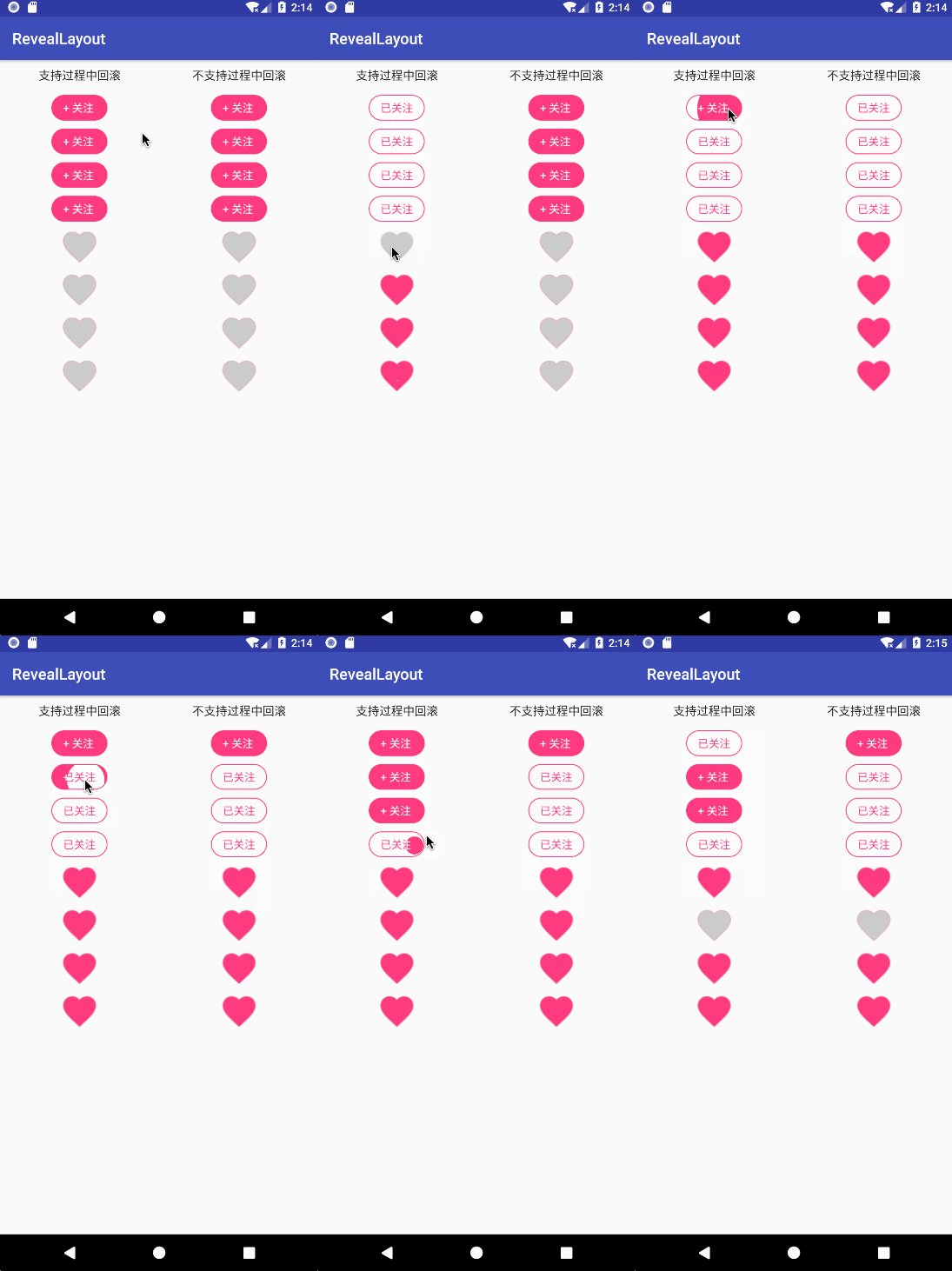
揭示效果布局,可以指定2个子布局,以圆形揭示效果切换选中状态
- 在项目根目录的build.gradle添加仓库地址
allprojects {
	repositories {
		...
		maven { url 'https://www.jitpack.io' }
	}
}
- 在项目app目录的build.gradle添加依赖
从1.1.1版本开始,版本号前不加v,引用时需要注意。
dependencies {
	implementation 'com.github.goweii:RevealLayout:1.1.1'
}
<per.goweii.reveallayout.RevealLayout
	android:layout_width="wrap_content"
	android:layout_height="wrap_content"
	android:layout_margin="5dp"
	app:rl_allow_revert="true"
	app:rl_anim_duration="1000"
	app:rl_check_with_expand="true"
	app:rl_checked="false"
	app:rl_checked_layout="@layout/reveal_layout_follow_checked"
	app:rl_uncheck_with_expand="true"
	app:rl_unchecked_layout="@layout/reveal_layout_follow_unchecked" />
revealLayout.setOnCheckedChangeListener(new RevealLayout.OnCheckedChangeListener() {
 @Override
 public void onCheckedChanged(RevealLayout revealLayout, boolean isChecked) {
 // TODO
 }
});
如一个关注取消关注控件FollowView,只需要继承RevealLayout,然后复写以下3个方法:
- initAttr(AttributeSet attrs):获取子类的自定义属性
- createCheckedView():创建选中状态视图,并初始化自定义属性
- createUncheckedView():创建非选中状态视图,并初始化自定义属性
public class FollowView extends RevealLayout{
 private float mTvTextSize;
 private int mTvPaddingVertical = 0;
 private int mTvPaddingHorizontal = 0;
 private String mTvUnFollowText = "";
 private int mTvUnFollowBgColor;
 private int mTvUnFollowBgRes;
 private int mTvUnFollowTextColor;
 private String mTvFollowText = "";
 private int mTvFollowBgColor;
 private int mTvFollowBgRes;
 private int mTvFollowTextColor;
 public FollowView(Context context) {
 this(context, null);
 }
 public FollowView(Context context, AttributeSet attrs) {
 this(context, attrs, 0);
 }
 public FollowView(Context context, AttributeSet attrs, int defStyleAttr) {
 super(context, attrs, defStyleAttr);
 }
 @Override
 protected void initAttr(AttributeSet attrs) {
 super.initAttr(attrs);
 DisplayMetrics metrics = getContext().getResources().getDisplayMetrics();
 TypedArray array = getContext().obtainStyledAttributes(attrs, R.styleable.FollowView);
 mTvPaddingVertical = (int) array.getDimension(R.styleable.FollowView_fv_tv_padding_vertical, 0F);
 mTvPaddingHorizontal = (int) array.getDimension(R.styleable.FollowView_fv_tv_padding_horizontal, 0F);
 mTvTextSize = array.getDimension(R.styleable.FollowView_fv_text_size, metrics.scaledDensity * 14) / metrics.scaledDensity;
 mTvUnFollowText = array.getString(R.styleable.FollowView_fv_unfollowed_text);
 mTvUnFollowBgRes = array.getResourceId(R.styleable.FollowView_fv_unfollowed_bg_res, 0);
 mTvUnFollowBgColor = array.getColor(R.styleable.FollowView_fv_unfollowed_bg_color, 0);
 mTvUnFollowTextColor = array.getColor(R.styleable.FollowView_fv_unfollowed_text_color, 0);
 mTvFollowText = array.getString(R.styleable.FollowView_fv_followed_text);
 mTvFollowBgRes = array.getResourceId(R.styleable.FollowView_fv_followed_bg_res, 0);
 mTvFollowBgColor = array.getColor(R.styleable.FollowView_fv_followed_bg_color, 0);
 mTvFollowTextColor = array.getColor(R.styleable.FollowView_fv_followed_text_color, 0);
 array.recycle();
 }
 @Override
 protected View createCheckedView() {
 TextView tvFollow = new TextView(getContext());
 tvFollow.setTextSize(mTvTextSize);
 tvFollow.setText(mTvFollowText);
 tvFollow.setGravity(Gravity.CENTER);
 tvFollow.setSingleLine();
 if (mTvFollowBgRes > 0) {
 tvFollow.setBackgroundResource(mTvFollowBgRes);
 } else {
 tvFollow.setBackgroundColor(mTvFollowBgColor);
 }
 tvFollow.setTextColor(mTvFollowTextColor);
 tvFollow.setPadding(mTvPaddingHorizontal, mTvPaddingVertical, mTvPaddingHorizontal, mTvPaddingVertical);
 return tvFollow;
 }
 @Override
 protected View createUncheckedView() {
 TextView tvUnFollow = new TextView(getContext());
 tvUnFollow.setTextSize(mTvTextSize);
 tvUnFollow.setText(mTvUnFollowText);
 tvUnFollow.setGravity(Gravity.CENTER);
 tvUnFollow.setSingleLine();
 if (mTvUnFollowBgRes > 0) {
 tvUnFollow.setBackgroundResource(mTvUnFollowBgRes);
 } else {
 tvUnFollow.setBackgroundColor(mTvUnFollowBgColor);
 }
 tvUnFollow.setTextColor(mTvUnFollowTextColor);
 tvUnFollow.setPadding(mTvPaddingHorizontal, mTvPaddingVertical, mTvPaddingHorizontal, mTvPaddingVertical);
 return tvUnFollow;
 }
}