原作者: Swathi Prasad
译者: ClamorousKun
GraphQL 是一种用于 API 的查询语言,使得客户端能够准确地获得它需要的数据,而且没有任何冗余。GraphQL是一种强类型协议,所有数据操作都会根据 GraphQL Schema 来进行校验。

在本文中,我们将使用Spring Boot构建一个简单的GraphQL服务器。
创建示例Spring Boot应用程序并添加以下依赖项。
-
graphql-spring-boot-starter
用于启用 GraphQL 控制器,并使其在 path/graphql 中可用。它将初始化GraphQL Schema bean。 复制代码 -
graphql-java
可以使用易于理解的Graphql Schema 语言来编写 schema。 复制代码 -
graphiql-spring-boot-starter
 提供图形界面,我们可以使用它来测试 GraphQL 查询和查看查询定义。
复制代码
 <dependency>
 <groupId>com.graphql-java</groupId>
 <artifactId>graphql-spring-boot-starter</artifactId>
 <version>5.0.2</version>
 </dependency>
 <dependency>
 <groupId>com.graphql-java</groupId>
 <artifactId>graphql-java-tools</artifactId>
 <version>5.2.4</version>
 </dependency>
 <dependency>
 <groupId>com.graphql-java</groupId>
 <artifactId>graphiql-spring-boot-starter</artifactId>
 <version>5.0.2</version>
 </dependency>
以下完整的POM文件内容。
<?xml version="1.0" encoding="UTF-8"?>
<project xmlns="http://maven.apache.org/POM/4.0.0"
 xmlns:xsi="http://www.w3.org/2001/XMLSchema-instance"
 xsi:schemaLocation="http://maven.apache.org/POM/4.0.0 http://maven.apache.org/xsd/maven-4.0.0.xsd">
 <modelVersion>4.0.0</modelVersion>
 <groupId>com.techshard.graphql</groupId>
 <artifactId>springboot-graphql</artifactId>
 <version>1.0-SNAPSHOT</version>
 <parent>
 <groupId>org.springframework.boot</groupId>
 <artifactId>spring-boot-starter-parent</artifactId>
 <version>2.1.6.RELEASE</version>
 <relativePath />
 </parent>
 <properties>
 <project.build.sourceEncoding>UTF-8</project.build.sourceEncoding>
 <project.reporting.outputEncoding>UTF-8</project.reporting.outputEncoding>
 </properties>
 <dependencies>
 <dependency>
 <groupId>org.springframework.boot</groupId>
 <artifactId>spring-boot-starter-web</artifactId>
 </dependency>
 <dependency>
 <groupId>org.springframework.boot</groupId>
 <artifactId>spring-boot-starter-data-jpa</artifactId>
 </dependency>
 <dependency>
 <groupId>com.graphql-java</groupId>
 <artifactId>graphql-spring-boot-starter</artifactId>
 <version>5.0.2</version>
 </dependency>
 <dependency>
 <groupId>com.graphql-java</groupId>
 <artifactId>graphql-java-tools</artifactId>
 <version>5.2.4</version>
 </dependency>
 <dependency>
 <groupId>com.graphql-java</groupId>
 <artifactId>graphiql-spring-boot-starter</artifactId>
 <version>5.0.2</version>
 </dependency>
 <dependency>
 <groupId>com.h2database</groupId>
 <artifactId>h2</artifactId>
 <scope>runtime</scope>
 </dependency>
 <dependency>
 <groupId>org.projectlombok</groupId>
 <artifactId>lombok</artifactId>
 <version>1.18.8</version>
 <optional>true</optional>
 </dependency>
 </dependencies>
 <build>
 <plugins>
 <plugin>
 <groupId>org.springframework.boot</groupId>
 <artifactId>spring-boot-maven-plugin</artifactId>
 </plugin>
 </plugins>
 </build>
</project>
接下来让我们创建一个名为Vehicle的简单实体和相应的JPA存储库。我们将使用Lombok来编写,这样可以避免编写诸如getter和setter等等的样板文件。
package com.techshard.graphql.dao.entity;
import lombok.Data;
import lombok.EqualsAndHashCode;
import javax.persistence.*;
import java.io.Serializable;
import java.time.LocalDate;
@Data
@EqualsAndHashCode
@Entity
public class Vehicle implements Serializable {
 private static final long serialVersionUID = 1L;
 @Id
 @Column(name = "ID", nullable = false)
 @GeneratedValue(strategy = GenerationType.AUTO)
 private int id;
 @Column(name = "type", nullable = false)
 private String type;
 @Column(name = "model_code", nullable = false)
 private String modelCode;
 @Column(name = "brand_name")
 private String brandName;
 @Column(name = "launch_date")
 private LocalDate launchDate;
 private transient String formattedDate;
 // Getter and setter
 public String getFormattedDate() {
 return getLaunchDate().toString();
 }
}
然后是相应的JPA存储库。
package com.techshard.graphql.dao.repository;
import com.techshard.graphql.dao.entity.Vehicle;
import org.springframework.data.jpa.repository.JpaRepository;
import org.springframework.stereotype.Repository;
@Repository
public interface VehicleRepository extends JpaRepository<Vehicle, Integer> {
}
GraphQL 用有自己的独特语言来编写GraphQL Schema,称为Schema Definition Language(SDL)。schema 的定义,是由端点上所有可用的 API 功能组成的。
GraphQL架构的典型示例如下所示:
type Vehicle {
	id: ID!,
	type: String,
	modelCode: String,
	brandName: String,
	launchDate: String
}
type Query {
	vehicles(count: Int):[Vehicle]
	vehicle(id: ID):Vehicle
}
type Mutation {
	createVehicle(type: String!, modelCode: String!, brandName: String, launchDate: String):Vehicle
}
接下来,在 src/main/resources 下创建一个文件夹,名为 graphql,并在该文件夹下创建vehicleql.graphqls文件。复制上面的内容并将其粘贴到vehicleql.graphqls文件中。需要注意的是,文件名称是可自定义的。以.graphqls作为文件扩展名即可。
在上面的 schema 中,每个对象都是用类型定义的。 GraphQL 中的类型系统是最基本的组件,它表示可以从服务获取的对象以及该对象所包含的字段。
在我们的 schema 中,我们有一个名为 Vehicle 的对象,作为域对象。 Query 类型表示可通过 GraphQL 服务器获取数据的查询。query 是交互式的,可修改,修改后即可看到新的结果。query 和结果的结构是一样的。这一点在 GraphQL 中很重要,因为所见即所得。
在稍后的文章中,我们可以看到一些真正运行的例子。
Mutation 类型用来表示那些用于对数据执行写入操作的 query。
Query 或 Mutation对象是基本 GraphQL 对象,它们没有任何关联的数据类。在这种情况下,解析器类将实现 GraphQLQueryResolver 或 GraphQLMutationResolver。These resolvers will be searched for methods that map to fields in their respective root types.(这段不是很懂,所以先贴原文)
接下来,让我们为Vehicle定义根解析器。
package com.techshard.graphql.query;
import com.coxautodev.graphql.tools.GraphQLQueryResolver;
import com.techshard.graphql.dao.entity.Vehicle;
import com.techshard.graphql.service.VehicleService;
import org.springframework.beans.factory.annotation.Autowired;
import org.springframework.stereotype.Component;
import java.util.List;
import java.util.Optional;
@Component
public class VehicleQuery implements GraphQLQueryResolver {
 @Autowired
 private VehicleService vehicleService;
 public List<Vehicle> getVehicles(final int count) {
 return this.vehicleService.getAllVehicles(count);
 }
 public Optional<Vehicle> getVehicle(final int id) {
 return this.vehicleService.getVehicle(id);
 }
}
在这个类中,我们有方法来获取单个Vehicle对象和Vehicle对象列表。请注意,我们在上面的模式中定义了这些方法。
现在,让我们定义一个Mutation解析器。
package com.techshard.graphql.mutation;
import com.coxautodev.graphql.tools.GraphQLMutationResolver;
import com.techshard.graphql.dao.entity.Vehicle;
import com.techshard.graphql.service.VehicleService;
import org.springframework.beans.factory.annotation.Autowired;
import org.springframework.stereotype.Component;
import java.time.LocalDate;
@Component
public class VehicleMutation implements GraphQLMutationResolver {
 @Autowired
 private VehicleService vehicleService;
 public Vehicle createVehicle(final String type, final String modelCode, final String brandName, final String launchDate) {
 return this.vehicleService.createVehicle(type, modelCode, brandName, launchDate);
 }
}
在这个类中,我们只有一个方法来创建一个Vehicle对象,这对应于我们的模式定义中的Mutation类型。
我们现在将定义一个可以进行实际交互的服务。
package com.techshard.graphql.service;
import com.techshard.graphql.dao.entity.Vehicle;
import com.techshard.graphql.dao.repository.VehicleRepository;
import org.springframework.stereotype.Service;
import org.springframework.transaction.annotation.Transactional;
import java.time.LocalDate;
import java.util.List;
import java.util.Optional;
import java.util.stream.Collectors;
@Service
public class VehicleService {
 private final VehicleRepository vehicleRepository ;
 public VehicleService(final VehicleRepository vehicleRepository) {
 this.vehicleRepository = vehicleRepository ;
 }
 @Transactional
 public Vehicle createVehicle(final String type,final String modelCode, final String brandName, final String launchDate) {
 final Vehicle vehicle = new Vehicle();
 vehicle.setType(type);
 vehicle.setModelCode(modelCode);
 vehicle.setBrandName(brandName);
 vehicle.setLaunchDate(LocalDate.parse(launchDate));
 return this.vehicleRepository.save(vehicle);
 }
 @Transactional(readOnly = true)
 public List<Vehicle> getAllVehicles(final int count) {
 return this.vehicleRepository.findAll().stream().limit(count).collect(Collectors.toList());
 }
 @Transactional(readOnly = true)
 public Optional<Vehicle> getVehicle(final int id) {
 return this.vehicleRepository.findById(id);
 }
}
复制代码
现在,我们可以来测试一下这个应用了。运行Spring Boot 应用程序。在浏览器中打开 http//localhost:8080/graphiql 链接。我们将看到一个友好的图形见面,如下图所示。
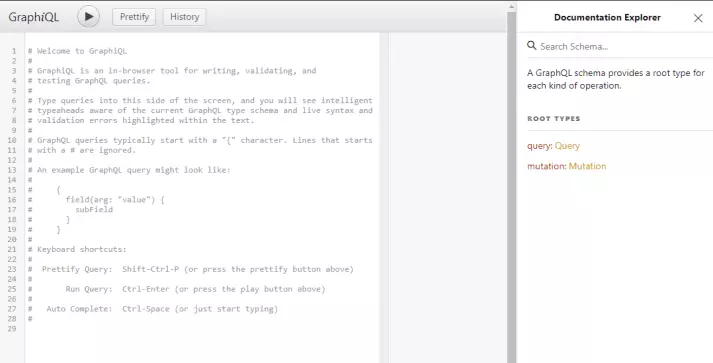
在用户界面的右侧,我们还可以看到文档。

现在,我们可以尝试运行以下查询。
mutation {
 createVehicle(type: "car", modelCode: "XYZ0192", brandName: "XYZ", launchDate: "2016-08-16")
 {
 id
 }
}
这将在Vehicle表中创建一行数据。结果为:
{
 "data": {
 "createVehicle": {
 "id": "1"
 }
 }
}
现在让我们运行查询来获取数据。
query {
 vehicles(count: 1)
 {
 id,
 type,
 modelCode
	}
}
然后我们将得到结果
{
 "data": {
 "vehicles": [
 {
 "id": "1",
 "type": "bus",
 "modelCode": "XYZ123"
 }
 ]
 }
}
请注意,我们仅请求有限数量的字段。我们可以通过添加或删除字段来更改查询,并查看新结果。
在本文中,我们研究了GraphQL的基本概念。查看详细文档。
可以在GitHub上找到本教程的完整源代码。