
json格式化,高亮展示,错误标识,获取key值在json中的路径
npm i json-stringfy
// jsonHeightLight(json[, options])
import syntaxHighlight, {getValueByJsonPath} from 'json-stringfy'
// 或者使用构建好的
import syntaxHighlight, {getValueByJsonPath} from 'json-highlight/dist/index.js'
import 'json-stringfy/dist/index.css'
const json = '{"cate_id":"10","cate_type":"cate","cate_code":"click","cate_name":"点击","filter":[{"dim":"evt_id1","dim_cate":"service_property","rel":"equal","val":[{"code":"20892","name":"20892"},{"code":"456456","name":"456456"}]},{"dim":"evt_id2","dim_cate":"service_property","rel":"equal","val":[{"code":"20892","name":"asddfg"}]}],"metric":["cnt"],"flag":0}'
document.querySelector("pre").innerHTML = syntaxHighlight(json) //需要将结果放到pre标签中
可以对配置颜色风格
syntaxHighlight(json, {
 colorConfig: {
		string: '#9C5903',
		number: '#07BD1D',
		boolean: '#04228A',
		null: '#767573',
		key: '#088EDF',
		errorKey: '#f5222d',
		warningKey: '#9c5903',
	}
})
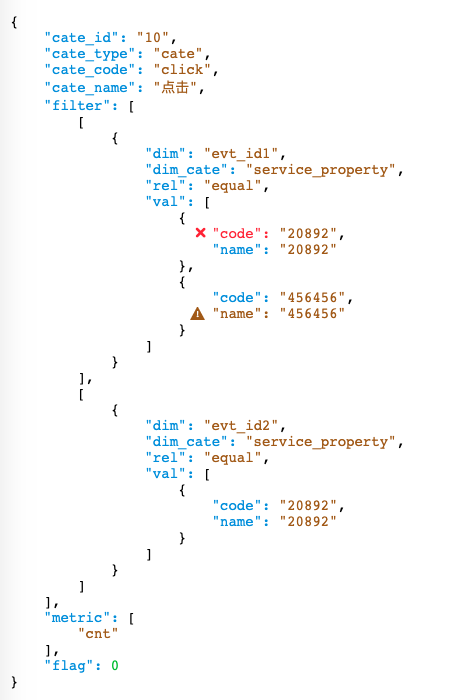
可以对指定的key进行标识,路径支持不带筛选的jsonpath
syntaxHighlight(json, {
 errorInfo:[
		{path: 'root.filter[0].val[0].code', type: 'error'},
		{path: 'root.filter[0].val[0].name', type: 'warning'}
	],
})
效果: alt
指定获取jsonpath的方式,默认为false,不获取jsonpath,有两个枚举值click、drag,分别为点击或拖拽的方式
当为click时,配合onClickKey属性获取path
syntaxHighlight(json, {
 pathTrigger:'click',
 onClickKey:(path)=>{
 console.log(path)
 }
})
当为drag时,需自己配置drop容器的事件,path可在e.dataTransfer.getData("path")中获取
可通过jsonpath获取json中的属性值,jsonpath支持数组属性简单筛选
import {getValueByJsonPath} from 'json-stringfy'
let value = getValueByJsonPath('root.filter[dim="evt_id2"][0].val[0].name',json)
console.log(value)
jsonpath格式
- 常规的对象路径,例如:
root.filter[0].val[0].name - 带筛选的数组,例如:
root.filter[dim="evt_id2"][0].val[0].name