


Maven Central Last Commit License Scala Version Scala Native Version
libcairo provides Scala Native bindings for the Cairo 2D graphics C library.
The goal of this project is to provide an easy-to-use Scala Native facade for the entire Cairo 2D graphics library. Currently, many of the basic functions needed to do graphics, and to read and write PNGs are covered. The remainder of the library will be steadily worked on.
The more "programmer friendly" part of this library is found in the io.github.edadma.libcairo package. That's the only
package you need to import from, as seen in the example below. The other package in the library
is io.github.edadma.libcairo.extern which provides for interaction with the libcairo C library using Scala Native
interoperability elements from the so-call unsafe namespace. There are no public declarations in
the io.github.edadma.libcairo package that use unsafe types in their parameter or return types, making it a pure
Scala facade. Consequently, you never have to worry about memory allocation or type conversions.
This library is published for Scala Native to Maven Central. Cairo's C library must be installed on your system:
brew install cairo # macOS (Homebrew)
sudo apt install libcairo2-dev # Debian / Ubuntu
Enable Scala Native in project/plugins.sbt:
addSbtPlugin("org.scala-native" % "sbt-scala-native" % "0.5.12")
Add the dependency in build.sbt:
libraryDependencies += "io.github.edadma" %%% "libcairo" % "0.0.7"
Then import the facade:
import io.github.edadma.libcairo._
The following examples are direct translations of examples from the Cairo documentation, specifically their tutorial.
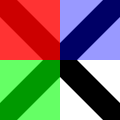
This example creates a PNG file called setsourcergba.png containing the following image:
import io.github.edadma.libcairo._
@main def run(): Unit =
 val surface = imageSurfaceCreate(Format.ARGB32, 120, 120)
 val cr = surface.create
 cr.scale(120, 120)
 cr.setSourceRGB(0, 0, 0)
 cr.moveTo(0, 0)
 cr.lineTo(1, 1)
 cr.moveTo(1, 0)
 cr.lineTo(0, 1)
 cr.setLineWidth(0.2)
 cr.stroke()
 cr.rectangle(0, 0, 0.5, 0.5)
 cr.setSourceRGBA(1, 0, 0, 0.80)
 cr.fill()
 cr.rectangle(0, 0.5, 0.5, 0.5)
 cr.setSourceRGBA(0, 1, 0, 0.60)
 cr.fill()
 cr.rectangle(0.5, 0, 0.5, 0.5)
 cr.setSourceRGBA(0, 0, 1, 0.40)
 cr.fill()
 surface.writeToPNG("setsourcergba.png")
 cr.destroy()
 surface.destroy()
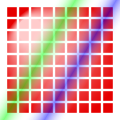
This example creates a PNG file called setsourcegradient.png containing the following image:
import io.github.edadma.libcairo._
@main def run(): Unit =
 val surface = imageSurfaceCreate(Format.ARGB32, 120, 120)
 val cr = surface.create
 /* Examples are in 1.0 x 1.0 coordinate space */
 cr.scale(120, 120)
 val radpat = patternCreateRadial(0.25, 0.25, 0.1, 0.5, 0.5, 0.5)
 radpat.addColorStopRGB(0, 1.0, 0.8, 0.8)
 radpat.addColorStopRGB(1, 0.9, 0.0, 0.0)
 for i <- 1 to 9; j <- 1 to 9 do cr.rectangle(i / 10.0 - 0.04, j / 10.0 - 0.04, 0.08, 0.08)
 cr.setSource(radpat)
 cr.fill()
 val linpat = patternCreateLinear(0.25, 0.35, 0.75, 0.65)
 linpat.addColorStopRGBA(0.00, 1, 1, 1, 0)
 linpat.addColorStopRGBA(0.25, 0, 1, 0, 0.5)
 linpat.addColorStopRGBA(0.50, 1, 1, 1, 0)
 linpat.addColorStopRGBA(0.75, 0, 0, 1, 0.5)
 linpat.addColorStopRGBA(1.00, 1, 1, 1, 0)
 cr.rectangle(0.0, 0.0, 1, 1)
 cr.setSource(linpat)
 cr.fill()
 surface.writeToPNG("setsourcegradient.png")
 cr.destroy()
 surface.destroy()
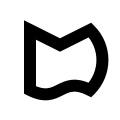
This example creates a PNG file called path-close.png containing the following image (may not be clearly visible if
your Github is in dark mode):
import math._
import io.github.edadma.libcairo._
@main def run(): Unit =
 val surface = imageSurfaceCreate(Format.ARGB32, 120, 120)
 val cr = surface.create
 cr.scale(120, 120)
 cr.setLineWidth(0.1)
 cr.setSourceRGB(0, 0, 0)
 cr.moveTo(0.25, 0.25)
 cr.lineTo(0.5, 0.375)
 cr.relLineTo(0.25, -0.125)
 cr.arc(0.5, 0.5, 0.25 * sqrt(2), -0.25 * Pi, 0.25 * Pi)
 cr.relCurveTo(-0.25, -0.125, -0.25, 0.125, -0.5, 0)
 cr.closePath()
 cr.stroke()
 surface.writeToPNG("path-close.png")
 cr.destroy()
 surface.destroy()
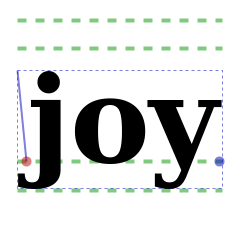
This example creates a PNG file called textextents.png containing the following image (may not be clearly visible if
your Github is in dark mode):
import math._
import io.github.edadma.libcairo._
@main def run(): Unit =
 /* Prepare drawing area */
 val surface = imageSurfaceCreate(Format.ARGB32, 240, 240)
 val cr = surface.create
 /* Example is in 26.0 x 1.0 coordinate space */
 cr.scale(240, 240)
 cr.setFontSize(0.5)
 /* Drawing code goes here */
 cr.setSourceRGB(0.0, 0.0, 0.0)
 cr.selectFontFace("Georgia", FontSlant.NORMAL, FontWeight.BOLD)
 val fe = cr.fontExtents
 val (ux, uy) = cr.deviceToUserDistance(1, 1)
 val px = max(ux, uy)
 val text = "joy"
 val te = cr.textExtents(text)
 val x = 0.5 - te.xBearing - te.width / 2
 val y = 0.5 - fe.descent + fe.height / 2
 /* baseline, descent, ascent, height */
 cr.setLineWidth(4 * px)
 cr.setDash(Seq(9 * px), 0)
 cr.setSourceRGBA(0, 0.6, 0, 0.5)
 cr.moveTo(x + te.xBearing, y)
 cr.relLineTo(te.width, 0)
 cr.moveTo(x + te.xBearing, y + fe.descent)
 cr.relLineTo(te.width, 0)
 cr.moveTo(x + te.xBearing, y - fe.ascent)
 cr.relLineTo(te.width, 0)
 cr.moveTo(x + te.xBearing, y - fe.height)
 cr.relLineTo(te.width, 0)
 cr.stroke()
 /* extents: width & height */
 cr.setSourceRGBA(0, 0, 0.75, 0.5)
 cr.setLineWidth(px)
 cr.setDash(Seq(3 * px), 0)
 cr.rectangle(x + te.xBearing, y + te.yBearing, te.width, te.height)
 cr.stroke()
 /* text */
 cr.moveTo(x, y)
 cr.setSourceRGB(0, 0, 0)
 cr.showText(text)
 /* bearing */
 cr.setDash(Nil, 0)
 cr.setLineWidth(2 * px)
 cr.setSourceRGBA(0, 0, 0.75, 0.5)
 cr.moveTo(x, y)
 cr.relLineTo(te.xBearing, te.yBearing)
 cr.stroke()
 /* text's advance */
 cr.setSourceRGBA(0, 0, 0.75, 0.5)
 cr.arc(x + te.xAdvance, y + te.yAdvance, 5 * px, 0, 2 * Pi)
 cr.fill()
 /* reference point */
 cr.arc(x, y, 5 * px, 0, 2 * Pi)
 cr.setSourceRGBA(0.75, 0, 0, 0.5)
 cr.fill()
 /* Write output and clean up */
 surface.writeToPNG("textextents.png")
 cr.destroy()
 surface.destroy()
This example creates a two-page PDF with document metadata, logical structure (for accessibility), a named destination, live hyperlinks, an outline (the viewer's bookmark sidebar), and page labels:
import io.github.edadma.libcairo._
@main def run(): Unit =
 val pdf = pdfSurfaceCreate("tagged.pdf", 612, 792)
 pdf.setMetadata(PdfMetadata.TITLE, "Tagged-PDF demo")
 pdf.setMetadata(PdfMetadata.AUTHOR, "Me")
 val cr = pdf.create
 cr.tagBegin("Document", "")
 // Page 1 — a named destination, a heading, and an external link.
 pdf.setPageLabel("Cover")
 cr.tagBegin(Tags.DEST, "name='top' x=72 y=72")
 cr.tagEnd(Tags.DEST)
 cr.tagBegin("H1", "")
 cr.selectFontFace("Georgia", FontSlant.NORMAL, FontWeight.BOLD)
 cr.setFontSize(24)
 cr.moveTo(72, 100)
 cr.showText("Tagged PDF from Scala Native")
 cr.tagEnd("H1")
 cr.tagBegin(Tags.LINK, "uri='https://github.com/edadma/libcairo'")
 cr.setSourceRGB(0, 0, 0.8)
 cr.setFontSize(12)
 cr.moveTo(72, 140)
 cr.showText("github.com/edadma/libcairo")
 cr.tagEnd(Tags.LINK)
 cr.showPage()
 // Page 2 — an internal link back to the destination on the cover.
 pdf.setPageLabel("1")
 cr.tagBegin(Tags.LINK, "dest='top'")
 cr.setSourceRGB(0, 0, 0.8)
 cr.moveTo(72, 100)
 cr.showText("Back to the top")
 cr.tagEnd(Tags.LINK)
 cr.tagEnd("Document")
 pdf.addOutline(PdfOutline.ROOT, "Cover", "dest='top'", PdfOutlineFlags.OPEN | PdfOutlineFlags.BOLD)
 cr.destroy()
 pdf.finish()
 pdf.destroy()
API documentation is forthcoming, however documentation for the C library is found here.