Skip to content

Navigation Menu

Sign in
Appearance settings

Search code, repositories, users, issues, pull requests...

Provide feedback

We read every piece of feedback, and take your input very seriously.

Saved searches

Use saved searches to filter your results more quickly

Sign up
Appearance settings

A beautiful vim colorsheme based on terminal's 256 colors

Notifications You must be signed in to change notification settings

duythinht/inori

Folders and files

NameName
Last commit message
Last commit date

Latest commit

History

26 Commits

Repository files navigation

The Inori colors scheme for vim

This colorscheme based on 256colors-terminal, working perfectly on gnome-terminal, iterm, tmux, screen-256colors, MacVim, gvim...

You don't need to import terminal's colors pallete

Help me improve it (please take a screen shot for bug or something you want change): https://github.com/duythinht/inori/issues

If you use terminal, setup with xterm-256color or something like that

# example for using gnome-terminal
export TERM=xterm-256color

For better experience, you should set terminal background to #262626 and text color to #c0c0c0

Install using Pathogen:

cd ~/.vim/bundle
git clone https://github.com/duythinht/inori

Install using Vundle

Plugin 'duythinht/inori'

Modify .vimrc

syntax enable
silent! colorscheme inori

Previews:
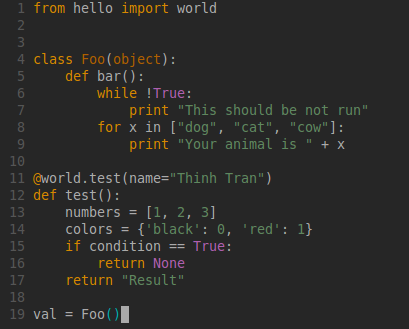
Vim Inori

About

A beautiful vim colorsheme based on terminal's 256 colors

Resources

Stars

Watchers

Forks

Releases

No releases published

Packages

No packages published

AltStyle によって変換されたページ (->オリジナル) /