Race-day voice callouts for RotorHazard, powered by Piper TTS and Sendspin.
Download · Usage Guide · Sendspin · Contributing
Race Voice generates RotorHazard announcements on the timing server, caches reusable WAV files, and sends playback to a Sendspin service for network clients.
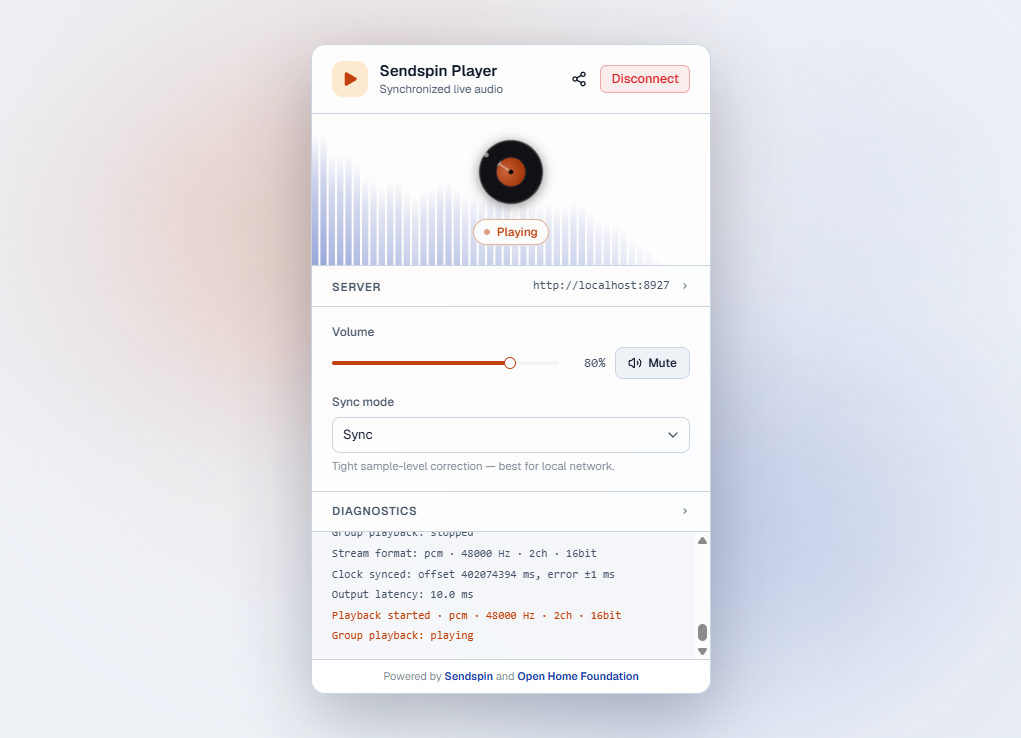
Server-side voice callouts for the RotorHazard timing platform, powered by Piper TTS. Audio is generated on the RotorHazard server and sent to sendspin-service, which streams to connected clients using the Sendspin protocol.
- 🎙️ Local TTS: Generates voice callouts with Piper TTS on the RotorHazard server.
- 📡 Sendspin service playback: Sends generated WAV files to a service that streams PCM audio to connected Sendspin clients over WebSocket, including WindowsSpin.
- 🌐 Browser player: A built-in RotorHazard plugin player at
/playerthat connects to the Sendspin service. - 🐳 Container: A Docker image is available for standalone service deployments, including the browser player at
/. - 🔊 Race sounds: Plays staging tones and the race-start buzzer through the same Sendspin output path.
- 🎛️ Configurable voice: Adjustable speech speed, noise scale, and phoneme width from the RotorHazard settings panel.
- ⚡ Smart caching: Reusable pilot-name and lap-number segments are cached separately; use Rebuild pre-cache after first setup or voice model/settings changes to prepare them ahead of racing.
- RotorHazard with RHAPI support for
Evt.RACE_STAGE_TONEandEvt.RACE_CLOCK_CALLOUT. - Python 3.12 or newer.
sendspin-serviceinstalled on the RotorHazard host or another reachable machine.- Network access from playback clients to
sendspin-service. - A browser on the playback device. RotorHazard serves the Sendspin player at
<RotorHazard UI base URL>/player.
- Download
race_voice.zipfrom the latest GitHub release. - In RotorHazard, open the plugin manager and upload the ZIP file.
- Restart RotorHazard if requested.
- Download the matching
sendspin-service_*.debfrom the same GitHub release and install it on the RotorHazard host. - Open the RotorHazard settings page and enable Race Voice.
- Confirm Sendspin service URL points to the service, normally
http://127.0.0.1:8766. - Open
<RotorHazard UI base URL>/playerfrom the playback device. - Use Rebuild pre-cache to prepare race-clock, schedule, pilot-name, and lap-number WAV files.
- Use Generate test phrase or Play audio check to verify playback.
Set RotorHazard browser Voice Volume and Tone Volume to 0 on clients that should only use Race Voice audio.
The first generated phrase for a voice model downloads the Piper model into the RotorHazard data cache. That can take a moment depending on the server and network connection.
- Usage Guide: setup, settings, browser player, cache layout, operational notes, and troubleshooting.
- Changelog: release history.
- Contributing: development setup and contribution guidelines.
If Race Voice helps your club, event, or race-day workflow, you can help fund continued development and maintenance.
- Support the project through GitHub Sponsors
- Send a one-off contribution through Ko-fi
Contributions are welcome! See CONTRIBUTING.md for setup instructions and development guidelines.
ContributorsRace Voice uses Sendspin for synchronized network audio playback. Sendspin and the browser SDK are Open Home Foundation projects; see sendspin-audio.com and openhomefoundation.org.
The RotorHazard Play audio check button uses a bundled demo WAV so playback can be tested without generating TTS first. That check clip is:
- Music track: Foreign by Moavii
- Source: https://freetouse.com/music
- Free Music Without Copyright (Safe)
Distributed under the MIT License. See LICENSE for more information.