

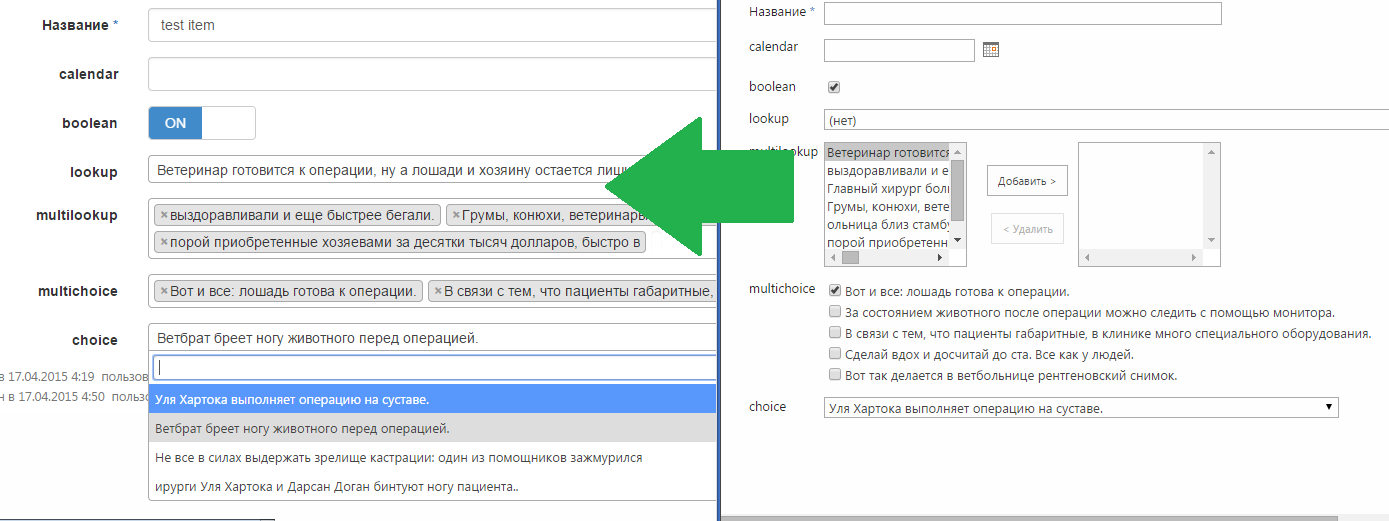
This library changes standard SharePoint(365 and On Prem) list form behaviour using CSR. Features are:
- Twitter Bootstrap - works in context of form, transforming it to emulate regular bootstrap form.
- Open Source instead of standard ones:
- Yes/No - http://www.bootstrap-switch.org/
- DateTime - http://eonasdan.github.io/bootstrap-datetimepicker/
- Lookup, Multi Lookup, Choice, Multi Choice - https://fk.github.io/select2-bootstrap-css/ alt tag
- Works in IE9+ and all modern browsers
- You can pass parameters of the 3rd party controls with respect to its manuals
####Using:
- Pick files from https://github.com/dimkk/spBsControls/tree/master/build and put it somewhere in SharePoint (Style Library for example)
- Navigate to list form
- Add Script Editor Webpart
- Add this html markup with href and src to the actual files from step 1
<link href='/Style%20Library/build/vendor.css' media='screen' rel='stylesheet' type='text/css'/>
<script src='/Style%20Library/build/vendor.js' type='text/javascript'></script>
<link href='/Style%20Library/build/spBsCtrls.css' media='screen' rel='stylesheet' type='text/css' />
<script src='/Style%20Library/build/spBsCtrls.js' type='text/javascript'></script>
- You can use Cisar (https://github.com/andrei-markeev/cisar), for example, to create proper js file for jslink property of list form webpart, or you can pick it from source: https://github.com/dimkk/spBsControls/blob/master/test.js
- If you are not using Cisar, open properties of list form web part and add path to test.js file from source in JSLink property, for example - ~siteCollection/Style Library/test.js
- Now look through test.js - its commented and simple - just create form wrapper, field wrapper and decide which field to enhance (use internal name of field, and don't forget to set right form context)
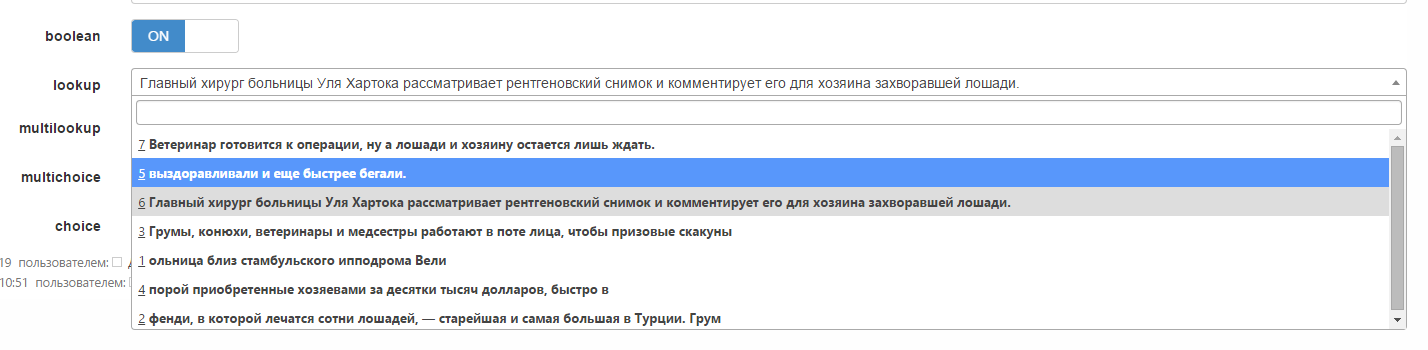
##How to pass params of third party controls?: Lets say, we need to customise dropdown in select2 control for lookup field - we need to show underscored ID and bold text:
- lets go to Select2 exapmples - https://select2.github.io/examples.html
- find Templating section
- insert that example to CSR JS file, like here https://github.com/dimkk/spBsControls/blob/master/test.js, example in lookup field, EditForm context
- Here is the result: alt tag
##Contribute
- Install node
- git clone https://github.com/dimkk/spBsControls.git
- cmd - to project
- npm install
- bower install
- gulp (will build project, dont forget to set variables https://github.com/dimkk/spBsControls/blob/master/gulp.config.js - path to mounted folder in SharePoint)
- gulp watch - will check the sources. Will rebuild and transfer result to mounted SharePoint folder
- gulp trans - will send test.js to folder, which was set in config https://github.com/dimkk/spBsControls/blob/master/gulp.config.js
##Ru:
Библиотека изменяет стандартную форму листа SharePoint(2013 и 365) используя CSR, добавляя следующее:
- Twitter Bootstrap - работает только в контексте этой формы. Добавляет необходимые элементы в разметку и форма становится похожа на обычнуй форму бутстрап
- Open Source контролы вместо стандартных:
- Да/Нет - http://www.bootstrap-switch.org/
- Дата(без времени) - http://eonasdan.github.io/bootstrap-datetimepicker/
- Лукап, Мультилукап, Выбор, Мультивыбор - https://fk.github.io/select2-bootstrap-css/ alt tag
- Работает в IE9
- Можно передавать параметры соответствующих опен сурс решений (Параметры смотреть в документации к соотв. решению)
####Использование:
- Кладем файлы из https://github.com/dimkk/spBsControls/tree/master/build куда-то в SharePoint (для примера в библиотеку стилей)
- Заходим на листформу
- Добавляем Script Editor Webpart
- Указываем путь до файлов (Например у меня в библиотеке стилей):
<link href='/Style%20Library/build/vendor.css' media='screen' rel='stylesheet' type='text/css'/>
<script src='/Style%20Library/build/vendor.js' type='text/javascript'></script>
<link href='/Style%20Library/build/spBsCtrls.css' media='screen' rel='stylesheet' type='text/css' />
<script src='/Style%20Library/build/spBsCtrls.js' type='text/javascript'></script>
- Используя, например, Cisar (https://github.com/andrei-markeev/cisar) - создаем js для csr, или берем для примера из репо: https://github.com/dimkk/spBsControls/blob/master/test.js
- Если не используем Cisar - заходим в свойства веб-части отображения формы листа и указываем путь до JS файла, например - ~siteCollection/Style Library/test.js
##Как передавать параметры: Например, если нужно кастомизировать то, как отображается lookup поле - (выводить подчёркнутое id итема и жирным - значение):
- Идём на страницу проекта Select2 - https://select2.github.io/examples.html
- Находим раздел Templating
- Вставляем подобный кусок в наш CSR файл https://github.com/dimkk/spBsControls/blob/master/test.js, пример в поле lookup в контексте EditForm
- Получаем результат: alt tag
##Для разработки
- Ставим node
- git clone https://github.com/dimkk/spBsControls.git
- cmd - заходим в проект
- npm install
- bower install
- gulp (соберет проект, не забудьте указать в https://github.com/dimkk/spBsControls/blob/master/gulp.config.js - путь до папки в SP)
- gulp watch - будет следить за изменениями
- gulp trans - закинет test.js в папку указанную в настройках https://github.com/dimkk/spBsControls/blob/master/gulp.config.js
####Тут немного видео: Видос