pypi version python support version size
A Friendly Airflow DAG Build Tool for Data Engineer with YAML file template.
Warning
This project will reference the DAG generate code from the Astronomer: DAG-Factory. But I replace some logic that fit with ETL propose for Data Engineer.
Note
Disclaimer: This project will override all necessary parameters that should pass to Airflow object with ETL context for Data Engineer use-case. So, if you want to use and enhance this project, you can fork this project anytime without notice me.
| Airflow Version | Supported | Noted |
|---|---|---|
>2.7.1,<3.0.0 |
✅ | Common version support for Airflow version 2.x.x |
>=3.x.x |
✅ | Common version support for Airflow version 3.x.x |
Note
I recommend to use Airflow2 until Airflow3 stable.
Feature Supported:
- ✅ JSON Schema Validation (Set IDE with
json-schema.json) - 💚 Allow Passing Variable to DAG Template before build
From my opinion, a data Engineer should focus on the user requirement instead of focusing on the Python code when it need creates a new DAG in our Airflow application.
So, this project focus for this plain to make sure that all DAG can readable and easy to maintain with the same standard when we want to scale up and out the Airflow application support 10 to 1000 DAGs.
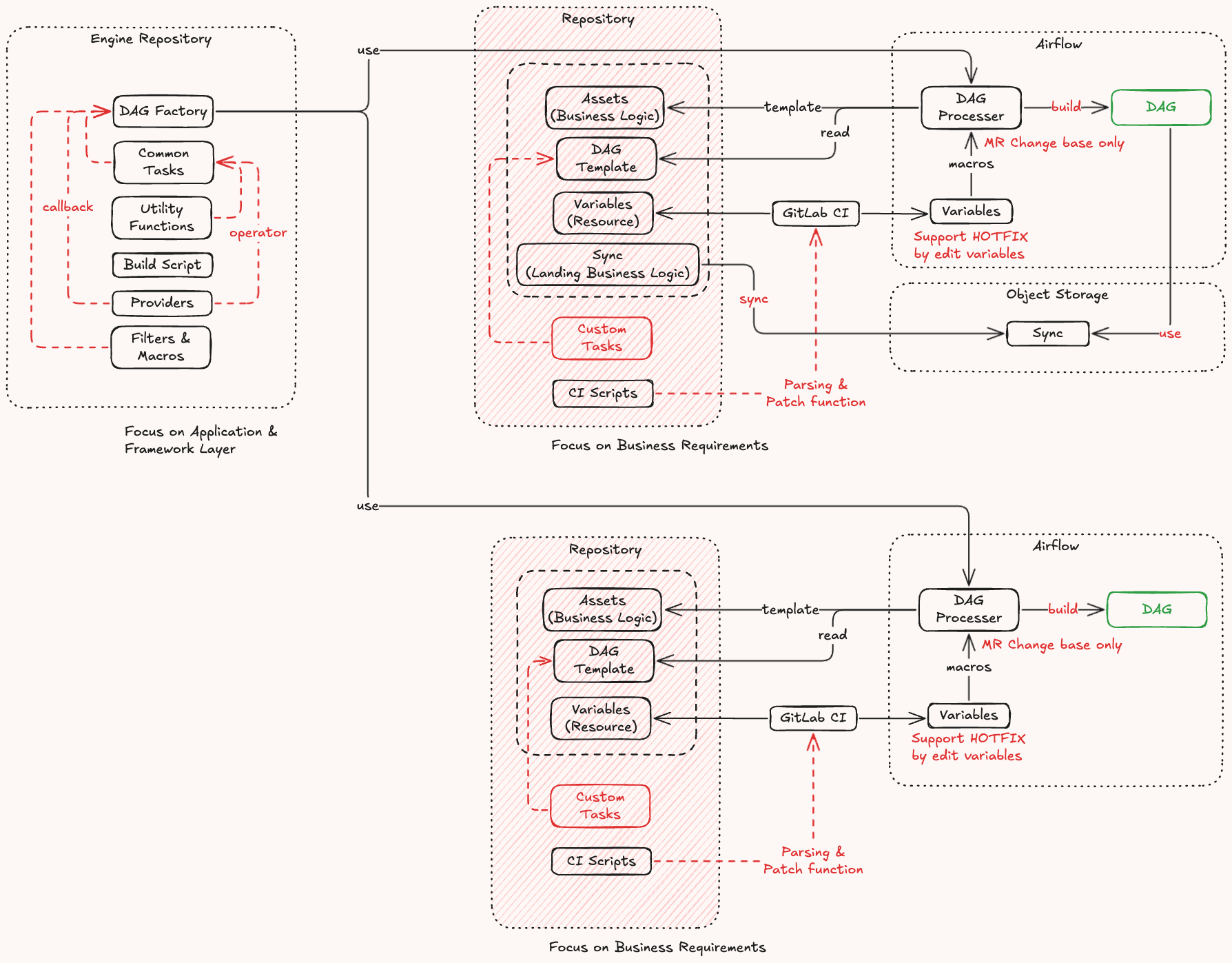
File Structure:
dags/
├── { domain }/
│ ├── { module-dags }/
│ │ ├── __init__.py
│ │ ├── dag.yml
│ │ ├── variables.yml
│ │ └── assets/
│ │ ├── dag-schema-mapping.json
│ │ └── dag-transform-query.sql
│ │
│ └── { module-dags }/
│ ├── __init__.py
Note
I think this project should support multiple DAGs structure like:
dags/
├── { domain }/
│ ├── { module-dags }/
│ │ ├── __init__.py
│ │ ├── dag-{ name-1 }.yml
│ │ ├── dag-{ name-2 }.yml
│ │ ├── variables.yml
│ │ └── assets/
│ │ ├── dag-case-1-schema-mapping.json
│ │ ├── dag-case-1-transform-query.sql
│ │ ├── dag-case-2-schema-mapping.json
│ │ └── dag-case-2-transform-query.sql
│ │
│ └── { module-dags }/
│ ├── __init__.py
uv pip install -U common
This DAG generator engine need you define the dag.yml file and set engine
object to get the current path on __init__.py file.
Note
If you want to dynamic environment config on the dag.yaml file, you can use a
variable.yaml file for dynamic value that marking on config template via macro
function, {{ vars('keystore-on-dag-name') }}.
On the dag-transaction.yml file:
name: transaction
schedule: "@daily"
owner: "de-oncall@email.com,de@email.com"
start_date: "{{ vars('start_date') }}"
catchup: "{{ vars('catchup') }}"
tags:
 - "domain:sales"
 - "tier:1"
 - "schedule:daily"
tasks:
 - task: start
 op: empty
 - group: etl_master
 upstream: start
 tasks:
 - type: extract
 op: python
 caller: get_api_data
 params:
 path: gcs://{{ vars("project_id") }}/sales/master/date/{{ exec_date | fmt('%y') }}
 - task: transform
 upstream: extract
 op: operator
 operator_name: gcs_transform_data
 params:
 path: gcs://{{ vars("project_id") }}/landing/master/date/{{ exec_date | fmt('%y') }}
 - task: sink
 upstream: transform
 op: common
 uses: write_iceberg
 params:
 path: gcs://{{ vars("project_id") }}
 - task: end
 upstream: etl_master
 op: empty
On the __inti__.py file:
"""# SALES DAG

This DAG will extract data from Google Cloud Storage to Google BigQuery LakeHouse
via DuckDB engine.

> This DAG is the temp DAG for ingest data to GCP.
"""
from dagtool import Factory, ToolModel, BuildContext
from airflow.models import DAG
from airflow.utils.dates import days_ago
from airflow.utils.task_group import TaskGroup
from airflow.operators.empty import EmptyOperator
# NOTE: Some external provider operator object.
from airflow.providers.google.cloud.operators import MockGCSTransformData
from pydantic import Field
# NOTE: Some function that want to use with PythonOperator
def get_api_data(path: str) -> dict[str, list[str]]:
 return {"data": [f"src://{path}/table/1", f"src://{path}/table/2"]}
# NOTE: Some common task that create any Airflow Task instance object.
class WriteIcebergTool(ToolModel):
 """Custom Task for user defined inside of template path."""
 path: str = Field(description="An Iceberg path.")
 def build(
 self,
 dag: DAG,
 task_group: TaskGroup | None = None,
 build_context: BuildContext | None = None,
 ) -> TaskGroup:
 with TaskGroup(
 group_id="write_iceberg",
 parent_group=task_group,
 dag=dag,
 ) as tg:
 t1 = EmptyOperator(task_id="prepare", dag=dag)
 t2 = EmptyOperator(task_id="write", dag=dag)
 t2.set_upstream(t1)
 return tg
factory = Factory(
 name="sales",
 path=__file__,
 docs=__doc__,
 operators={"gcs_transform_data": MockGCSTransformData},
 python_callers={"get_api_data": get_api_data},
 tools={"write_iceberg": WriteIcebergTool},
)
factory.build_airflow_dags_to_globals(
 gb=globals(),
 default_args={"start_date": days_ago(2)},
)
Output:
The DAG that was built from this package will have the name is, sales_transaction.
Note
On the variables.yml file that will set different stage area variables:
type: variable
variables:
 # NOTE: The key name that will get from the Airflow Variable or the local
 # variable file.
 - key: transaction
 stages:
 dev:
 start_date: "2025年01月01日"
 catchup: false
 project_id: "sales_project_dev"
 prod:
 start_date: "2025年01月31日"
 catchup: true
 project_id: "sales_project"
- Support Airflow Parameter
- Support Airflow Asset
- Support Backfill for Hotfix
- Support Declarative template
I do not think this project will go around the world because it has specific propose, and you can create by your coding without this project dependency for long term solution. So, on this time, you can open the GitHub issue on this project 🙌 for fix bug or request new feature if you want it.