
npm i valtio makes proxy-state simple
Build Status Build Size Version Downloads Discord Shield
Valtio turns the object you pass it into a self-aware proxy.
import { proxy, useSnapshot } from 'valtio'
const state = proxy({ count: 0, text: 'hello' })
You can make changes to it in the same way you would to a normal js-object.
setInterval(() => {
 ++state.count
}, 1000)
Create a local snapshot that catches changes. Rule of thumb: read from snapshots in render function, otherwise use the source. The component will only re-render when the parts of the state you access have changed, it is render-optimized.
// This will re-render on `state.count` change but not on `state.text` change
function Counter() {
 const snap = useSnapshot(state)
 return (
 <div>
 {snap.count}
 <button onClick={() => ++state.count}>+1</button>
 </div>
 )
}
Note for TypeScript users: Return type of useSnapshot can be too strict.
The snap variable returned by useSnapshot is a (deeply) read-only object.
Its type has readonly attribute, which may be too strict for some use cases.
To mitigate typing difficulties, you might want to loosen the type definition:
declare module 'valtio' {
 function useSnapshot<T extends object>(p: T): T
}
See #327 for more information.
Note: useSnapshot returns a new proxy for render optimization.
Internally, useSnapshot calls snapshot in valtio/vanilla,
and wraps the snapshot object with another proxy to detect property access.
This feature is based on proxy-compare.
Two kinds of proxies are used for different purposes:
proxy()fromvaltio/vanillais for mutation tracking or write tracking.createProxy()fromproxy-compareis for usage tracking or read tracking.
Use of this is for expert users.
Valtio tries best to handle this behavior
but it's hard to understand without familiarity.
const state = proxy({
 count: 0,
 inc() {
 ++this.count
 },
})
state.inc() // `this` points to `state` and it works fine
const snap = useSnapshot(state)
snap.inc() // `this` points to `snap` and it doesn't work because snapshot is frozen
To avoid this pitfall, the recommended pattern is not to use this and prefer arrow function.
const state = proxy({
 count: 0,
 inc: () => {
 ++state.count
 },
})
If you are new to this, it's highly recommended to use eslint-plugin-valtio.
You can access state outside of your components and subscribe to changes.
import { subscribe } from 'valtio'
// Subscribe to all state changes
const unsubscribe = subscribe(state, () =>
 console.log('state has changed to', state),
)
// Unsubscribe by calling the result
unsubscribe()
You can also subscribe to a portion of state.
const state = proxy({ obj: { foo: 'bar' }, arr: ['hello'] })
subscribe(state.obj, () => console.log('state.obj has changed to', state.obj))
state.obj.foo = 'baz'
subscribe(state.arr, () => console.log('state.arr has changed to', state.arr))
state.arr.push('world')
To subscribe to a primitive value of state, consider subscribeKey in utils.
import { subscribeKey } from 'valtio/utils'
const state = proxy({ count: 0, text: 'hello' })
subscribeKey(state, 'count', (v) =>
 console.log('state.count has changed to', v),
)
There is another util watch which might be convenient in some cases.
import { watch } from 'valtio/utils'
const state = proxy({ count: 0 })
const stop = watch((get) => {
 console.log('state has changed to', get(state)) // auto-subscribe on use
})
Valtio is compatible with React 19 use hook. This eliminates all the async back-and-forth, you can access your data directly while the parent is responsible for fallback state and error handling.
import { use } from 'react' // React 19
// import { use } from 'react18-use' // React 18
const state = proxy({ post: fetch(url).then((res) => res.json()) })
function Post() {
 const snap = useSnapshot(state)
 return <div>{use(snap.post).title}</div>
}
function App() {
 return (
 <Suspense fallback={<span>waiting...</span>}>
 <Post />
 </Suspense>
 )
}
It still suffers from "de-opt", which prevents useTransition to work well. To mitigate it, there is a third-party library use-valtio.
This may be useful if you have large, nested objects with accessors that you don't want to proxy. ref allows you to keep these objects inside the state model.
See #61 and #178 for more information.
import { proxy, ref } from 'valtio'
const state = proxy({
 count: 0,
 dom: ref(document.body),
})
You can read state in a component without causing re-render.
function Foo() {
 const { count, text } = state
 // ...
Or, you can have more control with subscribing in useEffect.
function Foo() {
 const total = useRef(0)
 useEffect(() => subscribe(state.arr, () => {
 total.current = state.arr.reduce((p, c) => p + c)
 }), [])
 // ...
By default, state mutations are batched before triggering re-render.
Sometimes, we want to disable the batching.
The known use case of this is <input> #270.
function TextBox() {
 const snap = useSnapshot(state, { sync: true })
 return (
 <input value={snap.text} onChange={(e) => (state.text = e.target.value)} />
 )
}
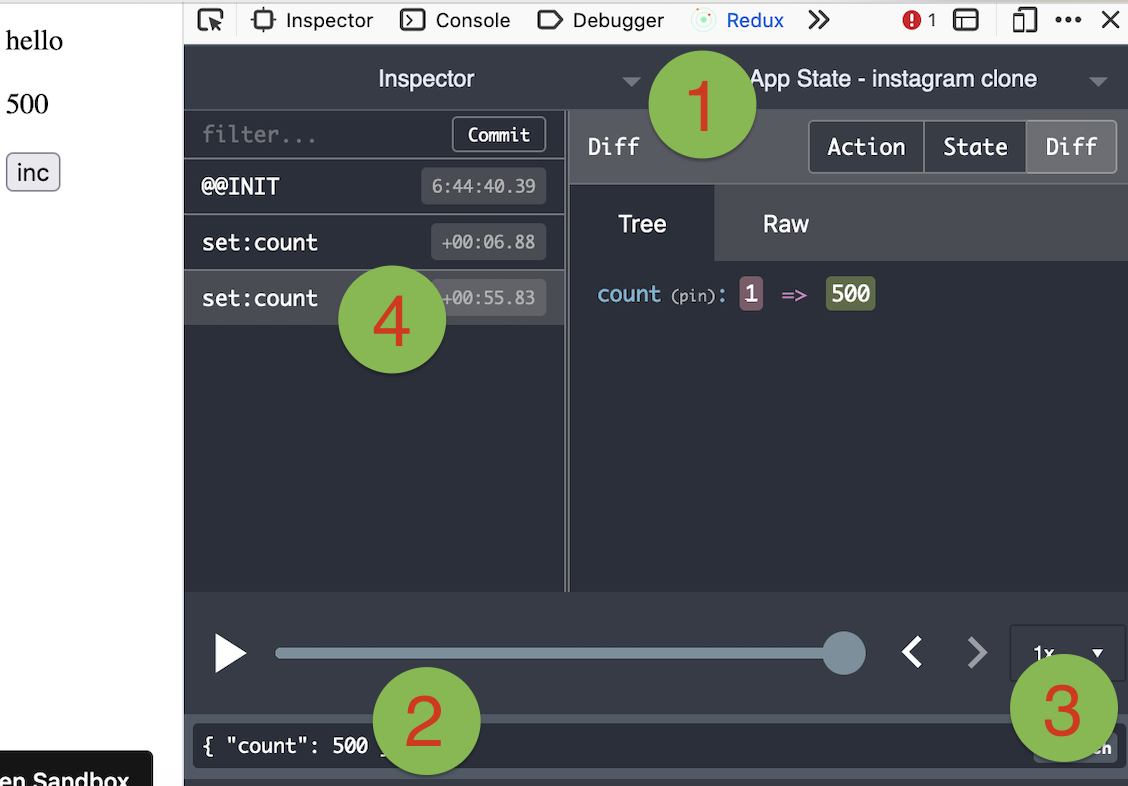
You can use Redux DevTools Extension for plain objects and arrays.
import { devtools } from 'valtio/utils'
const state = proxy({ count: 0, text: 'hello' })
const unsub = devtools(state, { name: 'state name', enabled: true })
Manipulating state with Redux DevTools
The screenshot below shows how to use Redux DevTools to manipulate state. First select the object from the instances drop down. Then type in a JSON object to dispatch. Then click "Dispatch". Notice how it changes the state.image
Valtio is not tied to React, you can use it in vanilla-js.
import { proxy, subscribe, snapshot } from 'valtio/vanilla'
// import { ... } from 'valtio/vanilla/utils'
const state = proxy({ count: 0, text: 'hello' })
subscribe(state, () => {
 console.log('state is mutated')
 const obj = snapshot(state) // A snapshot is an immutable object
})
While the separation of proxy state and its snapshot is important, it's confusing for beginners. We have a convenient util to improve developer experience. useProxy returns shallow proxy state and its snapshot, meaning you can only mutate on root level.
import { useProxy } from 'valtio/utils'
const state = proxy({ count: 1 })
const Component = () => {
 // useProxy returns a special proxy that can be used both in render and callbacks
 // The special proxy has to be used directly in a function scope. You can't destructure it outside the scope.
 const $state = useProxy(state)
 return (
 <div>
 {$state.count}
 <button onClick={() => ++$state.count}>+1</button>
 </div>
 )
}
You can define computed properties with object getters.
const state = proxy({
 count: 1,
 get doubled() {
 return this.count * 2
 },
})
Consider it as an advanced usage, because the behavior of this is sometimes confusing.
For more information, check out this guide.
This is to create a proxy which mimic the native Set behavior. The API is the same as Set API
import { proxySet } from 'valtio/utils'
const state = proxySet([1, 2, 3])
//can be used inside a proxy as well
//const state = proxy({
// count: 1,
// set: proxySet()
//})
state.add(4)
state.delete(1)
state.forEach((v) => console.log(v)) // 2,3,4
This is to create a proxy which emulate the native Map behavior. The API is the same as Map API
import { proxyMap } from 'valtio/utils'
const state = proxyMap([
 ['key', 'value'],
 ['key2', 'value2'],
])
state.set('key', 'value')
state.delete('key')
state.get('key') // ---> value
state.forEach((value, key) => console.log(key, value)) // ---> "key", "value", "key2", "value2"
Valtio v2 works with React 18 and up.
It only depends on react and works with any
renderers such as react-dom, react-native, react-three-fiber, and so on.
Valtio works on Node.js, Next.js and other frameworks.
Valtio also works without React. See vanilla.
Valtio is unopinionated about best practices. The community is working on recipes.