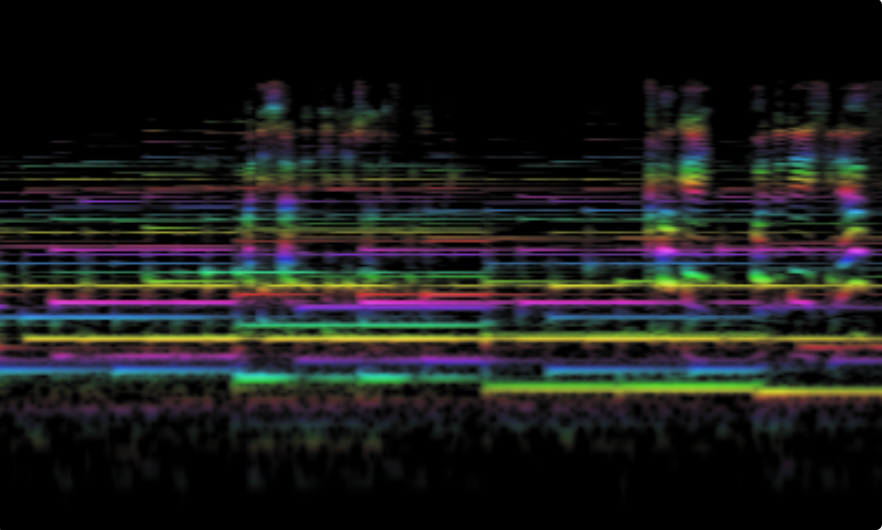
A zero-dependency, scientifically-grounded audio visualization tool built for musicians, researchers, and audio engineers. Displays audio as a colorized 12-TET (12-tone equal temperament) spectrogram with perceptually accurate frequency representation.
Features:
- 12-TET frequency mapping — Musical notes (A0 to C9) mapped to exact semitone bands
- Pink noise correction — 2dB/octave compensation in GPU shader for perceptually flat display
- WebGL2 rendering — GPU-accelerated ring buffer texture for smooth, high-performance visualization
- Display P3 support — Wider color gamut detection with saturation boost on supported displays
- High-resolution analysis — Configurable FFT size (4096-16384) for precise frequency resolution
- Signal-to-noise control — Sigmoid-based threshold and steepness adjustments
- Recording & capture — High-quality video recording (VP9/Opus or H.264/AAC) and screenshot capabilities
- PWA support — Install as a standalone app, works offline
- Zero external audio dependencies — Pure Web Audio API implementation
The spectrogram uses the Web Audio API's AnalyserNode with WebGL2-accelerated rendering:
- FFT analysis — Raw frequency data captured via
getFloatFrequencyData() - 12-TET band integration — FFT bins summed into musical semitone bands (10 sub-bands per semitone)
- Texture upload — Band values written to a ring buffer texture (LUMINANCE/UNSIGNED_BYTE)
- GPU shader processing — Pink noise correction (2dB/octave), sigmoid contrast, and HSL color mapping in fragment shader
- Ring buffer scrolling — Seamless scrolling via texture UV offset with WRAP_T=REPEAT
- Display P3 detection — Saturation boost applied when wide gamut display is available
The pink noise correction ensures that natural/musical signals (which typically follow a 1/f spectrum) appear perceptually flat across the frequency range. All per-pixel processing is GPU-bound for maximum performance.
- FFT Size — 12-14 (4096-16384) — Higher values improve low-frequency resolution
- Smooth — 0-1 — Temporal smoothing of the analyzer
- Speed — 1-4 — Scrolling speed of the spectrogram
- Midpoint — 0-1 — Sigmoid threshold for signal visibility
- Steep — 3-30 — Sigmoid steepness for noise floor control
- Vue 3 — Reactive UI framework
- Vite — Build tool and dev server
- UnoCSS — Utility-first CSS
- Web Audio API — Native browser audio processing (no external audio libraries)
# Clone the repository
git clone https://github.com/chromatone/spectrogram.git
cd spectrogram
# Install dependencies
pnpm install
# Run development server
pnpm dev
# Build for production
pnpm build
- Open the app in a modern browser
- Grant microphone access when prompted
- Adjust controls to fine-tune the visualization
- Use the camera button to capture screenshots
- Use the video button to record the spectrogram
- A0 — 27.5 Hz (lowest piano key)
- C9 — 15,870 Hz (highest piano key + 1 octave)
The spectrogram covers the full piano range plus one octave above, suitable for most musical analysis.
MIT