
Mageek is an ImageJ Plugin to process microscope images files in Fiji.
Mageek use ImageJ and Bio-Format to:
- open multi series
- project slices
- split channels (up to 4)
- apply a LUT to each channel.
- save the result as a *.tiff
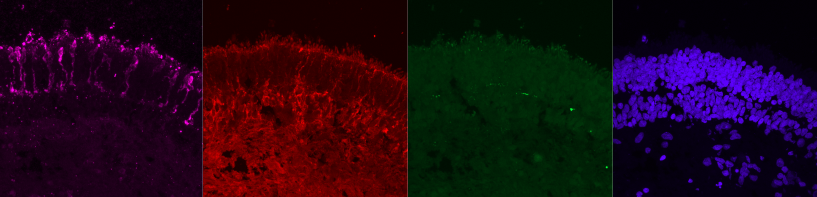
Here is the result of processing a single *.czi file and putting the 4 channels in a row:
-
Download
Mageek.jarlast release from the assets here. -
Download and install Fiji from https://imagej.net/Fiji/Downloads
-
Run Fiji
-
On the main menu, click on
Plugins -> Installand selectMageek.jarfile.
Screen Shot 2022年02月27日 at 4 05 27 PM

Screen Shot 2022年02月27日 at 4 06 54 PM

- Fiji must be restarted in order to take the plugin in account.
Screen Shot 2022年02月27日 at 4 07 22 PM

- Search for
Mageek, you should find it quickly by typingMageekin the search field.
Screen Shot 2022年02月27日 at 4 17 47 PM

- Validate by hitting
Enteror clickingRun.
Screen Shot 2022年02月27日 at 3 57 25 PM

- The Maggek UI appear.
Screen Shot 2022年02月27日 at 4 09 22 PM

- Browse to select a source directory.
- Mageek will analyse the content and show a list of files and their extensions. Only common extensions will be automatically selected. But fell free to select unselect item.
Screen Shot 2022年02月27日 at 4 11 06 PM

- Select the Z projection mode to apply on slices and the colors to apply to each channels.
Screen Shot 2022年02月27日 at 4 12 04 PM

- When you are ready, click on
Processbutton.
Screen Shot 2022年02月27日 at 4 12 36 PM

- You will see status messages and progress bar growing... Once done, you must find a new directory in your source directory named
ANALYSED:
Screen Shot 2022年02月27日 at 4 14 24 PM

Screen Shot 2022年02月27日 at 4 15 23 PM

The source code of Mageek has been developped by Berenger Dalle-Cort with discussions with Marcela Garita Hernandez in order to speed-up microscope image analysis process.
This Java code is the version 2 of a previous ImageJ Macro. Source code of this version is here.