A free, open-source network inspector for your phone. Point an iOS or Android device at Proxino and watch its HTTPS traffic live — requests, responses, timings, grouped per device — with filters, a JSON/HTML viewer, replay, and edit-and-resend. A self-hosted alternative to Proxyman and Charles: no account, no license, runs entirely on your machine.
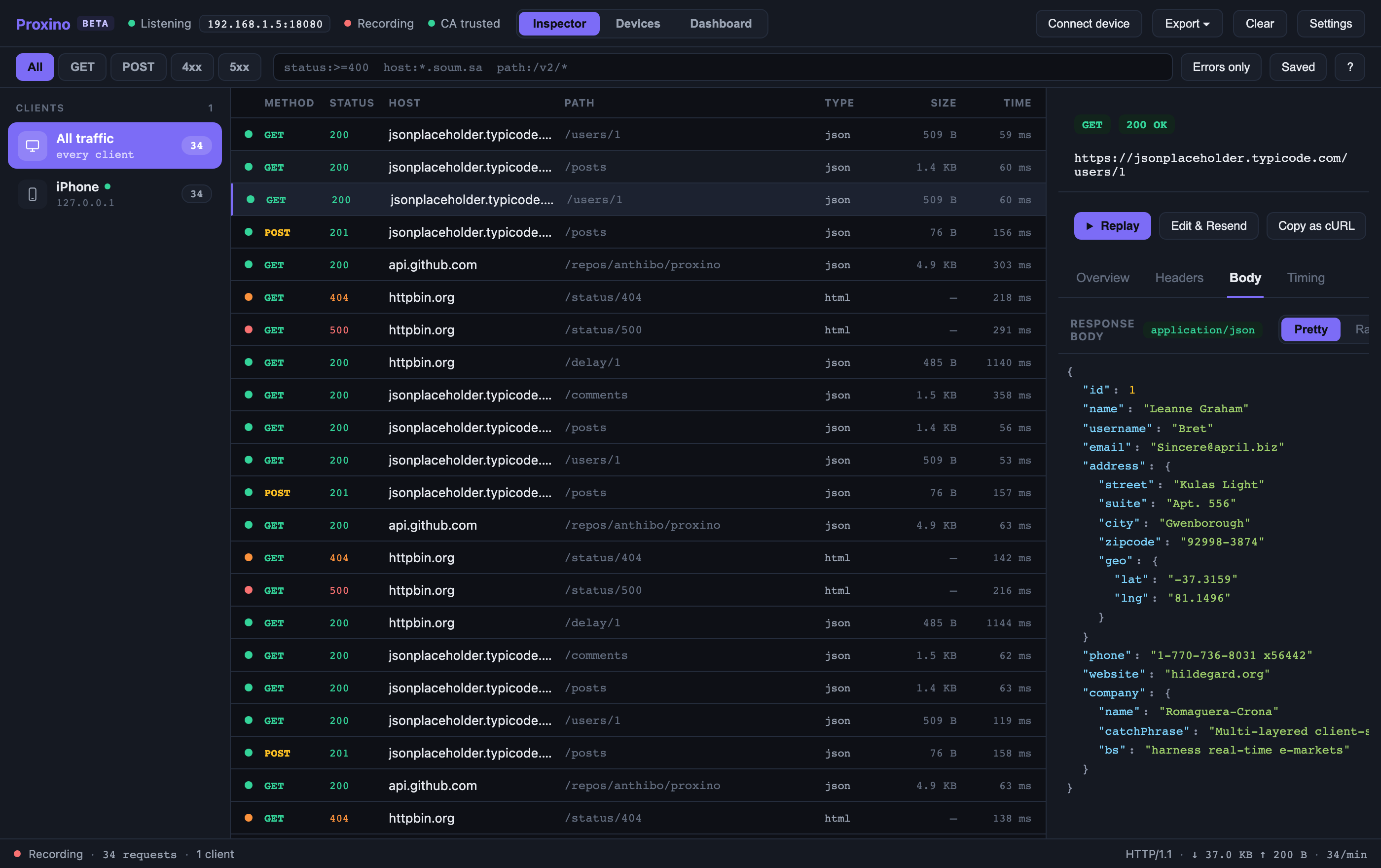
Proxino inspector showing captured iPhone traffic with a JSON response open
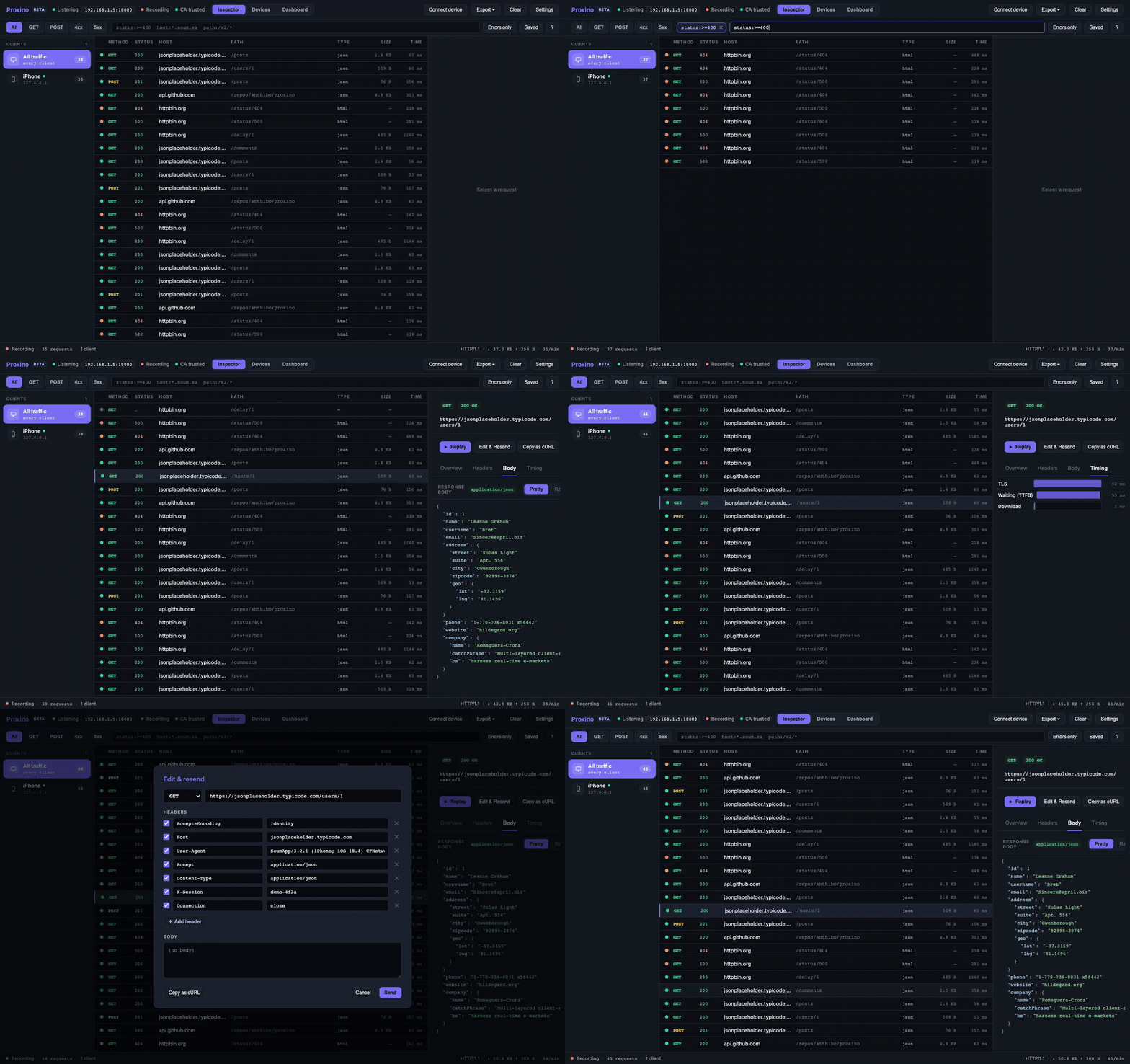
Filtering, opening a request, viewing headers and timing, and edit-and-resend
⚠️ It's a man-in-the-middle tool by design. Use it only on devices and traffic you own or are authorized to inspect. The web UI binds to127.0.0.1only.
Download from the latest release:
| Platform | File | First launch |
|---|---|---|
| macOS 12+ (Apple Silicon; Intel is on the roadmap) | Proxino_<version>_aarch64.dmg |
Unsigned build: right-click Proxino.app → Open, or xattr -dr com.apple.quarantine /Applications/Proxino.app |
| Windows 10/11 (x64) | Proxino_<version>_x64-setup.exe |
SmartScreen → More info → Run anyway |
| Linux (x64) | Proxino_<version>_amd64.AppImage or Proxino_<version>_amd64.deb |
AppImage: chmod +x Proxino_*.AppImage && ./Proxino_*.AppImage |
The app bundles the capture engine — no Python or Node needed. It uses port 8080 for the proxy and 8081 for the UI, falling back to free ports if those are taken (the Connect-device wizard always shows the real one).
The PyPI package isn't published yet — it will be pipx install proxino once v0.1.0 lands there. Until then, use the desktop app above or run from source below.
git clone https://github.com/anthibo/proxino && cd proxino
python3 -m venv .venv && .venv/bin/pip install -e .
cd web && npm install && npm run build && cd ..
.venv/bin/proxino
proxino --proxy-port 9090 --web-port 9091 changes the ports; any other flag is passed to mitmdump.
The commercial inspectors are excellent tools, and if you need breakpoints, map-local, or scripting today they still do more. Proxino is for the case where you want something free, open, and self-hosted that treats your phone as a first-class client:
- Free and MIT-licensed — no account, no license key, no trial timer.
- Open source — a mitmproxy addon, a FastAPI backend, and a React UI you can read and change.
- Runs where you work — native desktop app for macOS (Apple Silicon), Windows, and Linux, or the same UI in any browser when run from source (PyPI package coming soon).
- Phone-first — devices are auto-named from their traffic, grouped in the sidebar, and get their own connect wizard with a scannable CA QR code.
- Not there yet — no breakpoints/intercept, no map-local, no scripting. See the roadmap.
- Live capture of HTTP/HTTPS flows, streamed to the browser over WebSocket.
- Per‐device grouping — clients are auto‐named from the User‐Agent (iPhone, Android app, Mac...) with per‐device request counts; rename any device inline.
- Filter DSL —
status:>=400 host:*.example.com path:/v2/*, with autocomplete, quick method chips (All/GET/POST/4xx/5xx), an "Errors only" toggle, and saved filters. - Rich response viewer — collapsible syntax‐highlighted JSON, HTML/XML highlighting with a rendered Preview, line numbers, content‐type badge, and an error banner for 4xx/5xx.
- Detail pane — Overview (client, remote address, protocol/TLS, timing), Headers, Body, and a Timing waterfall.
- Replay & Edit‐and‐Resend — one‐click replay of a captured request, or open the editor to tweak method/URL/headers/body and send it as a new flow.
- Copy as cURL, HAR export, and session save/load (Proxino JSON).
- Connect‐device wizard with the proxy address and a scannable QR code for the CA certificate.
 ┌────────────┐ ┌──────────────────────────────┐
 phone │ mitmproxy │ flows │ Proxino addon │
 ───────▶ (:8080) ├────────▶ • in‐memory flow store │
 HTTPS │ TLS decrypt │ │ • ClientRegistry (devices) │
 └────────────┘ │ • FastAPI app (:8081) │
 │ REST + WebSocket │
 │ serves web/dist │
 └───────────────┬───────────────┘
 │ HTTP/WS
 ┌────────▼────────┐
 │ React web UI │ http://127.0.0.1:8081
 └─────────────────┘
proxino/— the mitmproxy addon (addon.py), flow model + store, client/device registry, the FastAPI server (server.py), and helpers (HAR, sessions, CA info, transform).web/— the Vite + React + TypeScript UI (Zustand store, filter DSL, JSON viewer, etc.).
See docs/architecture.md for a deeper tour.
- Put the phone on the same Wi‐Fi as this machine.
- Set a manual HTTP proxy to this machine's LAN IP, port 8080
(the Connect‐device wizard in the UI shows the exact address).
- iOS: Settings → Wi‐Fi → (i) → Configure Proxy → Manual
- Android: Wi‐Fi → long‐press network → Modify → Proxy → Manual
- Install and trust the CA so HTTPS can be decrypted:
- Open http://mitm.it on the device (through the proxy) and install the cert.
- iOS also needs: Settings → General → About → Certificate Trust Settings → enable full trust. (This step is easy to miss and is the usual cause of "no requests show up".)
Some apps use certificate pinning and will refuse the proxy's cert — those show up as Client TLS handshake failed in the log and can't be decrypted. That's expected.
# Backend tests
.venv/bin/python -m pytest
# Frontend unit tests + type‐check
cd web && npm test && npx tsc --noEmit
# End‐to‐end (Playwright, against a mock server)
cd web && npx playwright test
# Live‐reloading UI (proxy the dev server's API/WS to :8081)
cd web && npm run dev
Project layout:
proxino/ mitmproxy addon + FastAPI backend (Python)
web/ React + TypeScript web UI (Vite)
tests/ backend tests (pytest)
web/tests/ frontend unit tests (vitest)
web/e2e/ end‐to‐end tests (Playwright)
docs/ documentation
| What | Default | Notes |
|---|---|---|
| Proxy port | 8080 |
--proxy-port <n> |
| Web UI port | 8081 |
--web-port <n> (loopback only) |
| Max flows | 5000 in memory |
oldest evicted first |
| CA certificate | ~/.mitmproxy/ |
generated by mitmproxy on first run |
- Breakpoints / intercept-and-edit before forwarding
- Find-in-body search, copy-all-as-cURL
- Signed and notarized desktop builds, Intel macOS build, Homebrew tap
- Client-side scripting hooks
Ideas and PRs welcome — see CONTRIBUTING.md.
MIT © Abdulrahman Khalid