With .Net Core, it allows you to keep the json files of your applications securely encrypted on your remote server and easily integrate them into your applications.
<<<<<<< HEAD
https://i.postimg.cc/ZJ4WzpTg/1.png
======= >>>>>>> dee3f9c (Create README.md)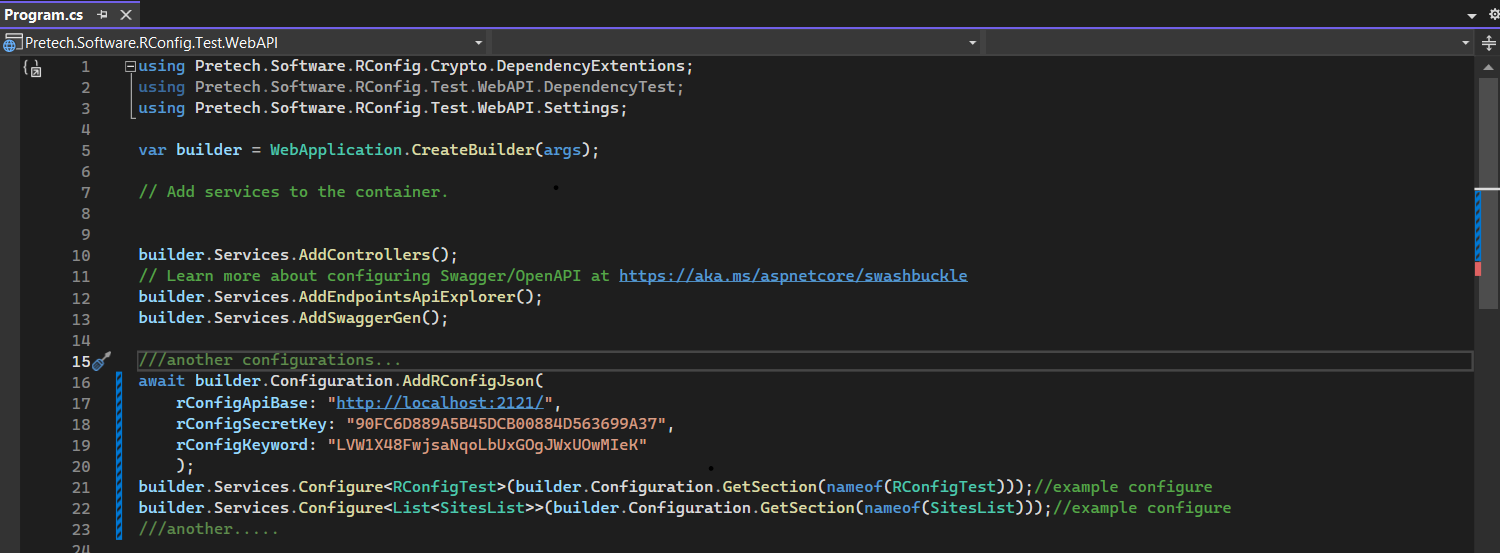
<<<<<<< HEAD
1-RConfig UI ( docker.yaml)
version: '3'
services:
 rconfig_ui:
 container_name: rconfig_ui
 image: alizorlu/pretechsoftwarerconfigui
 restart: always
 mem_limit: 2g
 environment:
 - RootUser=admin
 - RootPassword=admin
 - RootSession=01:00:00
 - SqlType=MsSQL
 - Mysql=Server=mysql.example.server.com;Database=rconfig;Uid=root;Pwd=pass;
 - MsSQL=Server=mssql.example.ser.com;Database=RConfig;Uid=root;Pwd=pass;Application Name=Rconfig.Ui.Application;Integrated Security=False;TrustServerCertificate=True;MultipleActiveResultSets=True;
 - Postgresql=Server=server.test.local;Port=5432;Database=rconfig;User Id=postgres;Password=pass;
 - TLS_VERSION=1
 - Mysql=Server=mysql.example.server.com;Database=rconfig;Uid=root;Pwd=pass;
 - MsSQL=Server=mssql.example.ser.com;Database=RConfig;Uid=root;Pwd=pass;Application Name=Rconfig.Ui.Application;Integrated Security=False;TrustServerCertificate=True;MultipleActiveResultSets=True;
>>>>>>> dee3f9c (Create README.md)
 ports:
 - "80:80"
2-RConfig API (docker.yaml) for docker container bash docker pull alizorlu/pretechsoftwarerconfigapiserver
2-RConfig API (docker.yaml)
version: '3'
services:
 rconfig_api:
 container_name: rconfig_api
 image: alizorlu/pretechsoftwarerconfigapiserver
 restart: always
 mem_limit: 2g
 environment:
<<<<<<< HEAD
 - SqlType=Postgresql
 - Mysql=Server=mysql.example.server.com;Database=rconfig;Uid=root;Pwd=pass;
 - MsSQL=Server=mssql.example.ser.com;Database=RConfig;Uid=root;Pwd=pass;Application Name=Rconfig.Ui.Application;Integrated Security=False;TrustServerCertificate=True;MultipleActiveResultSets=True;
 - Postgresql=Server=server.test.local;Port=5432;Database=rconfig;User Id=postgres;Password=pass;
 - SqlType=MsSQL
 - TLS_VERSION=1
 - Mysql=Server=mysql.example.server.com;Database=rconfig;Uid=root;Pwd=pass;
 - MsSQL=Server=mssql.example.ser.com;Database=RConfig;Uid=root;Pwd=pass;Application Name=Rconfig.Ui.Application;Integrated Security=False;TrustServerCertificate=True;MultipleActiveResultSets=True;
>>>>>>> dee3f9c (Create README.md)
 ports:
 - "80:80"
3-RConfig.Crypto(Dependency Ext . Lib) bash dotnet add package RConfig.Crypto.1.0.0 --version 1.0.0
3-RConfig.Crypto(Dependency Ext . Lib)
NuGet\Install-Package RConfig.Crypto.1.0.0 -Version 1.0.0- Key-based encryption (AES)
- IP based access (RConfig API)
- Appending remote changes automatically on the stack side
- Support for other databases (primarily postgresql)
- Adding usage metrics to RConfig UI
Use this section to mention useful resources and libraries that you have used in your projects.