Social Engineering TV
Insallation and configuration in Raspberry PI 4
CONFIGURATION
-
In Raspberry PI 4 install Raspbian OS.
-
Update Raspbian OS
-
Install Open Broadcaster Software.
-
File /boot/config.txt find and uncomment
nano /boot/config.txt
framebuffer_width=1280
framebuffer_height=720
[all]
gpu_mem=512
- Reboot
INSTALL WEB-SOCKET PLUGIN OBS
- Install last version of libasio-dev in my case version 1.18.1-1
wget http://ftp.us.debian.org/debian/pool/main/a/asio/libasio-dev_1.18.1-1_all.deb
dpkg -i libasio-dev_1.18.1-1_all.deb
- Download and Install obs-websocket plugin
git clone https://github.com/Palakis/obs-websocket.git
cd obs-websocket
cmake CmakeLists.txt
make
make install
- Copy file obs-websocket.so to path installed in Raspberry PI
cp /usr/local/lib/obs-plugins/obs-websocket.so /usr/lib/obs-plugins/obs-websocket.so
- Install library in python 3
pip3 install obs-ws-py
- When open OBS in GUI you can configure Port and Password for Web-Socket Plugin, same password and port must match in script setv, i use ip address 127.0.0.1 because the script is running in Raspberry PI
host = "127.0.0.1"
port = 4444
password = "changeme"
- reboot with capture card connected in USB 3 Port.
CAPTURE CARD AND AUDIO DETECTION
- Use list all display and capture cards
v4l2-ctl --list-devices
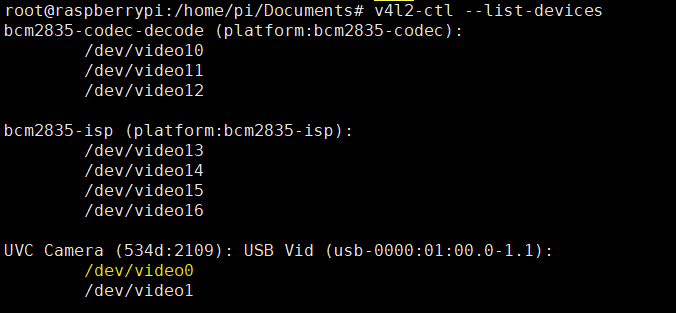
it detects /dev/video0
- In Raspbian OS with vnc session select audio input Digital Stereo that match with hdmi capture card.
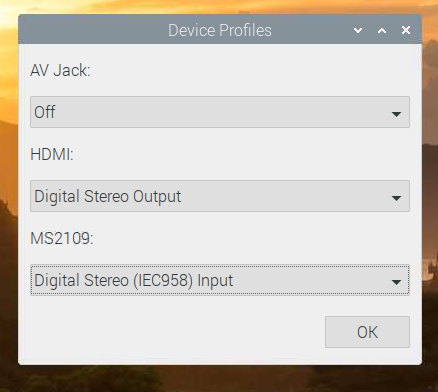
- in CLI change v4l2 configuration and run OBS
v4l2-ctl --set-fmt-video=width=1280,height=720
export DISPLAY=:0
MESA_GL_VERSION_OVERRIDE=3.3 obs
- Connect to Raspberry PI with SSH and run setv.py
root@raspberrypi:/home/pi/Documents# python3 setv.py
CONGRATULATIONS!!!
You can start to configure your scenes and collect victims like in Hollywood!!
EXAMPLES
In folder examples you can edit templates in gimp format
NETFLIX SPOOFING Netflix-full

CNN HOAX noticiero-hoax