
CI Python PyPi conda-forge License
mlforecast is a framework to perform time series forecasting using machine learning models, with the option to scale to massive amounts of data using remote clusters.
pip install mlforecast
conda install -c conda-forge mlforecast
For more detailed instructions you can refer to the installation page.
- Get Started with this quick guide.
- Follow this end-to-end walkthrough for best practices.
Current Python alternatives for machine learning models are slow,
inaccurate and don’t scale well. So we created a library that can be
used to forecast in production environments.
MLForecast
includes efficient feature engineering to train any machine learning
model (with fit and predict methods such as
sklearn) to fit millions of time
series.
- Fastest implementations of feature engineering for time series forecasting in Python.
- Out-of-the-box compatibility with pandas, polars, spark, dask, and ray.
- Probabilistic Forecasting with Conformal Prediction.
- Support for exogenous variables and static covariates.
- Familiar
sklearnsyntax:.fitand.predict.
Missing something? Please open an issue or write us in Slack
📚 End to End Walkthrough: model training, evaluation and selection for multiple time series.
🔎 Probabilistic Forecasting: use Conformal Prediction to produce prediciton intervals.
👩🔬 Cross Validation: robust model’s performance evaluation.
🔌 Predict Demand Peaks: electricity load forecasting for detecting daily peaks and reducing electric bills.
📈 Transfer Learning: pretrain a model using a set of time series and then predict another one using that pretrained model.
🌡️ Distributed Training: use a Dask, Ray or Spark cluster to train models at scale.
The following provides a very basic overview, for a more detailed description see the documentation.
Store your time series in a pandas dataframe in long format, that is, each row represents an observation for a specific serie and timestamp.
from mlforecast.utils import generate_daily_series
series = generate_daily_series(
 n_series=20,
 max_length=100,
 n_static_features=1,
 static_as_categorical=False,
 with_trend=True
)
series.head()
| unique_id | ds | y | static_0 | |
|---|---|---|---|---|
| 0 | id_00 | 2000年01月01日 | 17.519167 | 72 |
| 1 | id_00 | 2000年01月02日 | 87.799695 | 72 |
| 2 | id_00 | 2000年01月03日 | 177.442975 | 72 |
| 3 | id_00 | 2000年01月04日 | 232.704110 | 72 |
| 4 | id_00 | 2000年01月05日 | 317.510474 | 72 |
Note: The unique_id serves as an identifier for each distinct time series in your dataset. If you are using only single time series from your dataset, set this column to a constant value.
Next define your models, each one will be trained on all series. These can be any regressor that follows the scikit-learn API.
import lightgbm as lgb
from sklearn.linear_model import LinearRegression
models = [
 lgb.LGBMRegressor(random_state=0, verbosity=-1),
 LinearRegression(),
]
Now instantiate an
MLForecast
object with the models and the features that you want to use. The
features can be lags, transformations on the lags and date features. You
can also define transformations to apply to the target before fitting,
which will be restored when predicting.
from mlforecast import MLForecast
from mlforecast.lag_transforms import ExpandingMean, RollingMean
from mlforecast.target_transforms import Differences
fcst = MLForecast(
 models=models,
 freq='D',
 lags=[7, 14],
 lag_transforms={
 1: [ExpandingMean()],
 7: [RollingMean(window_size=28)]
 },
 date_features=['dayofweek'],
 target_transforms=[Differences([1])],
)
To compute the features and train the models call fit on your
Forecast object.
fcst.fit(series)
MLForecast(models=[LGBMRegressor, LinearRegression], freq=D, lag_features=['lag7', 'lag14', 'expanding_mean_lag1', 'rolling_mean_lag7_window_size28'], date_features=['dayofweek'], num_threads=1)
To get the forecasts for the next n days call predict(n) on the
forecast object. This will automatically handle the updates required by
the features using a recursive strategy.
predictions = fcst.predict(14)
predictions
| unique_id | ds | LGBMRegressor | LinearRegression | |
|---|---|---|---|---|
| 0 | id_00 | 2000年04月04日 | 299.923771 | 311.432371 |
| 1 | id_00 | 2000年04月05日 | 365.424147 | 379.466214 |
| 2 | id_00 | 2000年04月06日 | 432.562441 | 460.234028 |
| 3 | id_00 | 2000年04月07日 | 495.628000 | 524.278924 |
| 4 | id_00 | 2000年04月08日 | 60.786223 | 79.828767 |
| ... | ... | ... | ... | ... |
| 275 | id_19 | 2000年03月23日 | 36.266780 | 28.333215 |
| 276 | id_19 | 2000年03月24日 | 44.370984 | 33.368228 |
| 277 | id_19 | 2000年03月25日 | 50.746222 | 38.613001 |
| 278 | id_19 | 2000年03月26日 | 58.906524 | 43.447398 |
| 279 | id_19 | 2000年03月27日 | 63.073949 | 48.666783 |
280 rows ×ばつ 4 columns
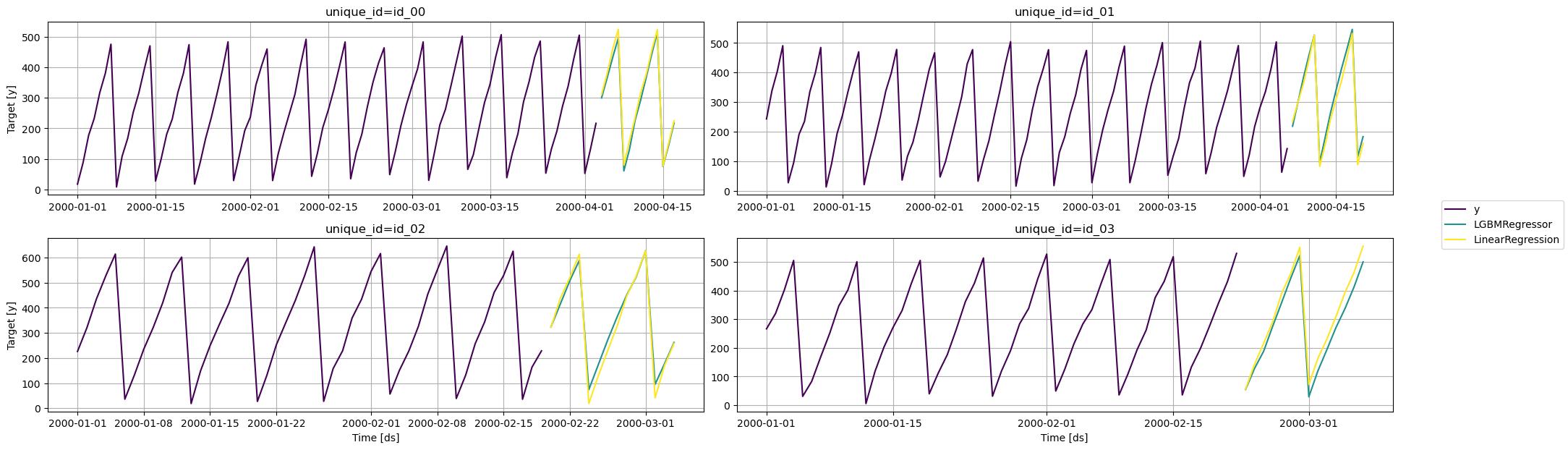
from utilsforecast.plotting import plot_series
fig = plot_series(series, predictions, max_ids=4, plot_random=False)
See CONTRIBUTING.md.