MerMark Editor - Mermaid Markdown Editor

A modern, open-source Markdown editor with built-in Mermaid diagram support
Release License Stars Downloads Buy me a coffee
AI Assistant • Presentations • Features • Screenshots • Installation • Usage • Development
MerMark Editor combines the simplicity of Markdown with the power of Mermaid diagrams in a beautiful, native desktop application. Perfect for developers, technical writers, and anyone who needs to create documentation with flowcharts, sequence diagrams, and other visualizations.
- No cloud dependency - Your documents stay on your computer
- Native performance - Built with Tauri for fast, lightweight operation
- WYSIWYG editing - See your formatted content as you type
- Mermaid integration - Create diagrams directly in your documents
- Marp presentations - Build slide decks in Markdown with a live preview and fullscreen present mode
- Multi-root workspaces - Open one folder or many; the AI sees them as scoped read-only context
- Local AI assistant - Talk to Claude, Codex, a fully offline Ollama model, or any OpenAI-compatible local server about your notes; they edit your files directly
- Cross-platform - Available on Windows, macOS and Linux
MerMark — Minimal theme with workspace sidebar MerMark — same layout with the AI Assistant docked on the right
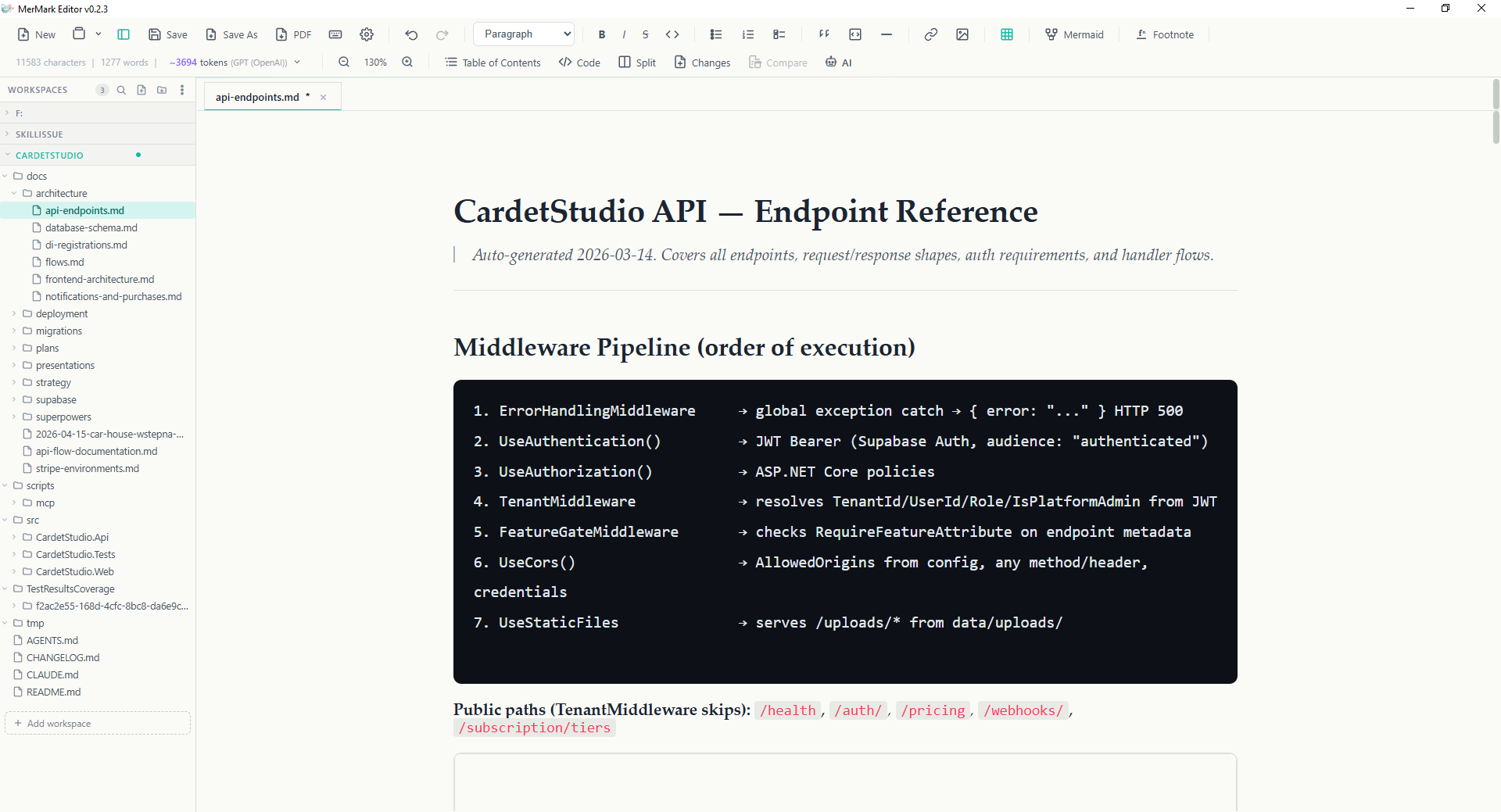
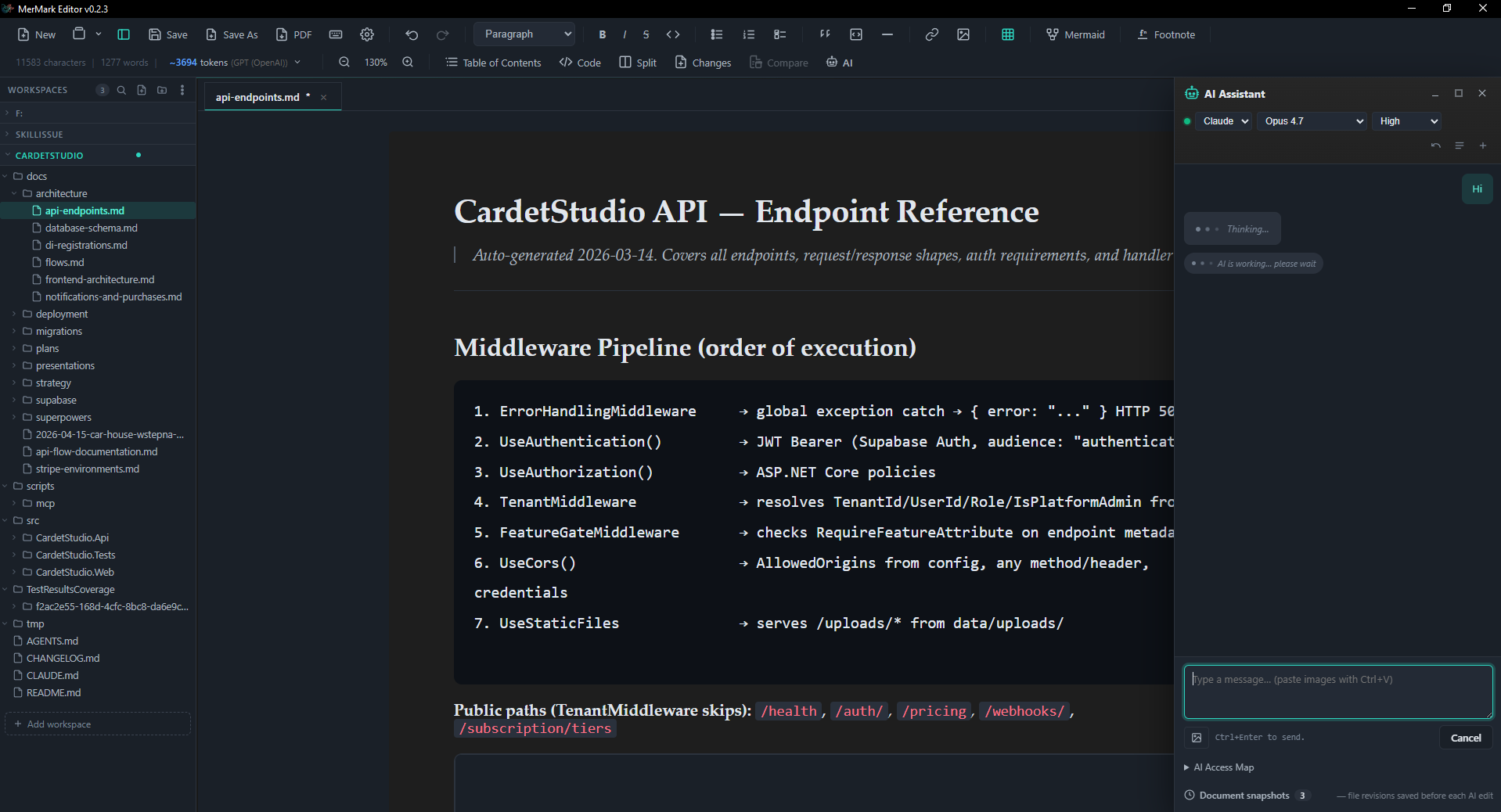
Turn any note into a slide deck. Start a Marp presentation from the New menu (or open an existing deck), write your slides in plain Markdown, and watch them render live next to the editor. A dedicated toolbar lets you add slides, switch themes, set per-slide layouts, drop in backgrounds, toggle slide numbers, and change the font size — then present fullscreen.
MerMark — Marp presentation with a live slide preview beside the editor

- Live split preview - edit on the left, see the real slides on the right, scrolling in sync
- Themes with previews - gaia, default, uncover; pick from graphical thumbnails
- Local and web images - both render in the live preview and in exports
- Present fullscreen - advance with arrow keys, a click, or auto-advance
If you already pay for Claude Code or OpenAI Codex — or both — MerMark plugs that subscription straight into the editor. The AI panel speaks to the claude and codex CLIs you already have logged in, so every request goes through the account you're already paying for. No API key to generate. No second bill. No proxy sitting between you and your provider.
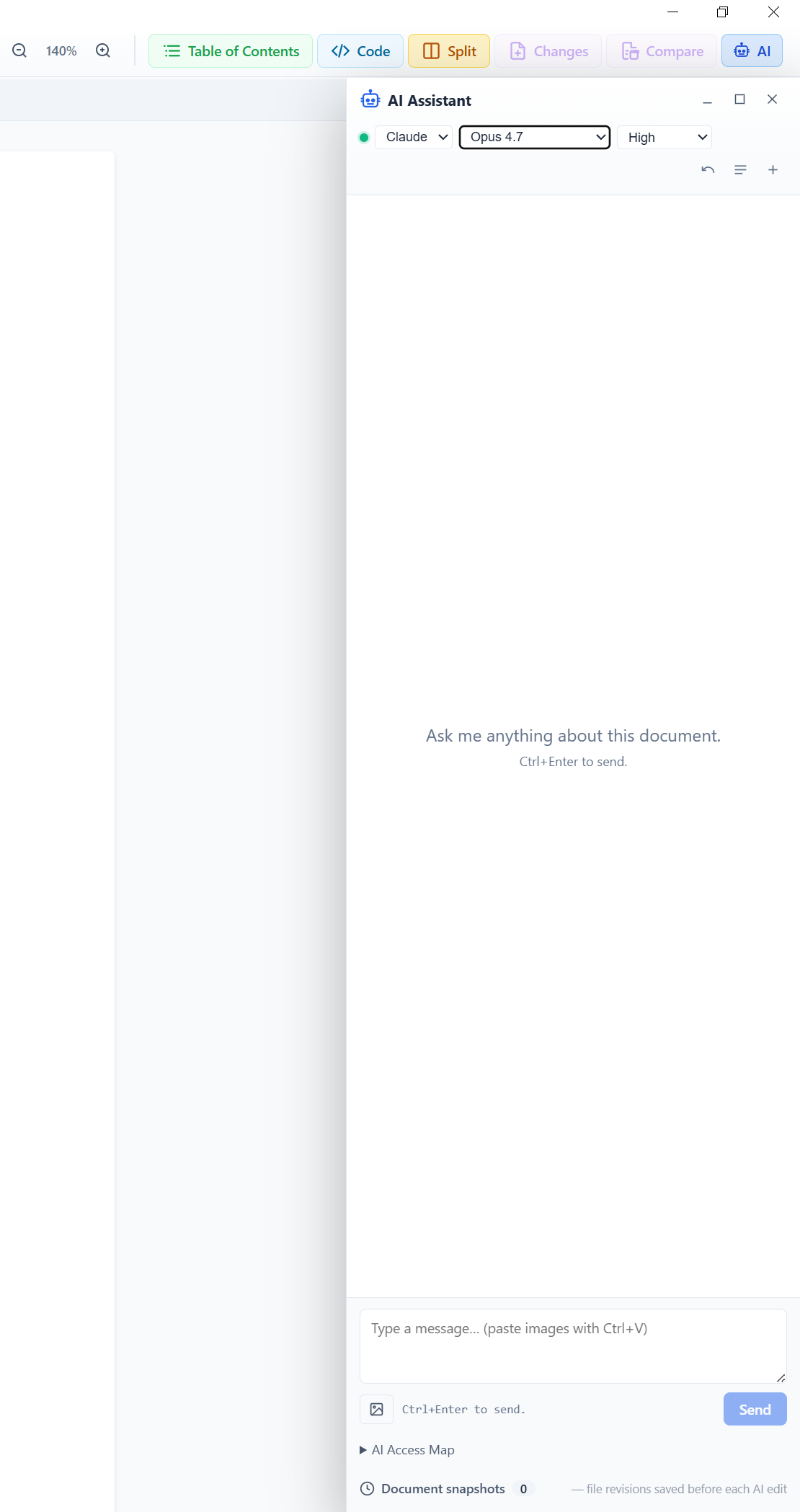
AI panel overview
AI panel docked next to the editor with model picker, threads dropdown, pinned fragments and live context bar
- Claude Code or Codex on a Pro/Plus plan — MerMark uses that login, no extra account.
- No API token to manage — the CLI handles auth, MerMark never sees your keys.
- Direct to provider — requests go from your machine straight to Anthropic or OpenAI; nothing else in between.
- No telemetry — zero data leaves the editor beyond the CLI call you'd run in a terminal yourself.
- Switch providers per turn — pick Claude for one chat, Codex for the next; all configured in one panel.
Prefer to keep everything on your own machine? Pick Ollama as the provider and chat against a local model — no account, no subscription, no network.
- Requires a local Ollama install running on your machine (
ollama serve); pull a model first (e.g.ollama pull llama3). - Models are listed automatically from your local install (
/api/tags) — the model dropdown fills with whatever you've pulled. - Streams replies straight from the local HTTP API; token usage is surfaced in the context bar just like the cloud providers.
- Configurable base URL in Settings → AI (defaults to
http://localhost:11434) if Ollama runs on another host or port. - Graceful when offline — if Ollama isn't running, the provider shows as Not running with a clear hint instead of failing silently.
Run your own model server? Pick OpenAI-compatible as the provider and point it at any server that speaks the OpenAI HTTP API — llama.cpp llama-server, LM Studio, vLLM, a local Mistral, or even Ollama's own /v1 endpoint.
- Speaks the OpenAI API —
POST /v1/chat/completions(streamed SSE) andGET /v1/models; no account, no subscription, no network beyond your server. - Models are listed automatically from
/v1/models— the dropdown fills with every model your server exposes. - Streams replies straight from the local HTTP API; token usage is surfaced in the context bar just like the cloud providers.
- Configurable base URL in Settings → AI (defaults to
http://localhost:8080); the/v1path is appended automatically, so a base that already ends in/v1is not doubled. - Graceful when offline — if the server isn't running, the provider shows as Not running with a clear hint instead of failing silently.
- Edit your markdown directly — "rewrite this section, friendlier tone", "extract action items", "translate to English". Writes straight to disk atomically; the editor reloads.
- Read across folders you authorize — point the access map at a project folder and the AI sees yesterday's notes, your glossary, your style guide.
- Modify peer files — split a long doc into multiple notes, generate a summary alongside the source, build a TOC file for a folder.
- Search the web — toggle the
networktool on when you need fresh information. - Run shell commands — opt-in
bashtoggle for grepping notes, running a build, anything terminal. Default off. - Auto-snapshot every AI write — one-click Revert if the result isn't what you wanted.
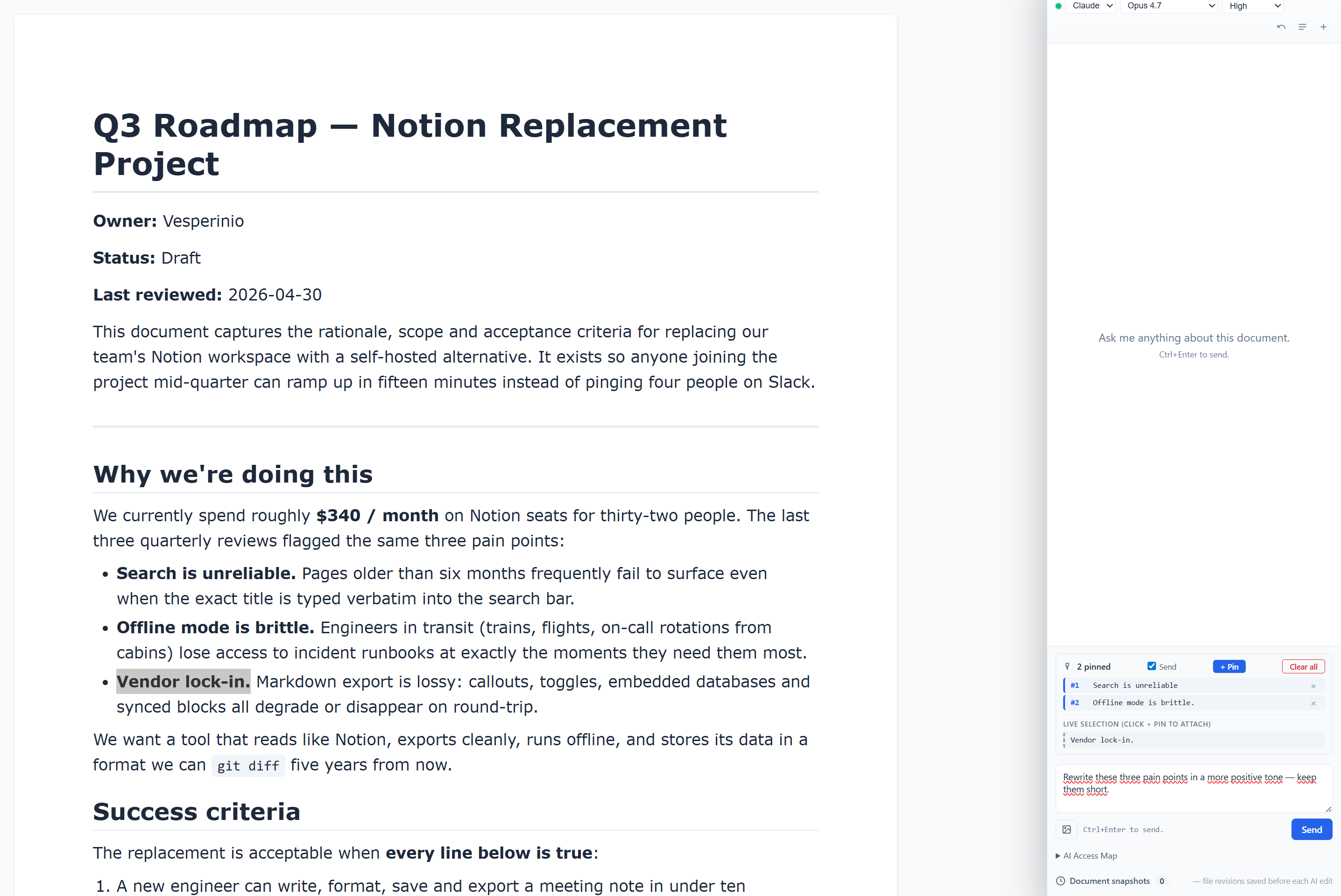
- Pin one or more highlighted fragments — Visual and Code view.
- The AI receives only those fragments, not the entire document.
- Toggle Send off to keep pins visible without sending this turn.
- Paste a screenshot (
Ctrl+V), drag-drop an image, or pick from disk. - 8 MB per image, png / jpg / gif / webp / bmp.
- Both Claude and Codex see the image.
- Sent images stay in chat history as thumbnails so you remember what you passed.
Pinning multiple fragments
Pin multiple highlighted fragments before sending — each appears as a numbered chip in the composer
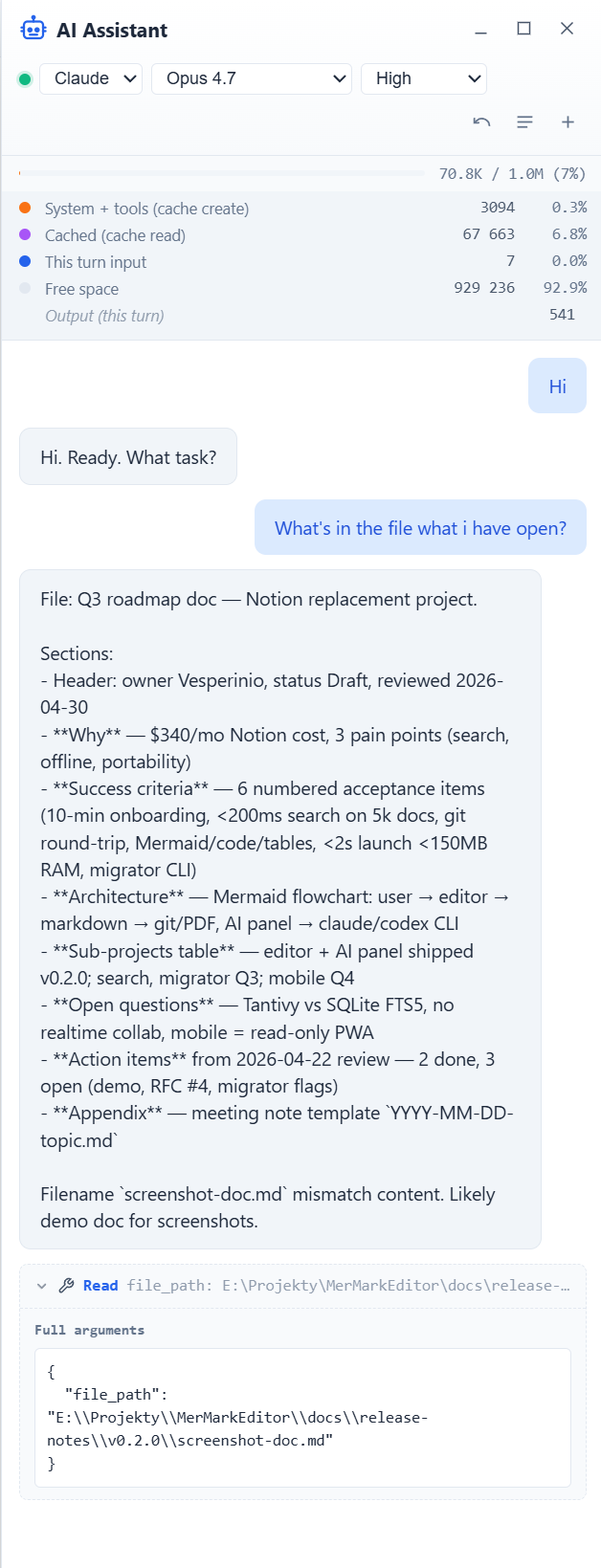
- Every tool the model invokes shows up inline as a dashed chip in the transcript.
- Chip carries the tool name and a one-line preview of the arguments.
- Click to expand a pretty-printed JSON view of the full call.
- Covers Read, Edit, Write, Bash, WebFetch, codex shell — all of them.
Tool call chips
Every tool the AI uses (Read, Edit, Write, Bash, WebFetch, ...) shows up inline as an expandable chip
- Every doc has its own scrollable thread history.
- + archives the current chat and starts a fresh one.
- Up to 50 threads per document, persisted in
localStorage. - Reopening an old thread restores the CLI, model, and reasoning effort you were using.
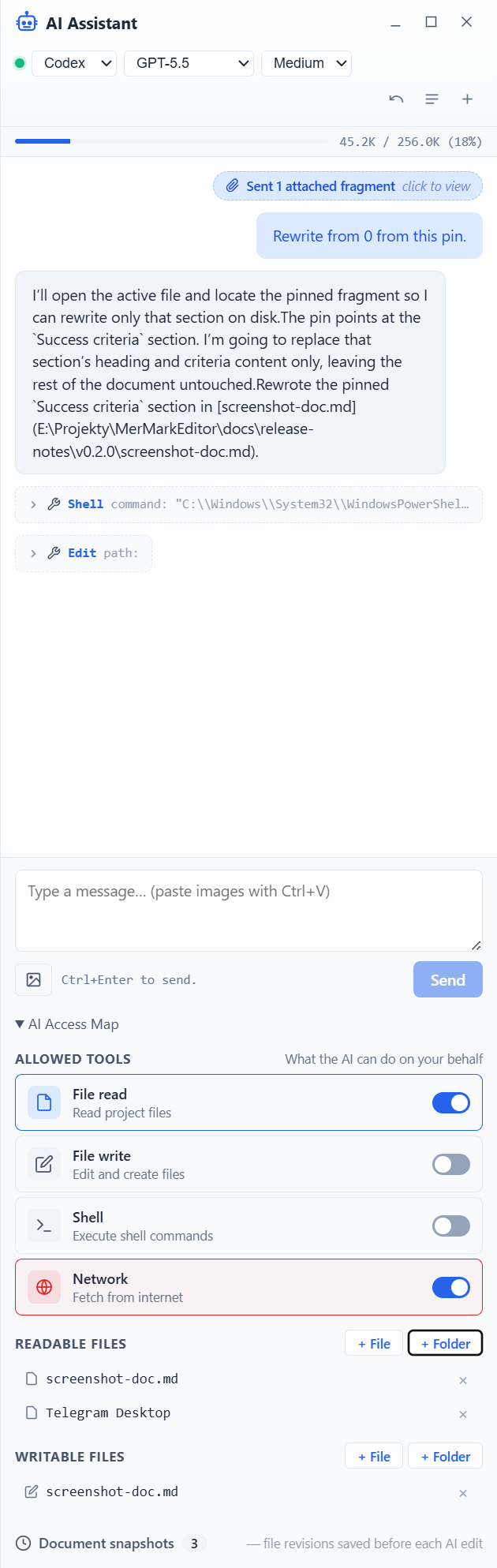
- Per-document access map: explicit read paths, write paths, tool toggles.
- Add files with + File, whole folders with + Folder.
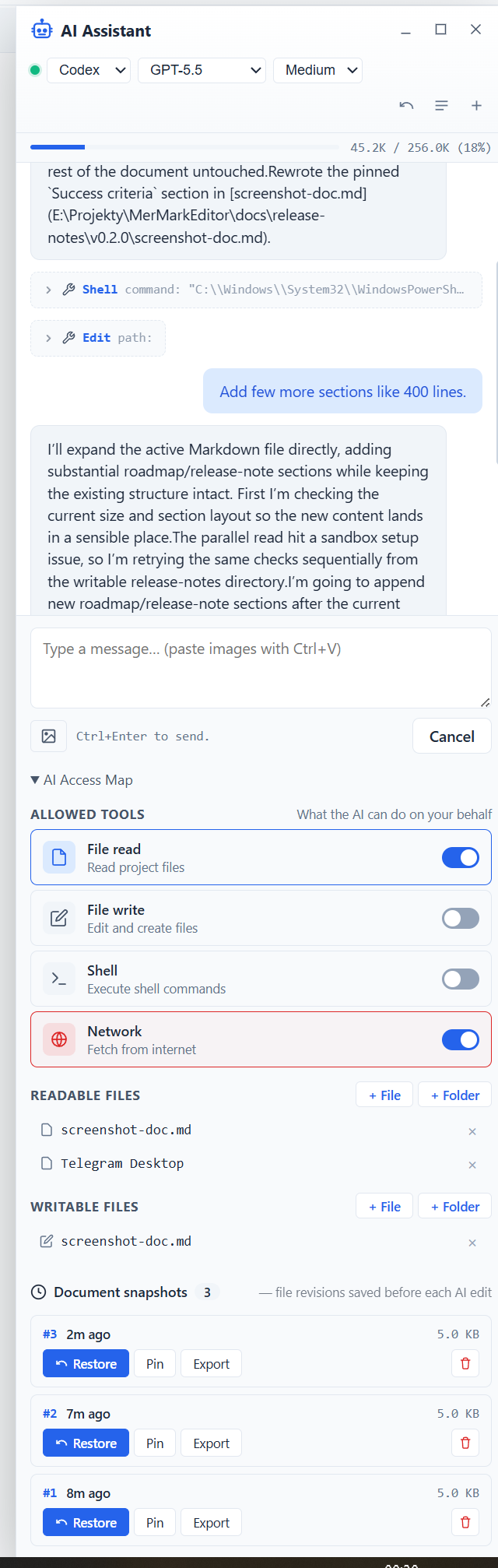
- Pre-edit snapshots auto-rotated (default 3 + pinned), one-click Revert.
- Statusbar dot: green / red / blinking-red (bypass on).
- Append-only audit log of every AI action, viewable in Settings.
Access map editor
Per-document access map — explicit read / write paths plus tool toggles
Snapshot history
Snapshot history — restore, pin, export or delete pre-edit revisions
- Switch
claude/codexfrom the chat header. - Per-CLI defaults persist (last model, last effort).
- Token streaming with a thinking indicator until the first chunk arrives.
- Segmented context-usage bar — input, cache, free — pulled from the CLI's reported usage.
- Clickable links open through the editor's external-link confirm dialog.
- Send shortcut:
Ctrl+Enter(Win/Linux),Cmd+Enter(macOS). - Minimize to a side tab, fullscreen, close — all in the panel header.
- Click AI on any diagram (or in fullscreen mermaid edit) — the main panel auto-pins the diagram source as scoped context and switches its preamble into mermaid-edit mode.
- Same panel, same model picker, same multi-turn conversation you use for prose.
- Each assistant reply is parsed for a
mermaidfenced block and rendered live in place of the saved diagram. - Apply ✓ / Discard ×ばつ / Stop buttons appear in the panel chip; Apply commits to the node, Discard keeps iterating, Stop ends the session.
The full feature list — including snapshot rotation, tmp-recovery on crashed sessions, multi-window-safe streaming and per-CLI session isolation — lives in RELEASE_NOTES.md.
- Full GitHub Flavored Markdown (GFM) support
- WYSIWYG editor with live preview
- Syntax highlighting for code blocks (50+ languages)
- Tables, task lists, blockquotes, and more
- Keyboard shortcuts for efficient editing
- Configurable padding — top, side and bottom sliders in Settings
- Flowcharts, sequence, class, state, ER, Gantt, pie and many more diagram types
- ELK layout — add
layout: elkto a flowchart for tidier arrow routing and less overlap on dense architecture diagrams - Resizable in document — drag the right edge to set a custom width (persisted in markdown)
- Resizable split in fullscreen edit — drag the divider between code and preview pane
- AI assist — click AI on any diagram and the main AI panel takes over with the diagram pinned as context
- Quick templates — flowchart / ELK flowchart / sequence / class / state / ER / Gantt / pie / mindmap one-click inserts
- Marp decks — pick Marp presentation for a new file, or open any existing deck
- Live split preview — edit on the left, see the rendered slides on the right, scrolling in sync
- Presentation toolbar — add slides, switch theme (gaia / default / uncover) with previews, set per-slide layout, add backgrounds, toggle slide numbers, change aspect ratio and font size
- Present fullscreen — advance with arrow keys, a click, or auto-advance
- Images — local files and web URLs render in the live preview and in exports
- Multi-root sidebar — open one folder or many; each gets a collapsible section with its own file tree
- File tree — expand / collapse folders, open files in tabs, OS-level reveal, rename, delete, new file / new folder
- AI sees the workspace — workspace root is added to the AI preamble as a read-only scope automatically
- Quick switcher (
Ctrl+Shift+E) — workspaces, files, full-text grep across the active workspace - Drag to reorder workspaces; expanded folders persist between sessions
- Export to PDF — close to WYSIWYG: same serif font and scale as the editor, syntax-highlighted code blocks, coral inline code, content-sized tables
- Save as Markdown (.md files), clean portable format
- Editor padding settings translate into PDF margins
- Tab support with pin / context menu — Pin / Unpin / Close / Close others / Close all but pinned / Close saved
- Dark/Light themes plus a Minimal theme variant (Mermaid-logo palette: teal + coral on slate)
- Word-style zoom slider in the status bar —
±buttons + percentage readout - Character / word / line / token counters as a single movable unit
- Styled prompt / confirm dialogs throughout (no native browser modals)
- Auto-save — never lose your work
- Trilingual UI - English, Polish and Chinese interface
- Keyboard shortcuts modal - Quick reference for all shortcuts (
Ctrl+/)
- Split View - Edit two documents side by side with adjustable split ratio
- Compare Tabs - Diff comparison between left and right pane documents (
Ctrl+Shift+C) - Change Tracking - View all changes made since last save (
Ctrl+Shift+D) - Code View - Switch between visual WYSIWYG and raw Markdown with cursor position tracking
- AI Token Counter - Estimate tokens for GPT (OpenAI), Claude (Anthropic), and Gemini (Google)
- Multi-window support - Open multiple independent editor windows
- Cross-window tab management - Drag and drop tabs between panes and windows
- File watching - Automatically detects external file changes and reloads content
- Conflict detection - Shows inline diff when both local and external changes exist
- Manual reload - Reload file from disk with
Ctrl+R
{03A741AD-0E65-42CC-9506-0C0EC0C8CF77}
Dark mode

{E38EA017-7177-4EBC-A5B9-3F8A4C905F14}
Clean, minimalist interface with intuitive toolbar

{AD7741E3-C03B-4450-B8A8-460E9E22BF3D}
Multi-tab editing with formatted documents and clickable table of contents

{99F3795E-DB3D-4197-A14B-DC068C25989F}
C4 Architecture diagrams with zoom controls and fullscreen mode

{F89EA26C-2E77-46E0-B8C7-C4FF18B263E9}
Fullscreen diagram view with 400% zoom for detailed inspection

{55AD4147-7F6E-4A92-BE1F-A1CEC80A792D}
Technical documentation with code blocks and embedded diagrams

{83B531B5-DD75-4850-B41E-BC7AE01EF82B}
Split view for editing two documents simultaneously

{118A90EF-97EE-463F-8C2E-63F06D69D75D}
Compare documents side by side with line-level diff highlighting

{CD31C3AF-C82A-4984-AB34-7B033CC035AD}
View all changes made since last save with additions and deletions

{454ECDFD-CE4B-4AA8-8A37-B972419B7ABB}
Toggle between visual and Markdown code view with cursor tracking

{E3861707-CF03-4497-874E-AC88EE2FB29B}
Quick reference for all keyboard shortcuts (Ctrl+/)

{766E35F6-7699-426A-9BC9-8ED46FEA249F}
AI token counter with model selection (GPT, Claude, Gemini)

{A9692CF1-B62D-4B3B-B27B-D561D689DFE7}
Multiple windows with cross-window tab drag and drop

Download the latest version from the Releases page.
| Platform | Download |
|---|---|
| Windows | .exe / .msi installer |
| macOS | .dmg (universal: Apple Silicon + Intel) |
| Linux | .deb / .AppImage |
This app is open-source and not code-signed. Your OS may show a security warning on first launch:
- Windows (SmartScreen): Click "More info" → "Run anyway"
- macOS: Right-click the app → "Open" → "Open" to bypass Gatekeeper
This is standard behavior for open-source software distributed without a paid code signing certificate. The source code is fully available for review in this repository.
- Windows: Windows 10 or later (64-bit)
- macOS: macOS 10.15 (Catalina) or later
- Linux: Ubuntu 22.04+ or equivalent (WebKitGTK 4.1 required)
- Open a file:
Ctrl+O(orCmd+Oon macOS) - Save:
Ctrl+S(saves as Markdown) - Save As:
Ctrl+Shift+S - Export to PDF: Click the PDF button in toolbar
| Action | Shortcut |
|---|---|
| New file | Ctrl+N |
| Open file | Ctrl+O |
| Save | Ctrl+S |
| Save As | Ctrl+Shift+S |
| Export PDF | Ctrl+P |
| Undo | Ctrl+Z |
| Redo | Ctrl+Y |
| Bold | Ctrl+B |
| Italic | Ctrl+I |
| Show changes | Ctrl+Shift+D |
| Compare tabs | Ctrl+Shift+C |
| Reload file | Ctrl+R |
| Close tab | Ctrl+W |
| Next tab | Ctrl+Tab |
| Previous tab | Ctrl+Shift+Tab |
| Jump to tab 1–9 | Ctrl+1 ... Ctrl+9 |
| Toggle Code / Visual view | Ctrl+Shift+V |
| Zoom in / out | Ctrl++ / Ctrl+- |
| Reset zoom | Ctrl+0 |
| Settings | Ctrl+, |
| Keyboard shortcuts | Ctrl+/ |
| Close modal | Escape |
On macOS, use
⌘(Cmd) in place ofCtrl.
Click the Mermaid button in the toolbar or type:
```mermaid
graph LR
 A[Start] --> B[Process]
 B --> C[End]
```
This creates a flowchart:
[Start] --> [Process] --> [End]
graph/flowchart- Flow diagramssequenceDiagram- Sequence diagramsclassDiagram- Class diagramsstateDiagram-v2- State diagramserDiagram- Entity Relationship diagramsgantt- Gantt chartspie- Pie chartsjourney- User journey diagramsgitgraph- Git graphsmindmap- Mind mapstimeline- Timelines
# Clone the repository
git clone https://github.com/Vesperino/MerMarkEditor.git
cd MerMarkEditor
# Install dependencies
pnpm install
# Run in development mode
pnpm tauri dev
# Build for production
pnpm tauri build
# Run tests
pnpm test
# Run tests once
pnpm test:run
- Frontend: Vue 3 + TypeScript
- Editor: TipTap (ProseMirror-based)
- Diagrams: Mermaid.js
- Desktop: Tauri 2.0
- Build: Vite
Contributions are welcome! Please feel free to submit a Pull Request.
- Fork the repository
- Create your feature branch (
git checkout -b feature/AmazingFeature) - Commit your changes (
git commit -m 'Add some AmazingFeature') - Push to the branch (
git push origin feature/AmazingFeature) - Open a Pull Request
This project is licensed under the MIT License - see the LICENSE file for details.
- Codycody31 - Huge thanks for macOS and Linux support!
- TipTap - Headless editor framework
- Mermaid - Diagramming and charting tool
- Tauri - Desktop application framework
- Vue.js - Progressive JavaScript framework
MerMark is and will stay free and open source under the MIT license. If you find this project useful, please consider:
- Giving it a star on GitHub
- Reporting bugs and suggesting features
- Contributing to the codebase
- Buying me a coffee — totally optional, just a way to say thanks if MerMark saves you time
Made with ❤️ by Vesperino