You can easily add numpy.ndarray.shape, torch.Size, other shape and type information at runtime to your script code as comments.
NumPyやPyTorchなどの配列のshape属性や,変数の型の実行時の情報を,スクリプトにコメントとして貼り付けるツールです.
pip install -U assessment
-U means upgrading.
This tool has two types of usage.
このツールには2つの使い方があります.

- Run this script as a module with argument of script name. Command line arguments to the target script are available.
Pythonのモジュールとしてassessmentを実行してください.引数は,スクリプト名の後にスクリプトに渡したい引数を続けることもできます.
python -m assessment src.py
python -m assessment src.py arg1 arg2 arg3
- You get the commented script. For example, you execute assessment to
src.py, you getsrc.py.commented.py.
src.pyというスクリプトに対して実行すると,src.py.commented.pyが生成されます.
src.py
import numpy as np
a = np.array([1,2,3,4,5,6])
b = np.array([0,1,2,3,4,5])
ab_h = np.hstack((a,b))
ab_v = np.vstack((a,b))
ab = np.dot(a,b)
AA, BB = np.meshgrid(a,b)
i = 1
f = 1.0
c = 1 + 1j
s = "string1"
class A():
 pass
a = A()
src.py.commented.py
import numpy as np
a = np.array([1,2,3,4,5,6]) #_ (6,)
b = np.array([0,1,2,3,4,5]) #_ (6,)
ab_h = np.hstack((a,b)) #_ (12,)
ab_v = np.vstack((a,b)) #_ (2, 6)
ab = np.dot(a,b) #_ ()
AA, BB = np.meshgrid(a,b) #_ [(6, 6),(6, 6),]
i = 1 #_ int
f = 1.0 #_ float
c = 1 + 1j #_ complex
s = "string1" #_ str
class A():
 pass
a = A() #_ A
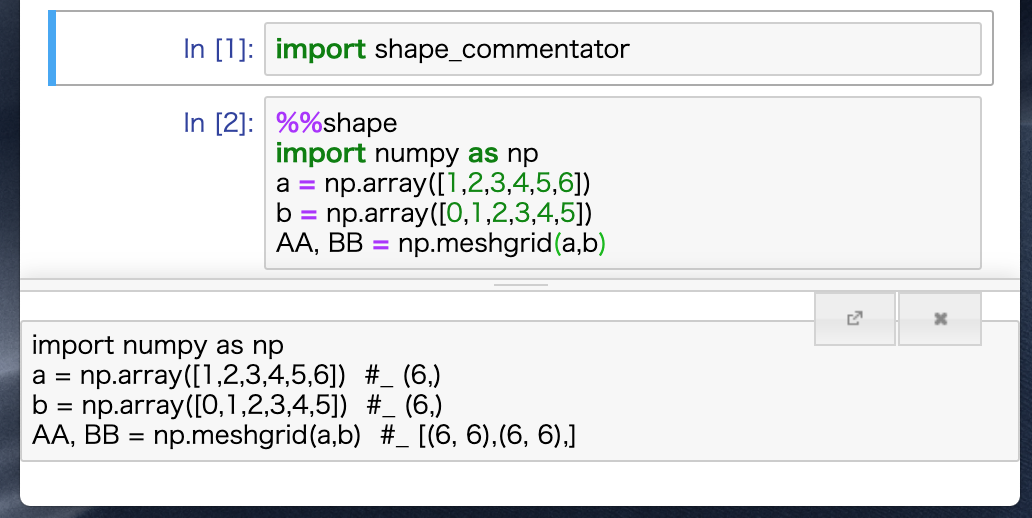
To use IPython / Jupyter Notebook magic command,
IPythonやJupyter Notebookでのマジックコマンドの使い方
import assessment
コメントを付ける
%%shape
a = np.array([1,2,3,4,5,6])
output
a = np.array([1,2,3,4,5,6]) #_ (6,)
コメントを消す
%%shape -d
a = np.array([1,2,3,4,5,6]) #_ (6,)
output
a = np.array([1,2,3,4,5,6])
Test scripts are written in these version of Python.
以下のバージョンがテストされています.
- 3.11.3
- 3.10.11
- 3.9.16
- 3.8.16
- 3.7.16
- 3.6.15
- 3.5.10
- 2.7.17
作った経緯などを書いた解説ブログはこちらにあります.
NumPyやPyTorchで使える超便利ツールを作った