
An open-source database client for PostgreSQL, MySQL/MariaDB and SQLite.
SQL notebooks, visual EXPLAIN, AI and MCP built in. Plugins add everything else.
README: English | Italiano | Español | 中文 | Français | Deutsch | 日本語 | Русский
Build & Release Discord Gitster

winget install Debba.Tabularis # Windows
brew tap TabularisDB/tabularis && brew install --cask tabularis # macOS
sudo snap install tabularis # Linux
Or grab an installer directly:
Windows macOS (Apple Silicon) macOS (Intel) Linux AppImage Linux .deb Linux .rpm
The app UI is available in English, Italian, Spanish, Chinese (Simplified), French, German, Japanese and Russian.
Discord — Join our Discord server to talk with the maintainers, share feedback, and get help from the community.
| tabularis | DBeaver CE | TablePlus | Beekeeper Studio | |
|---|---|---|---|---|
| License | Apache 2.0, free | Apache 2.0, free (Pro is paid) | Commercial | GPLv3 (paid editions) |
| SQL notebooks (SQL + Markdown cells, cross-cell variables, charts) | ✅ | ❌ | ❌ | ❌ |
| Built-in MCP server for AI agents | ✅ | ❌ | ❌ | ❌ |
| Plugins in any language (JSON-RPC over stdio) | ✅ | Java/Eclipse plugins | JavaScript plugins | ❌ |
| AI text-to-SQL with local models (Ollama) | ✅ | Cloud-based AI assistant | ❌ | ❌ |
| Visual EXPLAIN with interactive plan graphs | ✅ | ✅ | ❌ | ❌ |
| Databases out of the box | 3 (+ any via plugins) | 100+ | 20+ | ~10 |
Comparison as of June 2026; features in other tools may have changed since. If you need dozens of drivers, use DBeaver — tabularis focuses on doing a few databases well.
- Why tabularis?
- Installation
- Updates
- Discord
- Changelog
- Features
- Configuration Storage
- Tech Stack
- Development
- Roadmap
- Contributing
- Sponsors
- Origin Story
- License
winget install Debba.Tabularis
Download the installer from the Releases page and run it:
tabularis_x.x.x_x64-setup.exe
Follow the on-screen instructions to complete the installation.
To add our tap, run:
brew tap TabularisDB/tabularis
Then install:
brew install --cask tabularis
When you install tabularis on macOS, you need to allow accessibility access (Privacy & Security) to the tabularis app.
If you are upgrading and you already have tabularis on the allowed list you will need to manually remove them before accessibility access can be granted to the new version.
macOS users who download directly from releases may need to run:
xattr -c /Applications/tabularis.app
after copying the app to the Applications directory.
sudo snap install tabularis
Download the .AppImage file from the Releases page, make it executable and run it:
chmod +x tabularis_x.x.x_amd64.AppImage
./tabularis_x.x.x_amd64.AppImage
yay -S tabularis-bin
Tabularis checks for updates automatically on startup and notifies you when a new version is available. You can also download the latest version directly from the Releases page.
Join our Discord server to talk with the maintainers, share feedback, suggest features, or get help from the community.
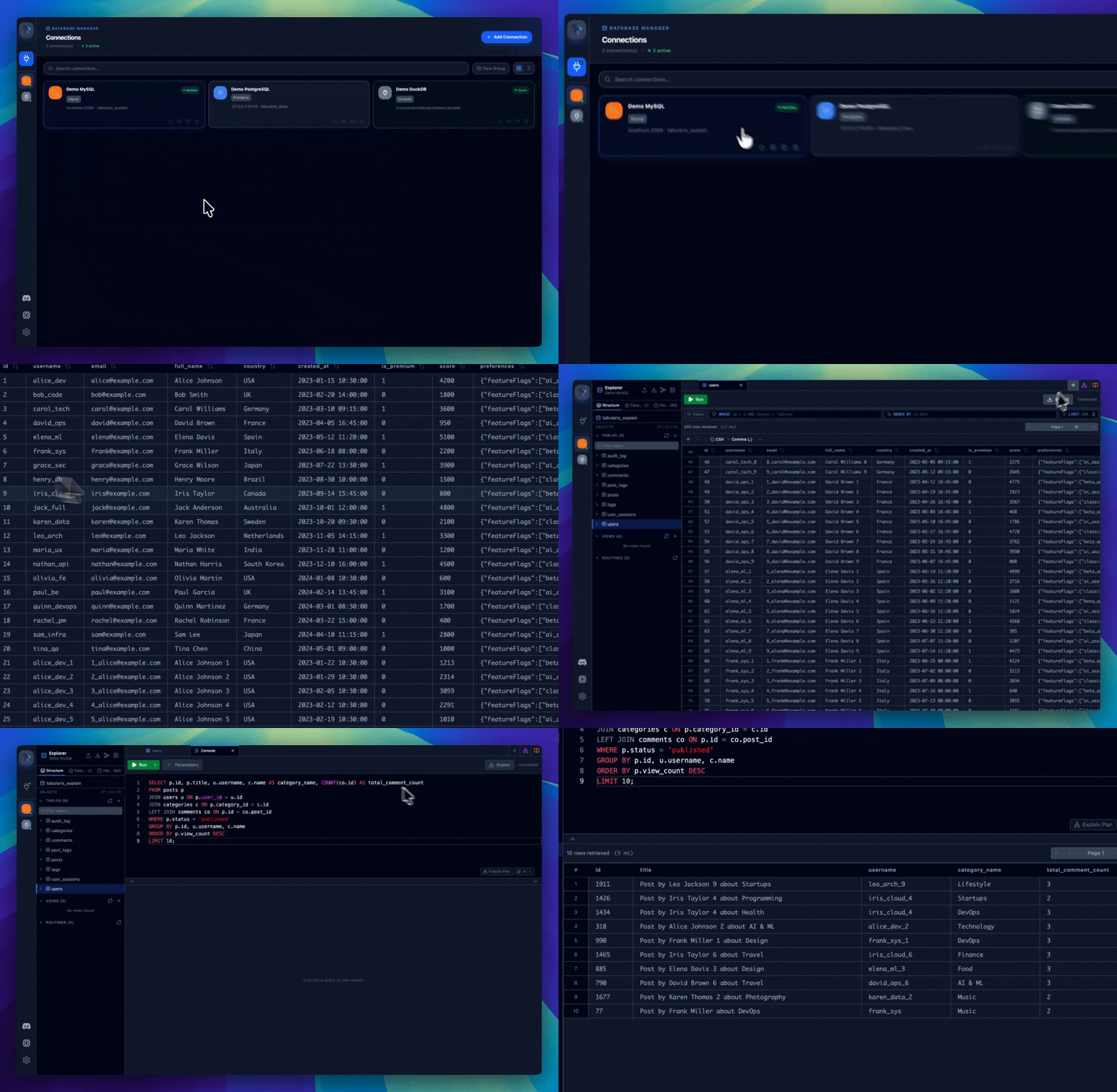
- Support for MySQL/MariaDB, PostgreSQL (with multi-schema support) and SQLite, with multi-database selection per connection.
- Save, manage, and clone connection profiles, with optional secure password storage in the system Keychain.
- SSH Tunneling with automatic readiness detection.
- Per-Connection Appearance: override the icon (Lucide, emoji, or custom image) and accent color of each saved connection.
- Tree View: Browse tables, columns, keys, indexes, views, and stored routines — with inline editing from the sidebar.
- ER Diagram: Interactive Entity-Relationship visualization (pan, zoom, layout) with selective table diagram generation.
- Context Actions: Show data, count rows, modify schema, duplicate/delete tables.
- SQL Dump & Import: Export and restore databases with a single flow.
- Monaco Editor with syntax highlighting and auto-completion, in a tabbed interface with isolated connections per tab and resizable split view.
- Multi-Statement Execution: Run All, Run Selected, or pick individual queries — results appear in separate tabs with independent pagination.
- Smart Query Splitting: Correctly handles stored procedures, functions, and
$$-delimited blocks. - Saved Queries and an AI assist overlay directly in the editor.
- Multi-Cell Workspace: Combine SQL and Markdown cells in a single document, with inline results and bar/line/pie charts.
- Cross-Cell Variables: Reference results from other cells with
{{cellName.columnName}}, plus global{{$paramName}}parameters. - Run All: Sequential execution with stop-on-error option and completion summary.
- Persistence & Export: Auto-saved as
.tabularis-notebookfiles; export as HTML, CSV, or JSON. - Outline panel, drag & drop cell reordering, and AI-generated cell names.
- Built-in shortcuts for navigation, editor, and data grid actions — platform-aware (
Cmdon macOS,Ctrlon Windows/Linux). - Fully customizable: Remap any non-locked shortcut from Settings → Keyboard Shortcuts; overrides persist to
keybindings.json. - Hold
Ctrl+Shiftin the sidebar to reveal numbered badges (1–9) for instant connection switching.
- Drag-and-Drop: Build queries visually with ReactFlow.
- Visual JOINs: Connect tables to create relationships.
- Advanced Logic: WHERE/HAVING filters, aggregates (COUNT, SUM, AVG), sorting, and limits.
- Real-time SQL: Instant code generation.
- Interactive Plan Graphs: Inspect execution plans as navigable node graphs instead of raw text.
- Table, Raw, and AI Views: Switch between exact node metrics, original database output, and optional AI-assisted analysis.
- Cross-Database Support: Works with PostgreSQL, MySQL/MariaDB, and SQLite using the best available
EXPLAINformat per driver. - Faster Optimization Loops: Spot expensive scans, estimate gaps, join behavior, and optimizer choices without leaving the editor.
- Inline & Batch Editing: Modify cells and commit multiple changes at once; create, delete, and multi-select rows.
- Export: Save results as CSV or JSON, or copy selected rows straight to the clipboard.
- JSON & JSONB Cells: Syntax-highlighted in the grid, with a dedicated editor window (Tree / Monaco / Raw modes).
- Spatial Data: Initial GEOMETRY support for MySQL.
Tabularis is hackable with an external plugin system. Plugins are standalone executables that communicate with the app over JSON-RPC 2.0 via stdin/stdout, and can be written in any language.
- Install Plugins: Browse and install community drivers from Settings → Available Plugins — no restart required.
- Manage Drivers: View all registered drivers (built-in and plugins) in Settings → Installed Drivers and uninstall plugins with one click.
- Any Database: Add support for DuckDB, MongoDB, or any other database by writing or installing a plugin.
- Plugin Registry: Official plugins are listed in
plugins/registry.json. - Developer Guide: See
plugins/PLUGIN_GUIDE.mdto build your own driver in any language.
- Real-time log viewer in Settings, with level filtering and export to
.logfiles. - Automatically expand and inspect SQL queries in logs.
- CLI Debug Mode: Start with
tabularis --debugfor verbose logging from launch.
Configuration is stored in ~/.config/tabularis/ (Linux), ~/Library/Application Support/tabularis/ (macOS), or %APPDATA%\tabularis\ (Windows): connection profiles, saved queries, app settings (config.json), custom themes, and per-connection editor preferences — tabs and queries are restored when you reopen a connection. The wiki covers the full file layout and every config.json option, including custom AI model overrides.
Optional Text-to-SQL and query explanation powered by OpenAI, Anthropic, MiniMax, OpenRouter, Ollama (local models, no API key, full privacy), and any OpenAI-compatible API (Groq, Perplexity, Azure OpenAI, LocalAI, ...). Model lists are fetched from your provider and cached locally; custom models can be configured per provider.
Tabularis includes a built-in MCP (Model Context Protocol) server that lets AI agents read your database schema and execute queries directly from their chat interface.
tabularis --mcp
One-click setup for Claude Desktop, Cursor, and Windsurf: open Settings → MCP Server Integration, click Install Config next to your client, and restart it. Manual configuration is covered in the wiki.
Once connected, your AI agent can:
| Tool | Description |
|---|---|
list_connections |
List all saved database connections |
list_tables |
List tables in a connection (with optional schema filter) |
describe_table |
Get full schema: columns, indexes, foreign keys |
run_query |
Execute any SQL query and return results |
"Show me all tables in my production database and describe the
orderstable"
"Write and run a query to find the top 10 customers by total order value this month"
"Check if there are any missing indexes on the
userstable"
- Frontend: React 19, TypeScript, Tailwind CSS v4.
- Backend: Rust, Tauri v2, SQLx.
pnpm install
pnpm tauri dev
pnpm tauri build
- [Feat]: Allow loading of multiple Databases per connection
- JSON/JSONB Editor & Viewer
- Visual Explain Analyze
- Plugin System
- Query History
- Plugin registry platform — OAuth publishing, release sync, download analytics
- UI design system & visual identity — call for contributors
- SQL Server driver — implementation roadmap & call for contributors
- Feature: Remote Control
- Command Palette
- SQL Formatting / Prettier
- Data Compare / Diff Tool
- Team Collaboration
- Better SQLite Support
- Better PostgreSQL Support
Contributions are welcome — see CONTRIBUTING.md. Good places to start:
- SQL Server driver — implementation roadmap & call for contributors
- UI design system & visual identity — call for contributors
- Write a driver plugin in any language — see the Plugin Guide
- turboSMTP turboSMTP — Professional SMTP relay — your emails delivered straight to the inbox, never to spam
- Kilo Code Kilo Code — Open source AI coding agent — build, ship, and iterate faster with 500+ models
- DigitalOcean DigitalOcean — Simple, predictable cloud infrastructure for developers and growing teams.
- Usero Usero — Feedback becomes code. Automatically.
- DevGlobe DevGlobe — Connect your IDE, show up on the globe, and showcase your projects to a community of builders.
Tabularis started as an experiment: how far could AI-assisted development get in building a working tool from scratch? Further than expected — it's now an actively maintained project with regular releases and a plugin ecosystem.
Apache License 2.0
Like tabularis? Star the repo ⭐ — it helps the project a lot.