A custom HACS integration that pulls your Suunto data into Home Assistant from the Suunto app (Sports Tracker) - signing in with just your email and password, no Docker and no partner keys.
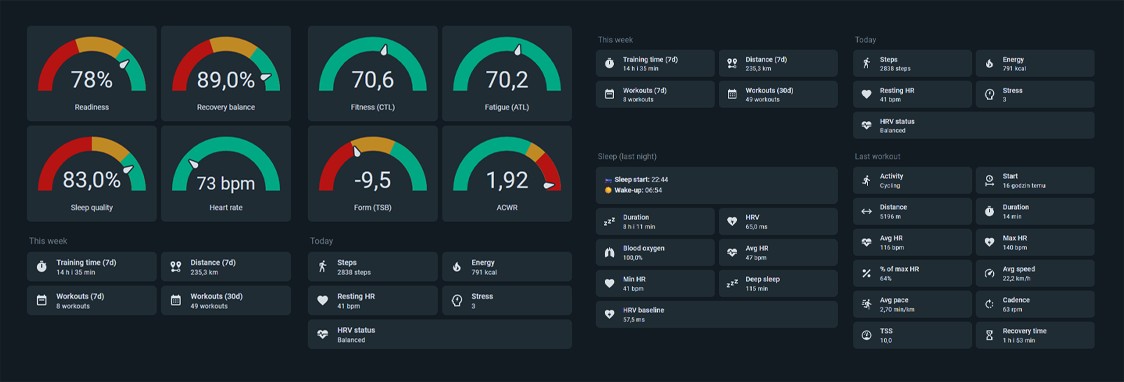
Example dashboard - live sensors plus backfilled long-term statistics (heart rate, training load, sleep).
Tip
⭐ Enjoying this integration? Every star is real motivation for me to keep developing it :)
Suunto watch ──▶ Suunto app / Sports Tracker ──▶ Home Assistant
⚠️ Unofficial integration - not affiliated with or endorsed by Suunto. It signs in with your own Suunto account and may stop working after a Suunto app update. Use your own account, at your own risk. Login pipeline ported fromtajchert/suuntool.
Full docs are in the project wiki : installation, every sensor, dashboard examples, derived metrics, long-term statistics and troubleshooting.
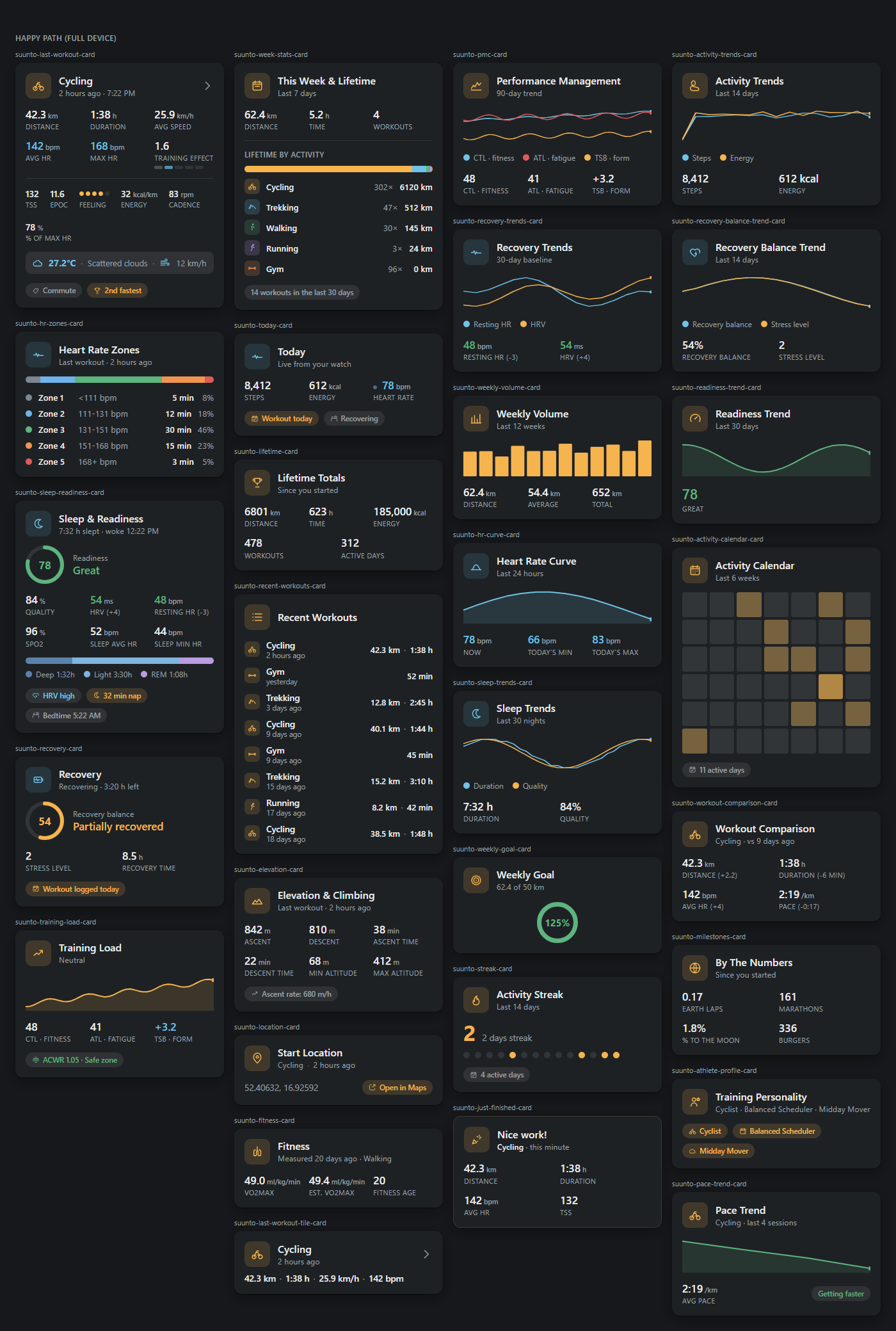
Want a dashboard without wiring 94 sensors into generic entity/gauge cards by hand? Suunto Cards is a companion HACS repo with 53 purpose-built cards - last workout, HR zones, sleep & readiness, recovery, training load, a live 24/7 heart rate curve, an activity heatmap calendar, workout-to-workout comparisons, fun lifetime-distance equivalents, a computed training personality, a FIFA-style player card, 20 unlockable achievements, a game-style level/XP bar, an RPG training class, a next-milestone countdown, a lifetime story card, a 24h sleep clock and a sleep-regularity chart, and more. Each card auto-detects your Suunto device (zero YAML for the common case), themes with your Home Assistant theme automatically, and follows your HA language (English, Polish, German, Portuguese, French, Spanish, Italian, Dutch).
-
Install via HACS (Custom repositories → this repo as an Integration) and restart HA.
-
Settings → Devices & Services → Add Integration → "Suunto App (unofficial)" → enter the email and password of your Suunto app account. (Account 2FA may block login.)
-
Options ("Configure" button): two refresh cadences -
- Live data interval (default 15 min): current heart rate, daily steps/energy.
- History interval (default 60 min): sleep, recovery, workouts, training load, baselines and other derived metrics - and the hourly long-term statistics (see below).
Splitting the cadences keeps live values fresh without re-fetching ~90 days of history every few minutes.
The password is used only once (at setup), exchanged for a session token,
and is not stored. Only the email and the revocable session token are written
to HA's .storage. If the session ever expires, HA shows "reauthentication
required" and asks for the password once (reauth) - the password is still not
kept between times.
Suunto sends a new-login notification on every /login2 call. The integration
caches the session token and reuses it across restarts - it only logs in again
on first setup or when the server invalidates the session. During normal operation
(data fetching) it does not log in and does not generate emails.
Settings → Devices & Services → the Suunto entry's ⋮ menu → Download diagnostics gives a redacted JSON dump of the integration's current state (useful when reporting a bug). Email, session token and GPS start coordinates are stripped; everything else - including the raw 24/7 sleep export used to build the sleep and nap sensors - is included as-is.
Every entity name follows your Home Assistant language automatically - English, Polish, German,
Portuguese, French, Spanish, Italian and Dutch are built in. Anything else falls back to English.
(Display names only; entity_ids never change with your language.)
The device card itself shows your actual watch model (e.g. "Suunto 9 Peak Pro"), read from your most recent workout - not just "Suunto App (unofficial)".
- Sleep: duration, stages (deep/light/REM), average/min heart rate, quality,
SpO2, HRV, sleep start, wake-up time, and nap duration (tracked separately
from night sleep so a nap never inflates it; state holds the most recent day
that had a nap, with
nap_countanddateattributes since naps are irregular and the value can be several days old). - Recovery: recovery balance, stress state.
- Daily activity: steps, active energy (kcal), current heart rate.
- Last workout: type, start, days since (a rest-day counter - 0 means
you trained today, handy as an automation trigger), start location
(latitude/longitude - plots on a Map card, plus a downsampled
routeattribute with the full GPS track and per-point speed for a custom, pace-colored route card), distance, duration, recovery time, average/max heart rate, average speed (km/h) and pace (min/km), cadence (rpm - Suunto reports it as cycles/min for every sport; on foot-based activities the sensor also carries acadence_spmattribute, the steps/min equivalent, so the state itself never changes and your history isn't rewritten), TSS (an alternative MET-based figure rides alongside it in thetss_metattribute, when Suunto computed one), time in 6 heart-rate zones (0-5), Peak Training Effect (Suunto's own 1-5 rating of the session), peak EPOC, your own feeling rating (1-5, when you set it on the watch), the workout type as Suunto classifies it (commute, strength, long aerobic base ...; the raw list is in the sensor'stagsattribute, alongsideis_manually_added- whether you typed the workout in rather than synced it from the watch), and recovered-at (when the recovery countdown ends). Each heart-rate zone sensor also carries its bpm range in thelower_limit_bpm/upper_limit_bpmattributes, so "38 min in zone 3" reads as an actual effort. Zone 0 is everything below zone 1, zone 1 is everything below zone 2 - most watches don't report a numeric split between zones 0 and 1 specifically, so zone 0 usually has no bpm range of its own even though its duration is always there; the top of zone 5 is your max heart rate. - Last workout - laps: state is how many laps the workout has; each lap in the
lapsattribute carries its own duration, distance and pace. 0 on a workout with no manual/auto laps, which is most of them. - Last workout - weather: on-site temperature (°C) as the sensor state, with humidity, wind speed (km/h), wind direction and a decoded condition (e.g. "Scattered clouds") in its attributes. Outdoor workouts only - unknown on an indoor session, since there's no weather to record.
- Last workout - achievements: state is how many route achievements (e.g.
"Fastest time on this route") the workout earned - 0 on most workouts, since
Suunto only awards these on a route you've ridden/run before. The full raw
list and this workout's
route_ranking(if Suunto tracked one) are in the attributes. - Last workout - climbing: ascent and descent (m), time spent climbing and descending, and the altitude range (min/max). Indoor sessions have no barometer data, so the altitude sensors stay unknown there.
- Lifetime stats: total distance (km), total time (h), total energy, number of workouts, active days, plus a per-sport breakdown (distance/time/count/energy for each activity type, in the sensor's attributes).
- This year: the same five totals again (distance, time, energy, workouts, active days) scoped to the current calendar year instead of your whole history - a running "year in review". Resets on January 1st; the workouts sensor's attributes also carry the year's single most-common activity (e.g. "Cycling, 62% of this year's workouts").
- This month: the same five totals once more, scoped to the current calendar month - resets on the 1st. Same shape as the yearly version above, including its own most-common-activity attribute.
- Training records: state is your longest-ever workout streak (consecutive days); attributes carry four more all-time personal records - fastest pace, biggest single-workout climb, longest single workout, farthest single workout, and highest single-session TSS - each with the workout it happened in. Seeded once via a deep history scan (same technique the VO2max sensor uses) and only ever improved from there, so these are true lifetime bests, not bounded to the normal fetch window.
- Training records - this month: the same five personal records, scoped to the current calendar month instead of your whole history - quietly resets on the 1st. No deep scan needed (a month always fits inside the normal fetch window), so it's always exactly in sync with this month's workouts.
- Training records - this year: the same five personal records again, scoped to the current calendar year - a running "training year in review". Resets on January 1st; like the all-time sensor above (and unlike the monthly one) it needs its own deep history scan to pick up January's workouts once they've aged out of the normal fetch window.
- Current streak: how many days in a row you've trained, right now - resets to 0 the moment a day is skipped. A different question from Training records' all-time longest streak above: that one only ever goes up, this one tracks whether you're on one today.
- Best efforts: state is how many standard distances (1K, 5K, 10K, half marathon, marathon) have a recorded personal best so far; each one's time and the workout it happened in ride in attributes. Foot-based activities only, computed from the same detailed GPS/pace data already fetched for the route/lap sensors - the fastest continuous stretch covering at least that distance within a single workout. Tracked from when you install this version onward, not retroactively - a genuine best from before you updated won't be found unless you happen to beat it again.
- Fitness: VO2max, estimated VO2max and fitness age, as measured by the
watch. Suunto derives these from runs and walks only, so they hold their last
reading between such workouts - each sensor's
measured_atattribute shows when (and from which activity) it was taken. The same three numbers are also imported as a long-term statistics trend (see below), so you can chart them over time instead of only seeing today's held value. - Derived - training load: Fitness (CTL), Fatigue (ATL), Form (TSB) from TSS history, plus the acute:chronic workload ratio (ACWR; safe zone ~0.8-1.3), and a training suggestion (rest/easy/moderate/hard) for today, derived from those same two numbers - a spiking ACWR (>1.5) always suggests rest, regardless of how fresh your form looks.
- Derived - recovery: HRV baseline + status (low/balanced/high), resting heart rate + baseline, and Readiness (0-100, a heuristic blending sleep, HRV, resting HR and recovery balance).
- Derived - per workout: % of max HR, calories per km, ascent rate, stride length.
- Weekly volume: workout distance, time and steps over the last 7 days (steps are read back from the hourly step statistics below, since they come from the 24/7 stream rather than the workout list).
- Counts: workouts in the last 7 / 30 days.
- Workouts calendar & recent list: a
calendarentity with every past workout as a browsable event, plus a Recent workouts sensor whose attribute holds the last 60 (date, type, distance, duration, HR, TSS) - see below. - Binary sensors: Recovering (on while Suunto's recovery countdown from the
last workout is still running), Workout today, and Unusual recovery (on
when your resting heart rate is elevated and your HRV is suppressed at the
same time, both vs. your own sleep-night baseline - a commonly used early
signal of illness or overreaching, not a diagnosis; stays
unknownuntil there is enough sleep history to have a real baseline). The first two flip on their own clock, so they change the moment the countdown ends or the day rolls over, without waiting for the next poll; Unusual recovery only changes when new sleep data arrives.
When a workout first reaches the integration (i.e. after your watch has synced to
the Suunto app), it fires a suunto_app_new_workout event on the Home Assistant
bus, so you don't have to watch a sensor for changes:
automation:
 - alias: Notify me about a new workout
 triggers:
 - trigger: event
 event_type: suunto_app_new_workout
 actions:
 - action: notify.persistent_notification
 data:
 message: >
 {{ trigger.event.data.activity }}:
 {{ (trigger.event.data.distance_meters | float(0) / 1000) | round(1) }} km
 in {{ trigger.event.data.duration_minutes }} min,
 TSS {{ trigger.event.data.tss }}, PTE {{ trigger.event.data.pte }}
The event carries key, activity, activity_id, start_time,
duration_minutes, distance_meters, avg_hr_bpm, max_hr_bpm, tss, pte,
recovery_time_hours and tags. The first poll after a Home Assistant restart
only takes stock of what already exists, and a workout that shows up more than a
week after it happened is recorded silently - your history is never replayed as a
burst of events.
Four ready-to-import blueprints under
blueprints/automation/suunto_app/ wrap the
patterns above so you don't have to write the YAML yourself - each just asks for
an action (e.g. "Send a notification") and the entities/thresholds it needs:
| Blueprint | What it does | Import |
|---|---|---|
| New Workout Notification | Runs your action with a one-line workout summary whenever suunto_app_new_workout fires. |
Open your Home Assistant instance and show the blueprint import dialog with the new-workout-notification blueprint pre-filled. |
| Low Readiness Alert | Runs your action once when the Readiness sensor drops below a threshold you set. | Open your Home Assistant instance and show the blueprint import dialog with the low-readiness-alert blueprint pre-filled. |
| Unusual Recovery Alert | Runs your action the moment the Unusual recovery sensor turns on. | Open your Home Assistant instance and show the blueprint import dialog with the unusual-recovery-alert blueprint pre-filled. |
| Weekly Training Digest | Runs your action with a weekly summary (workouts, distance, time, form) on the day(s)/time you pick. | Open your Home Assistant instance and show the blueprint import dialog with the weekly-digest blueprint pre-filled. |
Or import manually: Settings -> Automations & Scenes -> Blueprints -> Import Blueprint, and paste a blueprint's GitHub URL.
Derived metrics are computed locally in HA from history fetched via the API (sleep ~60 days, workouts ~90 days, paginated). CTL/ATL are seeded with the mean daily load to avoid an early-window underestimate. Readiness, training suggestion and unusual recovery are heuristics, not official Suunto metrics. All the math (CTL/ATL/TSB, ACWR, baseline, readiness, training suggestion, unusual recovery) is covered by deterministic tests in
metrics.py.
Suunto long-term statistics charts
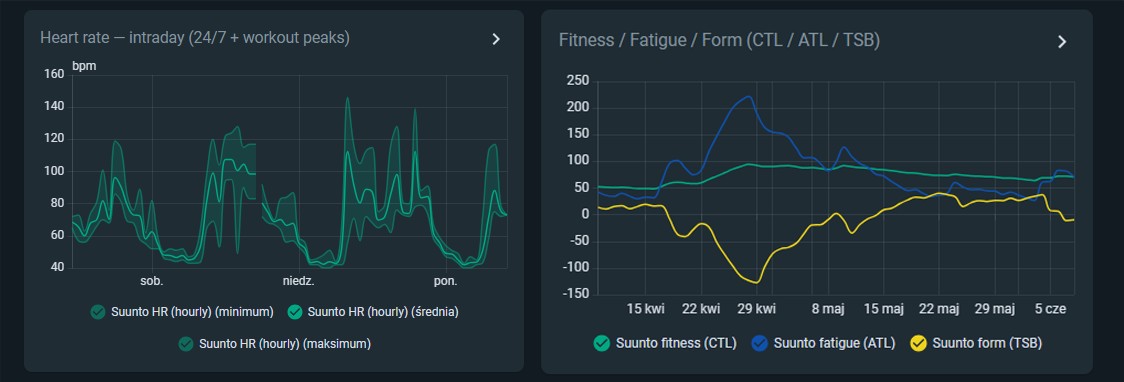
Backfilled statistics: intraday heart rate (24/7 + workout peaks) and the Fitness / Fatigue / Form (CTL / ATL / TSB) trend.
Beyond the 94 live sensors, the integration imports hourly long-term statistics for the fast-changing and daily metrics. They are backfilled over a rolling window, so if your watch syncs to the app late (e.g. hours later), the missed hours are filled in retroactively - something a normal sensor can't do, since it only records the latest value at poll time.
These are external statistics (suunto_app:...), not entities - view them in a
Statistics Graph card (or ApexCharts); they don't add to the sensor count.
- Hourly: heart rate (mean/min/max - the 10-min 24/7 stream plus the dense ~25 s heart-rate samples from workouts, so workout peaks show up), steps, energy, recovery balance, stress.
- Daily: sleep duration, HRV, resting heart rate, quality, SpO2; Readiness; the Fitness / Fatigue / Form (CTL/ATL/TSB) trend; peak Training Effect / peak EPOC (the day's hardest session, when there was more than one); and VO2max / estimated VO2max / fitness age - sparse, since Suunto only computes these from runs and walks, but every reading you get is charted as a point in the trend rather than only living in the live sensors' held state.
The backfill window is ~5 days - a sync delayed beyond that won't fill the part
older than the window. The hourly heart-rate statistic is the way to see a
gap-free daily HR curve (with workout peaks); the live current_hr sensor only
steps to the newest synced value and can't be filled backwards.
Suunto workouts calendar and recent activities list
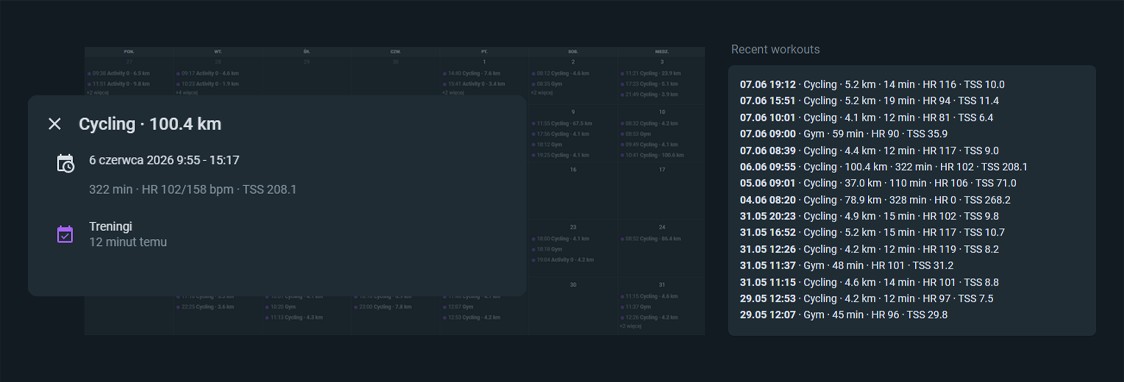
Every past workout is exposed as an event on a calendar entity - browse your
whole training history in a Calendar card, each event showing the activity,
distance and key stats (duration, HR, TSS). A companion Recent workouts sensor
keeps the last 60 sessions in its attributes for a compact list/table card. Both
reuse the workout history already fetched - no extra requests.
Each entry in Recent workouts also carries cadence_spm and
stride_length_m - the same running-dynamics figures behind the Cadence/Stride
sensors below, present only for foot-based activities (running, walking,
trekking), null otherwise - so a custom card can chart cadence or stride
trend across your recent runs.
The Last workout location sensor carries the start latitude/longitude of your most recent workout as attributes, so it can be plotted directly on a Map card:
type: map
entities:
 - sensor.suunto_last_workout_location # your entity id (named after the account)
Indoor workouts with no GPS track show as unknown (no marker). The same
start_lat / start_lon are also present on every entry of the Recent workouts
sensor's attributes, if you'd like to plot more than just the latest one (e.g. with
a template sensor or a custom card).
The same sensor also carries a route attribute: the last workout's full GPS
track as a downsampled [[lat, lon, speed_kmh], ...] list (up to 300 points),
each vertex carrying its own speed so a custom card can color the route by pace
without a second data source. It's deliberately excluded from Home Assistant's
recorder (only the live state matters for this), so it won't bloat your history
database. route is absent on indoor workouts, same as latitude/longitude.
The Lifetime by activity sensor's state is the number of activity types; the
per-sport totals ride in its activities attribute (each with activity,
workouts, distance_km, time_hours, energy_kcal). Render them with a Markdown
card:
type: markdown
content: |
 | Sport | Workouts | Distance | Time |
 | --- | --: | --: | --: |
 {% for a in state_attr('sensor.suunto_lifetime_by_activity', 'activities') -%}
 | {{ a.activity }} | {{ a.workouts }} | {{ a.distance_km }} km | {{ a.time_hours }} h |
 {% endfor %}
- "Login was rejected" - wrong email/password, or account 2FA.
- "Reauthentication required" - the session expired; enter the password again.
- Light/REM sleep sensors are
unknown- your watch does not report them. - Daily energy dropped by ~4x after updating to 1.0.14 - that is the fix, not a regression. The value was previously read as calories when the API sends joules. It is active energy (above resting), so it is meant to be well below your total daily burn. Existing history is not rewritten, so expect a step in the graph; you can clear the old long-term statistics in Developer Tools > Statistics if the jump bothers you.
- Altitude sensors are
unknownafter an indoor workout - intended. Without GPS or a barometer reading the watch reports no altitude, and showing 0 m would claim you trained at sea level. - Stride length is
unknown- it is only computed for foot-based activities, so it stays empty after a ride.
See CHANGELOG.md.
An unofficial, experimental hobby project - run it at your own risk.
- No ties to Suunto. Not affiliated with, endorsed by, or supported by Suunto Oy, Amer Sports, or Sports-Tracker. All trademarks stay with their owners.
- Built on shifting ground. It talks to a private, undocumented endpoint that can change or stop working at any moment - a single app update may break it.
- Possibly against Suunto's terms. Check them yourself. Hammering the service could get your account limited or closed; that's on you, not the author.
- Your account only. Use it strictly for your own data - never to collect or aggregate anyone else's.
- No warranty, no liability. Provided "as is", with no guarantees and no responsibility for anything that follows from using it.
- Not legal advice. If any of this gives you second thoughts, just use the official Suunto app.