最近公司项目要将原有的 Synthetic 迁移到 ViewBinding , 想着要把下划线改成驼峰就蛋疼 , 索性动手写了一个插件 ;
关于为什么要迁移 , 可以去看看这篇文章 Kotlin升级1.5版本synthetic引发的血案分析
总结来说 :
- kotlin 升级 1.5 之后 view cache 缓存机制的变化导致的效率问题 ;
- 使用 Kotlin Synthetics 获取 view 可能会导致 null pointer ;
- Synthetic 已经过期 , 按照惯性离消失也没多久了(手动狗头) ;
我们内部最终选用的是 KotlinDelegate 的实现 , 相关分析和原理可以看看原作者的文章 :
Android | ViewBinding 与 Kotlin 委托双剑合璧
根据上面的轮子 , 我们最终需要迁移的代码主要有两个 :
-
viewbinding 的实现 :
private val binding by viewBinding(LayoutTestBinding::bind)
-
将原有代码中的下划线命名修改为驼峰的命名方式 :
app_detail -> binding.appDetail
第一个 viewbinding 的实现 , 其实相对比较简单 , 最繁琐的莫过于驼峰的修改 , 所以这个插件的主要目的也是想在已有代码中快速过渡 ;
从 editor 选中的 R.layout.name 中 , 找到对应的 xml 并解析其中的所有 id :
 fun getLayoutFileFromCaret(file: PsiFile, editor: Editor): PsiFile? {
 val offset = editor.caretModel.offset
 val candidateA = file.findElementAt(offset)
 val candidateB = file.findElementAt(offset - 1)
 val layout = findLayoutResource(candidateA)
 return layout ?: findLayoutResource(candidateB)
 }
 private fun findLayoutResource(element: PsiElement?): PsiFile? {
 if (element == null) {
 return null // nothing to be used
 }
 val layout: PsiElement = element.parent.parent.firstChild
 ?: return null
 if ("R.layout" != layout.text) {
 return null // not layout file
 }
 val name = String.format("%s.xml", element.text)
 return resolveLayoutResourceFile(element, name)
 }
 fun resolveLayoutResourceFile(element: PsiElement?, layoutName: String?): PsiFile? {
 if (element == null || layoutName == null) return null
 val project = element.project
 val module = ModuleUtil.findModuleForPsiElement(element)
 var files: Array<PsiFile>? = null
 if (module != null) {
 val moduleScope = module.getModuleWithDependenciesAndLibrariesScope(false)
 files = FilenameIndex.getFilesByName(project, layoutName, moduleScope)
 }
 if (files == null || files.isEmpty()) {
 files = FilenameIndex.getFilesByName(project, layoutName, everythingScope(project))
 }
 return if (files.isEmpty()) {
 null //no matching files
 } else files[0]
 }
根据找到的 ID 集合 , 通过文本替换原有的 id 为驼峰 :
fun doWriteAction(viewIdInfoAsList: List<ViewInfo>) {
 writeCommandAction(mProject).run<Exception> {
 try {
 var classStr = mClass.text
 //按文字长度降序进行替换 , 以防重复替换子元素
 val viewList = viewIdInfoAsList.sortedByDescending {
 it.id.length
 }
 for (info in viewList) {
 var str = String.format(
 Constants.COMMON_VIEW,
 info.id
 )
 if (info.id.contains("_")){
 str = String.format(
 Constants.COMMON_VIEW,
 CaseFormat.UPPER_UNDERSCORE.to(CaseFormat.LOWER_CAMEL, info.id)
 )
 }
 println("SynthiticReplaceMethod info.id ${info.id} str $str")
 classStr = classStr.replace(
 info.id, str
 )
 }
 mClass = mClass.replace(mFactory.createClass(classStr)) as KtClass
 mClass.body?.addAfter(mFactory.createProperty(bindingCode), mClass.body?.firstChild)
 } catch (e: Exception) {
 e.printStackTrace()
 }
 }
}
- 把包下下来 https://github.com/MartinHY/Synthetic2ViewBinding/releases/tag/V1.0.1
- idea 本地安装
- 迁移完删除 0.0
选中代码中的 layout id , 右键选中 Synthetic2ViewBinding :

生成相关替换代码 :
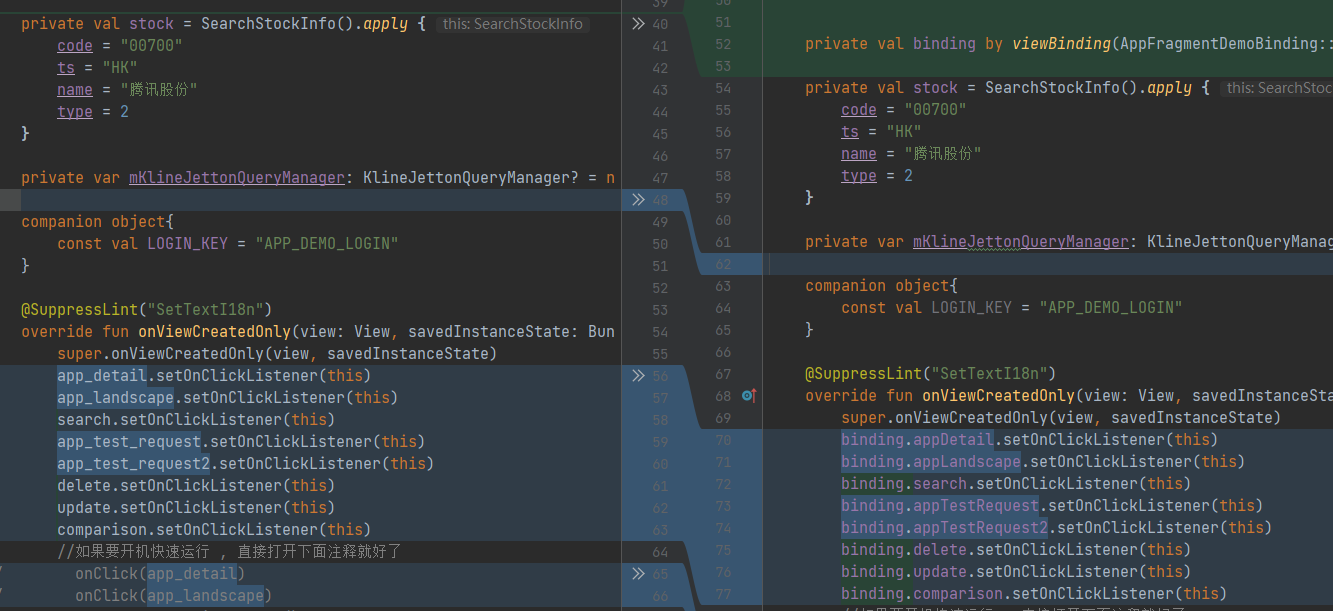
-
不支持内部类的相关实现 , viewBinding 只会生成在构造的下面 , 请自行拷贝 , 驼峰的替换是全局的 ;
-
关于命名重复的问题 , 由于是插件是通过 ktClass 的文本全局替换的 , 所以不会检测是否是方法还是变量啥的 , 统一经过文本替换, 建议自行逐行检验对比( RollBackChange 就很好用) ;
-
插件只负责解决迁移的效率问题 , 相关功能还是需要自行进行校验的 ;