-
Notifications
You must be signed in to change notification settings - Fork 15
Releases: LSYS/forestplot
v0.4.1
b7591e3 What's Changed
- Fix padding for data w/ 6 (or fewer) rows (resolves #52) by @LSYS in #117
- Thanks to @jeanbaptisteb for providing the fix! (see #52 (comment))
Full Changelog: v0.4.0...v0.4.1
Assets 2
Mplot
04b8858 What's Changed
Forestplot
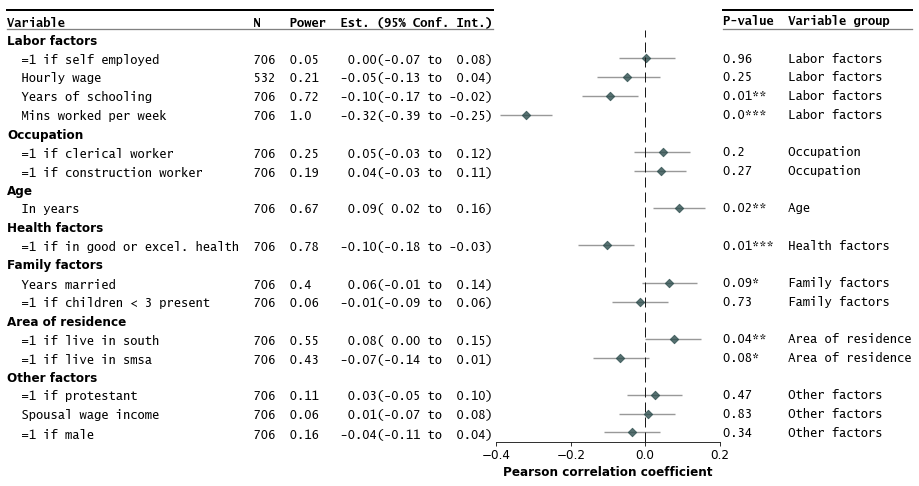
forestplot is a Python package to make publication-ready but customizable coefficient plots.
- GitHub repo: https://github.com/LSYS/forestplot
- Docs: https://forestplot.readthedocs.io
To install via PyPI:
pip install forestplotQuickstart:
import forestplot as fp
df_mmodel = pd.read_csv("../examples/data/sleep-mmodel.csv").query(
 "model=='all' | model=='young kids'"
)
fp.mforestplot(
 dataframe=df_mmodel,
 estimate="coef",
 ll="ll",
 hl="hl",
 varlabel="label",
 capitalize="capitalize",
 model_col="model",
 color_alt_rows=True,
 groupvar="group",
 table=True,
 rightannote=["var", "group"],
 right_annoteheaders=["Source", "Group"],
 xlabel="Coefficient (95% CI)",
 modellabels=["Have young kids", "Full sample"],
 xticks=[-1200, -600, 0, 600],
 mcolor=["#CC6677", "#4477AA"],
 # Additional kwargs for customizations
 **{
 "markersize": 30,
 # override default vertical offset between models (0.0 to 1.0)
 "offset": 0.35,
 "xlinestyle": (0, (10, 5)), # long dash for x-reference line
 "xlinecolor": ".8", # gray color for x-reference line
 },
)

Full Changelog: v0.3.3...v0.4.0
Assets 2
v0.3.3
d362bc5 What's Changed
- Add axis object as argument to forest plot by @juancq in #73
- Warn about duplicated
varlabel(closes #76, closes #81). - Add test that above warning works.
- Add known issues about duplicated
varlabel(closes #76, closes #81) and PyCharm (closes #80).
New Contributors
Forestplot
forestplot is a Python package to make publication-ready but customizable coefficient plots.
- GitHub repo: https://github.com/LSYS/forestplot
- Docs: https://forestplot.readthedocs.io
To install via PyPI:
pip install forestplotQuickstart:
import forestplot as fp
df = fp.load_data("sleep") # companion example data
fp.forestplot(df, # the dataframe with results data
 estimate="r", # col containing estimated effect size
 ll="ll", hl="hl", # columns containing conf. int. lower and higher limits
 varlabel="label", # column containing variable label
 ylabel="Confidence interval", # y-label title
 xlabel="Pearson correlation" # x-label title
 )

Full Changelog: v0.3.2...v0.3.3
Assets 2
v0.3.2
55c76f1 What's Changed
- Patch to fix bug for newer matplotlib versions (by @LSYS in #85).
- Thanks to @maikia for flagging and @Tian-hao for solution (#82).
- No user-facing changes.
Forestplot
forestplot is a Python package to make publication-ready but customizable coefficient plots.
- GitHub repo: https://github.com/LSYS/forestplot
- Docs: https://forestplot.readthedocs.io
To install via PyPI:
pip install forestplotQuickstart:
import forestplot as fp
df = fp.load_data("sleep") # companion example data
fp.forestplot(df, # the dataframe with results data
 estimate="r", # col containing estimated effect size
 ll="ll", hl="hl", # columns containing conf. int. lower and higher limits
 varlabel="label", # column containing variable label
 ylabel="Confidence interval", # y-label title
 xlabel="Pearson correlation" # x-label title
 )
Full Changelog: v0.2.2...v0.3.2
Assets 2
v0.3.1
What's Changed
No user-facing changes.
Pandas append API in the backend is deprecated and so replaced by concat. This should accommodate newer versions of Pandas, like the recent v2.0 release.
Forestplot
forestplot is a Python package to make publication-ready but customizable coefficient plots.
- GitHub repo: https://github.com/LSYS/forestplot
- Docs: https://forestplot.readthedocs.io
To install via PyPI:
pip install forestplotQuickstart:
import forestplot as fp
df = fp.load_data("sleep") # companion example data
fp.forestplot(df, # the dataframe with results data
 estimate="r", # col containing estimated effect size
 ll="ll", hl="hl", # columns containing conf. int. lower and higher limits
 varlabel="label", # column containing variable label
 ylabel="Confidence interval", # y-label title
 xlabel="Pearson correlation" # x-label title
 )
Full Changelog: v0.2.2...v0.3.1
Assets 2
v0.3.0
What's Changed
Main user-facing change is that no drawing of CI (confidence intervals) is now possible.
- Allow no drawing of CI #58
- Update docs accordingly to reflect that
llandhloptions are no longer required
Forestplot
forestplot is a Python package to make publication-ready but customizable coefficient plots.
- GitHub repo: https://github.com/LSYS/forestplot
- Docs: https://forestplot.readthedocs.io
To install via PyPI:
pip install forestplotQuickstart:
import forestplot as fp
df = fp.load_data("sleep") # companion example data
fp.forestplot(df, # the dataframe with results data
 estimate="r", # col containing estimated effect size
 ll="ll", hl="hl", # columns containing conf. int. lower and higher limits
 varlabel="label", # column containing variable label
 ylabel="Confidence interval", # y-label title
 xlabel="Pearson correlation" # x-label title
 )
No CI:
fp.forestplot(df, # the dataframe with results data
 estimate="r", # col containing estimated effect size
 varlabel="label", # column containing variable label
 )

See the README for more customizations.
Full Changelog: v0.2.2...v0.3.0
Assets 2
v0.2.2
30ee8d0 What's Changed
- Fix spacing issue at top of plot (fixes #48, #47)
- Create notebook for some simple regression tests (closes #49)
- Tidy imports using isort (closes #50)
- Allowed thresholds and symbols for p-values to be passedthrough (fixes #51)
- Fix different heigh and fontsize for confidence interval and p-value labels (fixes #53)
- Update docs for RTD (closes #54)
- Freeze matplotlib-inline dependency in setup.py (closes #56)
Forestplot
forestplot is a Python package to make publication-ready but customizable coefficient plots.
- GitHub repo: https://github.com/LSYS/forestplot
- Docs: https://forestplot.readthedocs.io
To install via PyPI:
pip install forestplotQuickstart:
import forestplot as fp
df = fp.load_data("sleep") # companion example data
fp.forestplot(df, # the dataframe with results data
 estimate="r", # col containing estimated effect size
 ll="ll", hl="hl", # columns containing conf. int. lower and higher limits
 varlabel="label", # column containing variable label
 ylabel="Confidence interval", # y-label title
 xlabel="Pearson correlation" # x-label title
 )
See the README for more customizations.
Full Changelog: v0.2.0...v0.2.2
Assets 2
v0.2.1
What's Changed
-
Remove excessive vertical whitespace
-
Add matplotlib-inline as requirement
-
Add note to save using bbox_inches="tight"
-
Add versioning
-
Add recipe to run readme-examples.ipynb notebook
Full Changelog: v0.2.0...v0.2.1
Assets 2
v0.2.0
f288456 What's Changed
- Create workflow to check links in readme.md by @LSYS in #14
- Patch by @LSYS in #16
- Update docs & fix group subheadings order by @LSYS in #20
- Add logscale option, make no string normalization the default by @LSYS in #34
- add wheel to build, include a requirements_dev.txt and document by @shapiromatron in #35
- Fix typo in readme by @shapiromatron in #31
- Better backend for Confidence Intervals (closes #29)
- Plotting of estimates on a log-scale (closes #28)
- Maintain label character formatting (making no string normalisation the default, closes #27)
tldr
- logscale is now an option
- default is now not to normalize strings
New Contributors
- @shapiromatron made their first contribution in #35
Full Changelog: v0.0.4...v0.2.0
Assets 2
Release of Forestplot v0.1.0
forestplot is a Python package to make publication-ready but customizable forest plots.
- GitHub repo: https://github.com/LSYS/forestplot
- Docs: https://forestplot.readthedocs.io
To install via PyPI:
pip install forestplotQuickstart:
import forestplot as fp
df = fp.load_data("sleep") # companion example data
fp.forestplot(df, # the dataframe with results data
 estimate="r", # col containing estimated effect size
 ll="ll", hl="hl", # columns containing conf. int. lower and higher limits
 varlabel="label", # column containing variable label
 ylabel="Confidence interval", # y-label title
 xlabel="Pearson correlation" # x-label title
 )
More customizations are available, for example: