这是个推官方支持的 Unity3D 插件(Android & iOS)。更多详情请访问个推官网:http://docs.getui.com/。
-
确保使用 Unity 打开需要集成本插件的 Unity3D 工程
-
运行插件目录下的 GTPushUnityPlugin_vX.X.X.unitypackage
-
当前版本unitypackage版本v1.3
插件将会自动添加到 Unity3D 工程中,完成插件的添加。
- unity2025.x系列的版本:GTPushUnityPlugin(202404).unitypackage
- unity2024.x系列的版本:GTPushUnityPlugin(202404).unitypackage
- unity2021.x系列的版本:GTPushUnityPlugin_v1.3(2021.x).unitypackage
- unity2018.x系列的版本:GTPushUnityPlugin_v1.3(2018.x).unitypackage,支持assets、res等资源文件夹,使用gradle打包的方式
- 2024年04月10日 升级iOS sdk版本到3.0.5.0,新增回调onNotificationMessageWillPresent,GeTuiSdkDidSetTagsAction
- 2023年02月17日 升级iOS sdk版本到2.6.9.0
- 2022年09月21日 升级android sdk版本到3.2.12.0
- android兼容unity编译器高版本打包方式,把多厂商和个推sdk集成到一个aar中
在 Unity 游戏场景中,新建一个空的 Gameobject,挂载 GetuiPushDemo.cs(或者直接挂载到 Main Camera),然后根据项目需要对 GetuiPushDemo.cs 中的个推推送功能进行定制,其中有某些参数需要到个推官网注册生成并引用。(个推开发者平台)
插件支持个推推送和多厂商渠道。目前支持以下厂商渠道:(多厂商接入)
- 华为
- 小米
- OPPO
- VIVO
- 魅族
- 荣耀
- UPS
需要替换manifestPlaceholders的参数:
manifestPlaceholders = [
 //个推相关参数
 GETUI_APPID: "",
 GT_INSTALL_CHANNEL: "",
 // 华为 相关应用参数
 HUAWEI_APP_ID : "",
 // 小米相关应用参数
 XIAOMI_APP_ID : "",
 XIAOMI_APP_KEY : "",
 // OPPO 相关应用参数
 OPPO_APP_KEY : "",
 OPPO_APP_SECRET: "",
 // VIVO 相关应用参数
 VIVO_APP_ID : "",
 VIVO_APP_KEY : "",
 // 魅族相关应用参数
 MEIZU_APP_ID : "",
 MEIZU_APP_KEY : "",
 // 荣耀相关应用参数
 HONOR_APP_ID : "",
]
- 替换插件包
Assets/Plugins/Android/launcherTemplate.gradle文件中manifestPlaceholders对应的参数。 - 替换
Assets/Plugins/Android/launcherTemplate.gradle中agconnect-services.json绝对路径(您的应用在华为开发者平台申请后的配置文件)
- 建议自行使用com.android.library打出aar包替换push.png(该图片为通知栏通知的图标)
- 如果您还未配置您的游戏的
Bundle Idenifier, 在 Unity 中选择 File---Build Settings---选择Android Player图标--Player Settings,在 Identification 选项下的 Bundle Idenifier 里设置应用的包名。 - 如果您还未设置您的游戏的 Icon,在 Unity 中选择 File---Build Settings---选择Android Player图标--Player Settings,在Identification 选项下的 Icon 里设置图标。
- 如果您需要运行该插件的示例代码,在 Unity 中将
Assets/GTPluginsDemo.cs用鼠标拖动到Main Camera中(运行后可在Logcat中查看调用日志)。
华为渠道需要特别说明一下,在Assets/Plugins/Android/launcherTemplate.gradle中,project.afterEvaluate方法实现了自动把华为的配置文件拷贝到assets目录下,所以需要您自行替换hwConfig的路径
project.afterEvaluate { Project p ->
 //p: project ':app' ,untiy : project ':launcher'
 String appPath = p.getBuildDir().parentFile.absolutePath
 String assetsPath = appPath +'/src/main/assets'
 File file = new File(assetsPath,'agconnect-services.json')
 println 'assetsPath =========================>' + assetsPath
 println file.absolutePath + ' ====================> ' + file.exists()
 if (!file.exists()) {
 if (!file.parentFile.exists()) {
 println file.absolutePath + ' mkdir '
 file.mkdir()
 }
 //华为推送的配置文件路径,请替换下面xxxx(华为推送的配置文件的绝对路径)
 File hwConfig = new File('xxxx','agconnect-services.json')
 if (hwConfig.exists()) {
 copy {
 from hwConfig
 into file.parentFile.absolutePath
 }
 println 'copy file(hwConfig) success : ' + hwConfig
 }
 }
}
- 替换插件包
Assets/Plugins/Android/mainTemplate.gradle文件中manifestPlaceholders对应的参数。 - 华为厂商需要替换
Assets/Plugins/Android/assets/agconnect-services.json
- 如果您还未配置您的游戏的
Bundle Idenifier, 在 Unity 中选择 File---Build Settings---选择Android Player图标--Player Settings,在 Identification 选项下的 Bundle Idenifier 里设置应用的包名。 - 如果您还未设置您的游戏的 Icon,在 Unity 中选择 File---Build Settings---选择Android Player图标--Player Settings,在Identification 选项下的 Icon 里设置图标。
- 如果您需要运行该插件的示例代码,在 Unity 中将
Assets/GTPluginsDemo.cs用鼠标拖动到Main Camera中(运行后可在Logcat中查看调用日志)。
特别注意
如果使用华为厂商推送除了上述说的处理配置文件
agconnect-services.json,还需要处理文件的读取,可以使用以下方式:
在AndroidManifest.xml 标签中使用android.name="com.getui.sdk.GTApp"
<?xml version="1.0" encoding="utf-8"?>
<manifest xmlns:android="http://schemas.android.com/apk/res/android">
 ...代码省略
 <application android.name="com.getui.sdk.GTApp">
 </application>

</manifest>
如果您的应用或者游戏,自定义了Application,那么您需要在
Application.attachBaseContext()中自己实现读取文件的逻辑:package xxx.xxx.xxx; import android.app.Application; import android.content.Context; import com.huawei.agconnect.config.AGConnectServicesConfig; import com.huawei.agconnect.config.LazyInputStream; import java.io.IOException; import java.io.InputStream; public class YourApplication extends Application { @Override protected void attachBaseContext(Context base) { super.attachBaseContext(base); AGConnectServicesConfig config = AGConnectServicesConfig.fromContext(base); config.overlayWith(new LazyInputStream(base) { public InputStream get(Context context) { try { return context.getAssets().open("agconnect-services.json"); } catch (IOException e) { return null; } } }); } }然后在
AndroidManifest.xml中声明您自己的Application:<?xml version="1.0" encoding="utf-8"?> <manifest xmlns:android="http://schemas.android.com/apk/res/android"> ...代码省略 <application android.name="xxx.xxx.xxx.YourApplication"> </application> </manifest>
1、以下几个参数需要在个推开发者平台创建应用后获取并替换。
const string appId = "tHrR9RAVKK9npDDGK7tHp6";
const string appKey = "CyiCeSdnJB6N0O0hvziYe8";
const string appSecret = "HGuR9YU1Cq7BUXGXBhbLf7";
//iOS 启用流程
//启动 SDK
GetuiPush.StartSDK (appId,appKey,appSecret);
//设置消息回调监听对象,设置为自身,默认为 Main Camera
GetuiPush.setListenerGameObject(this.gameObject.name);
//注册推送通知
GetuiPush.registerUserNotification();
// 注册 VoIP 通知
GTPushBinding.voipRegistration();
更多细节请参考 demo
注意:如果某些 Unity 版本在允许弹窗的情况下无法根据 NotificationServices.deviceToken 获取到 deviceToken,请根据以下步骤检查项目:
- 开启 Push Notification 能力。
- 将
Preprocessor.h文件中UNITY_USES_REMOTE_NOTIFICATIONS的值 0 改为 1。
如果依然不能正常获取 deviceToken,则在生成的原生项目的 UnityAppController.mm 中导入头文件 #import "GeTuiSdk.h" 并在 - (void)application:(UIApplication*)application didRegisterForRemoteNotificationsWithDeviceToken:(NSData*)deviceToken方法中添加如下代码:
NSString *token = [[deviceToken description] stringByTrimmingCharactersInSet:[NSCharacterSet characterSetWithCharactersInString:@"<>"]];
token = [token stringByReplacingOccurrencesOfString:@" " withString:@""];
NSLog(@"\n>>>[DeviceToken Success]:%@\n\n", token);
// [ GTSdk ]:向个推服务器注册deviceToken
[GeTuiSdk registerDeviceToken:token];
2、生成 iOS 工程,并打开该工程。
在Target=UnityFramework设置如下, Other linker Flags 添加 -Objc
添加必要的框架。
-
libc++.tbd
-
libz.tbd
-
libsqlite3.tbd
-
UserNotifications.framework
-
PushKit.framework
-
CallKit.framework
-
libresolv.tbd
注意:UserNotifications.framework 及 PushKit.framework 必须使用 optional 选项,如没有勾选改选项,iOS9 以下机型会因为没有这个库而闪退
Unity3D 有时候会默认添加以下几个 framework,视具体版本而定,如没有需手动添加:
- Security.framework
- MobileCoreServices.framework
- SystemConfiguration.framework
- CoreTelephony.framework
- AVFoundation.framework
- CoreLocation.framework
3、在 Xcode 8.x 以上,必须开启Push Notification能力。找到应用Target设置中的Capabilities -> Push Notifications,确认开关已经设为ON状态。如果没有开启该开关,在 Xcode 8.x 上编译后的应用将获取不到DeviceToken:
为了更好支持消息推送,SDK可定期抓取离线消息,提高消息到达率,需要配置后台运行权限:
4、iOS 推送证书配置请参考:创建 APNs 推送证书
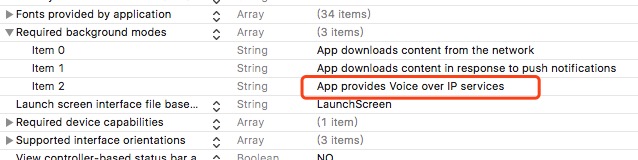
5、v_1.0.9 版本开始支持 VoIP 推送,需要添加后台推送 VoIP 的权限,在 info.plist 文件的后台权限中添加该权限:
注意:
Apple 在 iOS 10 中新增了Notification Service Extension机制,可在消息送达时进行业务处理。为精确统计消息送达率,在集成个推SDK时,可以添加 Notification Service Extension,并在 Extensions 中添加 GTExtensionSDK 的统计接口,实现消息展示回执统计功能。具体可参考个推集成文档。
由于 iOS & Android 注册推送的流程不一样,因此注册流程所暴露的 API 不一致。此外,iOS 有更多的回调接口,也需要注意区别使用。
/**
 * SDK登入成功返回clientId
 *
 * @param clientId 标识用户的clientId
 * 说明:启动GeTuiSdk后,SDK会自动向个推服务器注册SDK,当成功注册时,SDK通知应用注册成功。
 * 注意: 注册成功仅表示推送通道建立,如果appid/appkey/appSecret等验证不通过,依然无法接收到推送消息,请确保验证信息正确。
 */
	public void onReceiveClientId(string clientId){
		GTPushBinding.setPushMode (true);
		Debug.Log ("GeTuiSdkDidRegisterClient clientId : " + clientId);
	}
	/**
 * SDK通知收到个推推送的透传消息
 *
 * @param payload 推送消息内容
 * @param taskId 推送消息的任务id
 * @param msgId 推送消息的messageid
 * @param offLine 是否是离线消息,YES.是离线消息 (Android无此字段)
 * @param appId 应用的appId (Android无此字段)
 */
	public void onReceiveMessage(string payloadJsonData){
		Debug.Log ("GeTuiSdkDidReceivePayloadData payload JsonData : " + payloadJsonData);
	}
GTPushBinding.StartSDK (appId,appKey,appSecret);
GTPushBinding.setListenerGameObject (this.gameObject.name);
GTPushBinding.registerUserNotification ();
GTPushBinding.voipRegistration();
//绑定tag,不同的tag用,分割
GTPushBinding.setTag("ge,tui");
GTPushBinding.bindAlias("getui");
GTPushBinding.unBindAlias("getui");
	/**
	 * SDK设置关闭推送模式回调
	 *
	 * @param isModeOn true:开启 false:关闭
	 */
	public void GeTuiSdkDidSetPushMode(string isModeOn){
		Debug.Log ("GeTuiSdkDidSetPushMode isModeOn : " + isModeOn);
	}

	/**
	 * SDK遇到错误消息返回error
	 *
	 * @param error SDK内部发生错误,通知第三方,返回错误
	 */
	public void GeTuiSdkDidOccurError(string error){
		Debug.Log ("GeTuiSdkDidOccurError error : " + error);
	}
	/**
	 * SDK运行状态通知
	 *
	 * @param message 返回SDK运行状态
	 */
	public void GeTuiSDkDidNotifySdkState(string state){
		Debug.Log ("GeTuiSDkDidNotifySdkState state : " + state);
	}
	/**
	 * SDK绑定、解绑回调
	 *
	 * @param action 回调动作类型 kGtResponseBindType 或 kGtResponseUnBindType
	 * @param result 成功返回 YES, 失败返回 NO
	 * @param sequenceNum 返回请求的序列码
	 * @param error 成功返回nil, 错误返回相应error信息
	 */
	public void GeTuiSdkDidAliasAction(string message){
		Debug.Log ("GeTuiSdkDidAliasAction message : " + message);
	}
	/*
	 * 设置标签回调
	 *
	 * @param result 成功返回 YES, 失败返回 NO
	 * @param sequenceNum 返回请求的序列码
	 * @param error 成功返回nil, 错误返回相应error信息
	 */
	public void GeTuiSdkDidSetTagsAction(string message)
	{
		Debug.Log("GetuiSdk GeTuiSdkDidSetTagsAction message : " + message);
	}

	/**
	 *
	 *	 VoIP 推送消息回调
	 */
	public void onReceiveVoIPMessage(string message){
		Debug.Log ("onReceiveVoIPMessage message : " + message);
	}
	public void onNotificationMessageWillPresent(string msg)
	{
		Debug.Log("GetuiSdk onNotificationMessageWillPresent : " + msg);
	}
	public void onNotificationMessageArrived(string msg)
	{
		Debug.Log("GetuiSdk onNotificationMessageArrived : " + msg);
	}
	public void onNotificationMessageClicked(string msg){
		Debug.Log ("GetuiSdk onNotificationMessageClicked : " + msg);
	}
GTPushBinding.initPush (this.gameObject.name));
GTPushBinding.turnOnPush();
更多 API 详情请参考 GTPushBinding.cs 相同方法名的方法说明,以及在 GetuiPushDemo.cs 中的相关使用示例。