A lightweight HTTP(S) proxy server written in C#.
Build Status Join the chat at https://gitter.im/Titanium-Web-Proxy/Lobby
Kindly report only issues/bugs here. For programming help or questions use StackOverflow with the tag Titanium-Web-Proxy.
- Multi-threaded fully asynchronous proxy employing server connection pooling, certificate cache, and buffer pooling
- View/modify/redirect/block requests and responses
- Supports mutual SSL authentication, proxy authentication & automatic upstream proxy detection
- Kerberos/NTLM authentication over HTTP protocols for windows domain
Install by nuget
For beta releases on beta branch
Install-Package Titanium.Web.Proxy -Pre
For stable releases on stable branch
Install-Package Titanium.Web.Proxy
Supports
- .Net Standard 2.0 or above
- .Net Framework 4.5 or above
- Visual Studio Code as IDE for .NET core
- Visual Studio 2017/2019 as IDE for .NET framework/.NET core
- Visual Studio Code as IDE for .NET core
- Visual Studio 2017 as IDE for Mono
- Visual Studio Code as IDE for .NET core
- Mono develop as IDE for Mono
Refer the HTTP Proxy Server library in your project and look up the test project to learn usage.
Setup HTTP proxy:
var proxyServer = new ProxyServer();
//locally trust root certificate used by this proxy
proxyServer.CertificateManager.TrustRootCertificate = true;
//optionally set the Certificate Engine
//Under Mono only BouncyCastle will be supported
//proxyServer.CertificateManager.CertificateEngine = Network.CertificateEngine.BouncyCastle;
proxyServer.BeforeRequest += OnRequest;
proxyServer.BeforeResponse += OnResponse;
proxyServer.ServerCertificateValidationCallback += OnCertificateValidation;
proxyServer.ClientCertificateSelectionCallback += OnCertificateSelection;
var explicitEndPoint = new ExplicitProxyEndPoint(IPAddress.Any, 8000, true)
{
//Use self-issued generic certificate on all https requests
//Optimizes performance by not creating a certificate for each https-enabled domain
//Useful when certificate trust is not required by proxy clients
//GenericCertificate = new X509Certificate2(Path.Combine(System.IO.Path.GetDirectoryName(System.Reflection.Assembly.GetExecutingAssembly().Location), "genericcert.pfx"), "password")
};
//Fired when a CONNECT request is received
explicitEndPoint.BeforeTunnelConnect += OnBeforeTunnelConnect;
//An explicit endpoint is where the client knows about the existence of a proxy
//So client sends request in a proxy friendly manner
proxyServer.AddEndPoint(explicitEndPoint);
proxyServer.Start();
//Transparent endpoint is useful for reverse proxy (client is not aware of the existence of proxy)
//A transparent endpoint usually requires a network router port forwarding HTTP(S) packets or DNS
//to send data to this endPoint
var transparentEndPoint = new TransparentProxyEndPoint(IPAddress.Any, 8001, true)
{
	//Generic Certificate hostname to use
	//when SNI is disabled by client
	GenericCertificateName = "google.com"
};
proxyServer.AddEndPoint(transparentEndPoint);
//proxyServer.UpStreamHttpProxy = new ExternalProxy() { HostName = "localhost", Port = 8888 };
//proxyServer.UpStreamHttpsProxy = new ExternalProxy() { HostName = "localhost", Port = 8888 };
foreach (var endPoint in proxyServer.ProxyEndPoints)
Console.WriteLine("Listening on '{0}' endpoint at Ip {1} and port: {2} ",
 endPoint.GetType().Name, endPoint.IpAddress, endPoint.Port);
//Only explicit proxies can be set as system proxy!
proxyServer.SetAsSystemHttpProxy(explicitEndPoint);
proxyServer.SetAsSystemHttpsProxy(explicitEndPoint);
//wait here (You can use something else as a wait function, I am using this as a demo)
Console.Read();
//Unsubscribe & Quit
explicitEndPoint.BeforeTunnelConnect -= OnBeforeTunnelConnect;
proxyServer.BeforeRequest -= OnRequest;
proxyServer.BeforeResponse -= OnResponse;
proxyServer.ServerCertificateValidationCallback -= OnCertificateValidation;
proxyServer.ClientCertificateSelectionCallback -= OnCertificateSelection;
proxyServer.Stop();
Sample request and response event handlers
private async Task OnBeforeTunnelConnectRequest(object sender, TunnelConnectSessionEventArgs e)
{
 string hostname = e.HttpClient.Request.RequestUri.Host;
 if (hostname.Contains("dropbox.com"))
 {
 //Exclude Https addresses you don't want to proxy
 //Useful for clients that use certificate pinning
 //for example dropbox.com
 e.DecryptSsl = false;
 }
}
public async Task OnRequest(object sender, SessionEventArgs e)
{
 Console.WriteLine(e.HttpClient.Request.Url);
 ////read request headers
 var requestHeaders = e.HttpClient.Request.RequestHeaders;
 var method = e.HttpClient.Request.Method.ToUpper();
 if ((method == "POST" || method == "PUT" || method == "PATCH"))
 {
	//Get/Set request body bytes
	byte[] bodyBytes = await e.GetRequestBody();
	await e.SetRequestBody(bodyBytes);
	//Get/Set request body as string
	string bodyString = await e.GetRequestBodyAsString();
	await e.SetRequestBodyString(bodyString);

	//store request
	//so that you can find it from response handler
 	e.UserData = e.HttpClient.Request;
 }
 //To cancel a request with a custom HTML content
 //Filter URL
 if (e.HttpClient.Request.RequestUri.AbsoluteUri.Contains("google.com"))
 {
	e.Ok("<!DOCTYPE html>" +
	 "<html><body><h1>" +
	 "Website Blocked" +
	 "</h1>" +
	 "<p>Blocked by titanium web proxy.</p>" +
	 "</body>" +
	 "</html>");
 }
 //Redirect example
 if (e.HttpClient.Request.RequestUri.AbsoluteUri.Contains("wikipedia.org"))
 {
	e.Redirect("https://www.paypal.com");
 }
}
//Modify response
public async Task OnResponse(object sender, SessionEventArgs e)
{
 //read response headers
 var responseHeaders = e.HttpClient.Response.ResponseHeaders;
 //if (!e.ProxySession.Request.Host.Equals("medeczane.sgk.gov.tr")) return;
 if (e.HttpClient.Request.Method == "GET" || e.HttpClient.Request.Method == "POST")
 {
	if (e.HttpClient.Response.ResponseStatusCode == "200")
	{
	 if (e.HttpClient.Response.ContentType!=null && e.HttpClient.Response.ContentType.Trim().ToLower().Contains("text/html"))
	 {
		byte[] bodyBytes = await e.GetResponseBody();
		await e.SetResponseBody(bodyBytes);
		string body = await e.GetResponseBodyAsString();
		await e.SetResponseBodyString(body);
	 }
	}
 }

 if(e.UserData!=null)
 {
	 //access request from UserData property where we stored it in RequestHandler
	 var request = (Request)e.UserData;
 }

}
/// Allows overriding default certificate validation logic
public Task OnCertificateValidation(object sender, CertificateValidationEventArgs e)
{
 //set IsValid to true/false based on Certificate Errors
 if (e.SslPolicyErrors == System.Net.Security.SslPolicyErrors.None)
	e.IsValid = true;
 return Task.FromResult(0);
}
/// Allows overriding default client certificate selection logic during mutual authentication
public Task OnCertificateSelection(object sender, CertificateSelectionEventArgs e)
{
 //set e.clientCertificate to override
 return Task.FromResult(0);
}
- Support HTTP 2.0
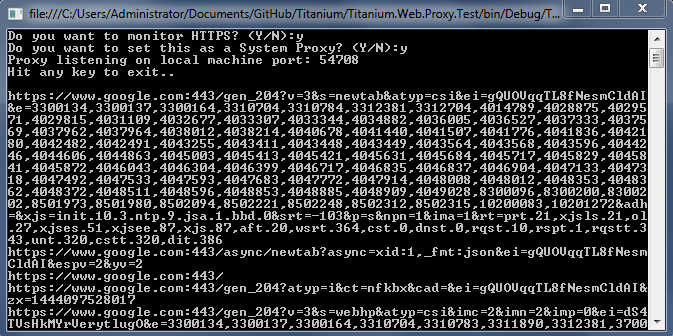
Console example application screenshot
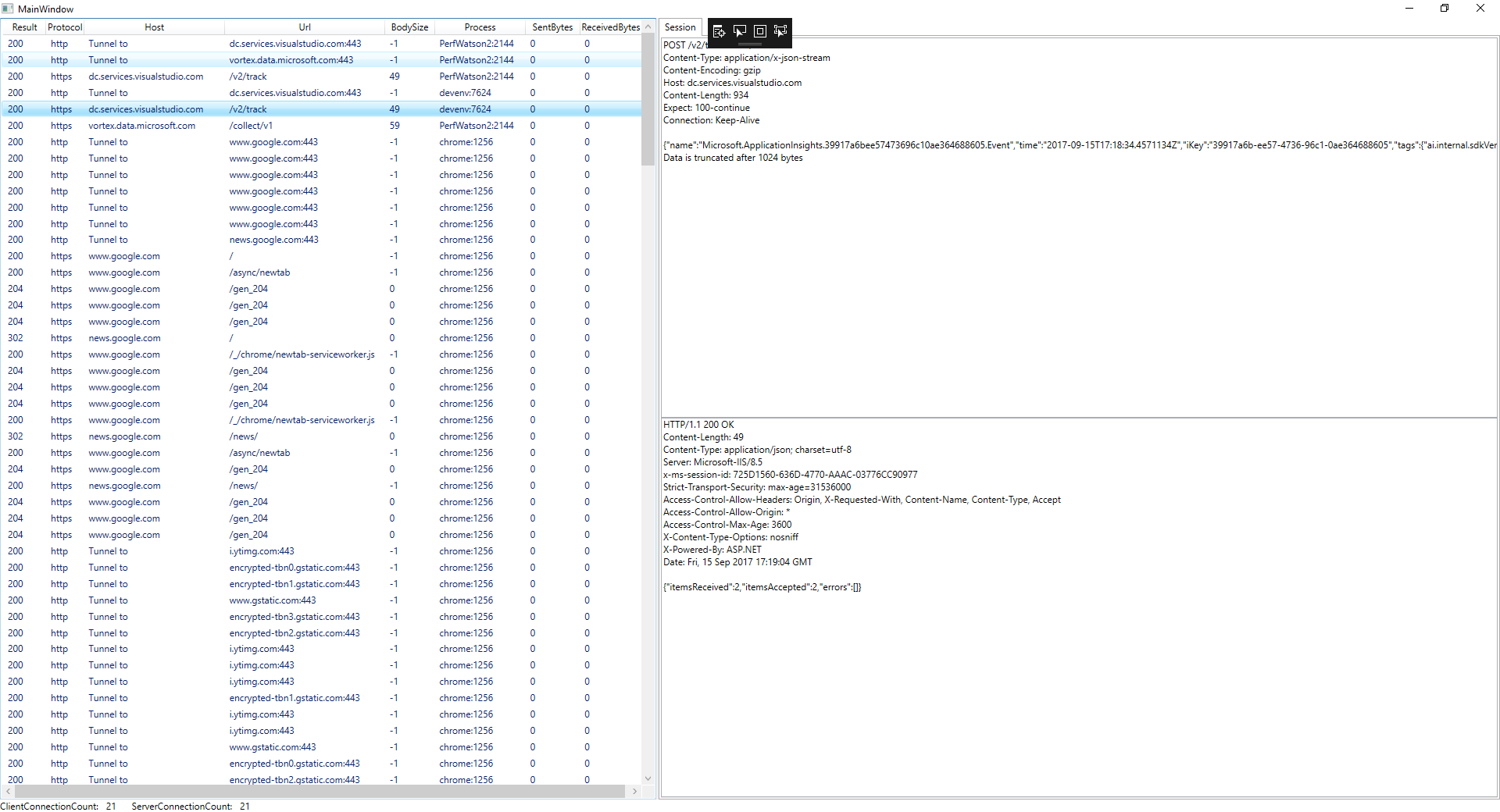
GUI example application screenshot