
Kubernetes multi-cluster deployment automation service
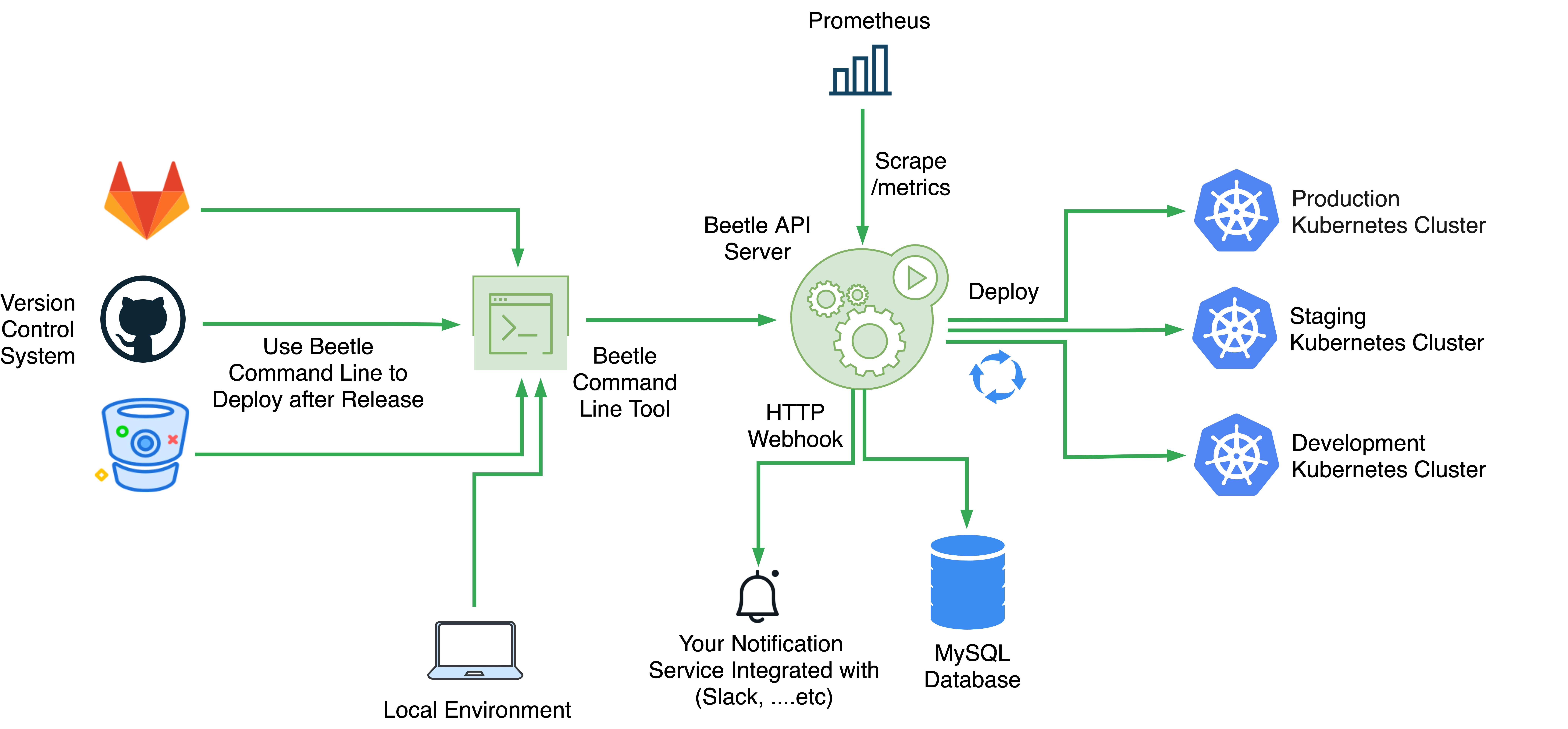
Application deployment and management should be automated, auditable, and easy to understand and that's what beetle tries to achieve in a simple manner. Beetle automates the deployment and rollback of your applications in a multi-cluster, multi-namespaces kubernetes environments. Easy to integrate with through API endpoints & webhooks to fit a variety of workflows.
Download the latest beetle binary.
$ curl -sL https://github.com/Clivern/Beetle/releases/download/vx.x.x/beetle_x.x.x_OS.tar.gz | tar xzCreate your config file as explained on development part and run beetle with systemd or anything else you prefer.
$ ./beetle serve -c /custom/path/config.prod.yml
Beetle uses Go Modules to manage dependencies. First Create a prod config file.
$ git clone https://github.com/Clivern/Beetle.git
$ cp config.dist.yml config.prod.yml
Then add your default configs. You probably wondering how the following configs even work! let's pick one and explain.
The item mode: ${BEETLE_APP_MODE:-dev} means that the mode is dev unless environment variable BEETLE_APP_MODE is defined. so you can always override the value by defining the environment variable export BEETLE_APP_MODE=prod. and same for others
# App configs
app:
 # Env mode (dev or prod)
 mode: ${BEETLE_APP_MODE:-dev}
 # HTTP port
 port: ${BEETLE_API_PORT:-8080}
 # App URL
 domain: ${BEETLE_APP_DOMAIN:-http://127.0.0.1:8080}
 # TLS configs
 tls:
 status: ${BEETLE_API_TLS_STATUS:-off}
 pemPath: ${BEETLE_API_TLS_PEMPATH:-cert/server.pem}
 keyPath: ${BEETLE_API_TLS_KEYPATH:-cert/server.key}
 # Message Broker Configs
 broker:
 # Broker driver (native)
 driver: ${BEETLE_BROKER_DRIVER:-native}
 # Native driver configs
 native:
 # Queue max capacity
 capacity: ${BEETLE_BROKER_NATIVE_CAPACITY:-5000}
 # Number of concurrent workers
 workers: ${BEETLE_BROKER_NATIVE_WORKERS:-4}
 # API Configs
 api:
 key: ${BEETLE_API_KEY:- }
 # Runtime, Requests/Response and Beetle Metrics
 metrics:
 prometheus:
 # Route for the metrics endpoint
 endpoint: ${BEETLE_METRICS_PROM_ENDPOINT:-/metrics}
 # Application Database
 database:
 # Database driver (sqlite3, mysql)
 driver: ${BEETLE_DATABASE_DRIVER:-sqlite3}
 # Database Host
 host: ${BEETLE_DATABASE_MYSQL_HOST:-localhost}
 # Database Port
 port: ${BEETLE_DATABASE_MYSQL_PORT:-3306}
 # Database Name
 name: ${BEETLE_DATABASE_MYSQL_DATABASE:-beetle.db}
 # Database Username
 username: ${BEETLE_DATABASE_MYSQL_USERNAME:-root}
 # Database Password
 password: ${BEETLE_DATABASE_MYSQL_PASSWORD:-root}
 # Kubernetes Clusters
 clusters:
 -
 name: ${BEETLE_KUBE_CLUSTER_01_NAME:-production}
 inCluster: ${BEETLE_KUBE_CLUSTER_01_IN_CLUSTER:-false}
 kubeconfig: ${BEETLE_KUBE_CLUSTER_01_CONFIG_FILE:-/app/configs/production-cluster-kubeconfig.yaml}
 -
 name: ${BEETLE_KUBE_CLUSTER_02_NAME:-staging}
 inCluster: ${BEETLE_KUBE_CLUSTER_02_IN_CLUSTER:-false}
 kubeconfig: ${BEETLE_KUBE_CLUSTER_02_CONFIG_FILE:-/app/configs/staging-cluster-kubeconfig.yaml}
 # HTTP Webhook
 webhook:
 url: ${BEETLE_WEBHOOK_URL:- }
 retry: ${BEETLE_WEBHOOK_RETRY:-3}
 apiKey: ${BEETLE_WEBHOOK_API_KEY:- }
# Log configs
log:
 # Log level, it can be debug, info, warn, error, panic, fatal
 level: ${BEETLE_LOG_LEVEL:-info}
 # output can be stdout or abs path to log file /var/logs/beetle.log
 output: ${BEETLE_LOG_OUTPUT:-stdout}
 # Format can be json
 format: ${BEETLE_LOG_FORMAT:-json}
And then run the application.
$ go build beetle.go
$ ./beetle serve -c /custom/path/config.prod.yml
// OR
$ make run
// OR
$ go run beetle.go serve -c /custom/path/config.prod.yml
Go to https://editor.swagger.io/ and import this file https://raw.githubusercontent.com/Clivern/Beetle/main/swagger.yaml.
For transparency into our release cycle and in striving to maintain backward compatibility, Beetle is maintained under the Semantic Versioning guidelines and release process is predictable and business-friendly.
See the Releases section of our GitHub project for changelogs for each release version of Beetle. It contains summaries of the most noteworthy changes made in each release.
If you have any suggestions, bug reports, or annoyances please report them to our issue tracker at https://github.com/clivern/beetle/issues
If you discover a security vulnerability within Beetle, please send an email to hello@clivern.com
We are an open source, community-driven project so please feel free to join us. see the contributing guidelines for more details.
© 2020, clivern. Released under MIT License.
Beetle is authored and maintained by @clivern.