The web UI for word_cloud (text to word cloud picture converter)
- 功能:利用 word_cloud 将 普通文本 转为 词云图像 文件
- 可视化:使用 Gradio 将该功能可视化
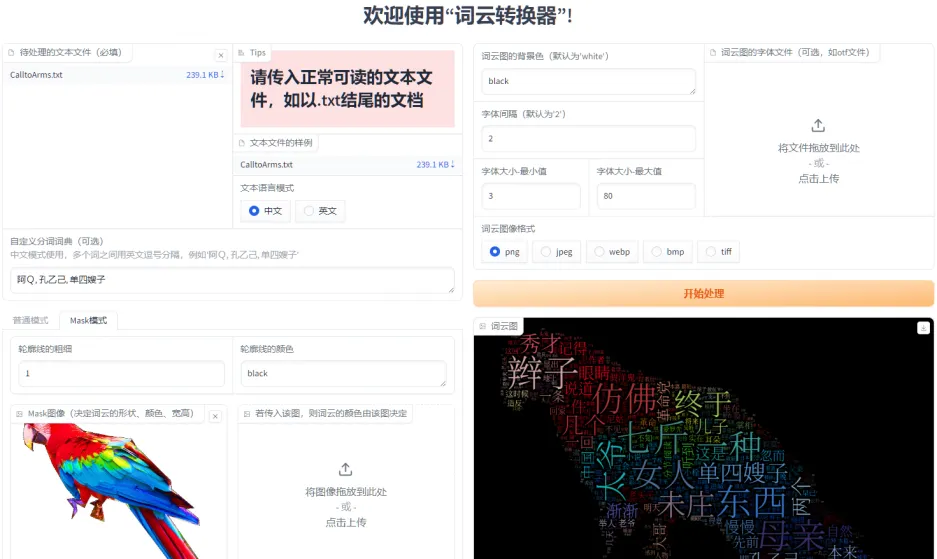
- 新建一个虚拟环境(Python 3.9.16),或使用已有的Python环境
- 例如
$ conda create -n env_name python=3.9
- 例如
- 使用 PIP 方式安装
$ pip install wordcloud-webui
- 使用源码方式安装
- 下载本项目代码
- 点击本项目GitHub页面右上角的绿色的按钮
Code,再点击Download ZIP
- 点击本项目GitHub页面右上角的绿色的按钮
- 解压项目,进入到项目根目录
- 安装,执行
$ pip install -e ./ -i "https://pypi.doubanio.com/simple/"
- 安装,执行
- 下载本项目代码
- 注
- 卸载命令
$ pip uninstall wordcloud-webui
- 卸载命令
- 由于安装时已经在当前 Python 环境中安装了 script
- 所以可以在任意位置直接执行
$ wordcloud-gui,启动 WebUI
- 进入到本项目的目录下,执行
$ cd src/wordcloud_webui - 二选一
- 在本地电脑端启动,直接执行
$ python main.py - 在服务器端启动,执行
$ nohup python main.py 1>server_run.log 2>&1 &
- 在本地电脑端启动,直接执行
- 更新、安装工具
$ pip install --upgrade setuptools$ pip install --upgrade build
- 进入到项目根目录下,执行
$ python -m build - 构建完成会在项目 dist 目录下,生成 tar.gz 和 whl 文件
- 直接使用 PIP 即可安装,如
pip install .\dist\wordcloud_webui-0.1.0-py3-none-any.whl