Travis CocoaPods CocoaPods CocoaPods Laguage CocoaPods LeoDev GitHub stars
☀️ 一款简约而不失强大的 ActionSheet,微博、微信和 QQ 都采用了极其类似的样式,完全支持 Swift。
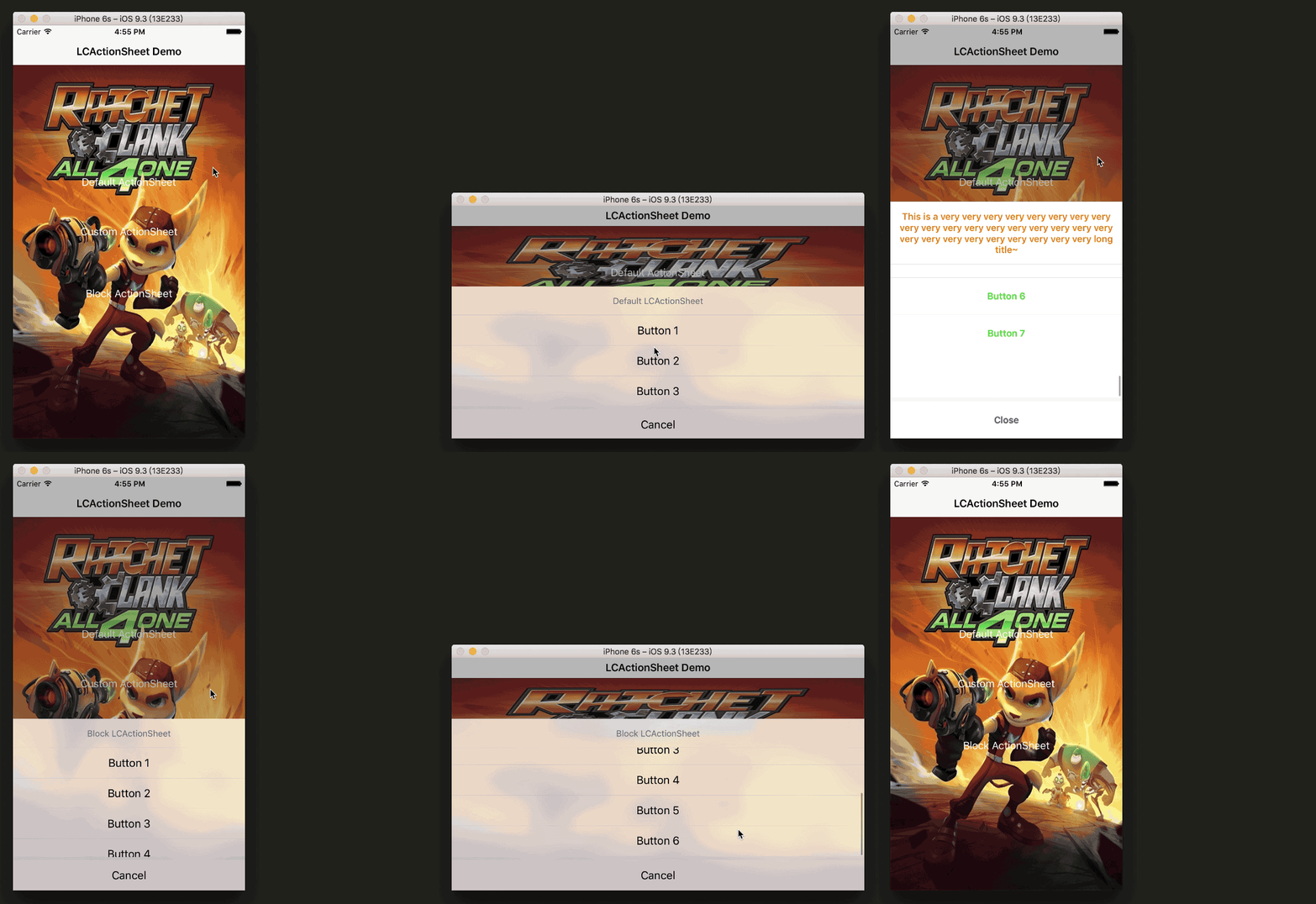
如果上图没打开,直接前往 Demo 图地址。
In me the tiger sniffs the rose.
心有猛虎,细嗅蔷薇。
欢迎访问我的博客:https://LeoDev.me
- 环境 Requirements
- 介绍 Introduction
- 使用 Usage
- 小伙伴们 Partners
- 版本 ChangeLog
- 提示 Tips
- 示例 Preview
- 鸣谢 Thanks
- 联系 Support
- 许可 License
- iOS 7.0+
- Xcode 7.0+
- Objective-C & Swift
☀️ 一款简约而不失强大的 ActionSheet,微博、微信和 QQ 都采用了极其类似的样式,完全支持 Swift。
-
iOS 7.0 +,Demo 需要 CocoaPods 环境运行。
-
格调高雅,风格百搭,看起来还算不丑。
-
高度自定义,可能需要自定义的基本都考虑到了。详见 LCActionSheet Properties 部分。
-
有代理,有 Block,可类方法,可实例方法,想怎样,就怎样。
-
代理、Block 非常完善,从 will 到 did 都有,详见 LCActionSheet Delegate & Block 部分。
-
支持统一配置 Config,作用于全局样式,告别冗余代码,更易维护,详见 V 2.7.0。
-
适配 iPad,支持横屏,支持竖屏,支持一会横屏一会竖屏,支持超长标题,理论上支持无数个按钮,统统支持。
-
注释完整,代码风格较为良好,善意满满,便于阅读源码,照顾强迫症,拓展更多功能请前往 PR。
-
(削除) 就不黑状态栏,就是这么刚。 (削除ここまで)已黑。
💬 告示
英文还不错时间又充裕的同学可以帮我翻译出 README 的英文版,我好往 CocoaControls 上扔啊~
可白文翻译,使用 Markdown 编辑更佳!义务的哦,如果翻译用心的话我个人请你杯咖啡 ☕️!
直接 PR 或者发我邮箱
echo bGVvZGF4aWFAZ21haWwuY29tCg== | base64 -D都可!
-
两种导入方法:
-
方法一:CocoaPods:
pod 'LCActionSheet' -
方法二:直接把 LCActionSheet 文件夹(在 Demo 中)拖拽到你的项目中
-
-
在相应位置导入头文件:
#import <LCActionSheet/LCActionSheet.h>,(可选)遵守协议<LCActionSheetDelegate> -
调用下列任意方法即可:
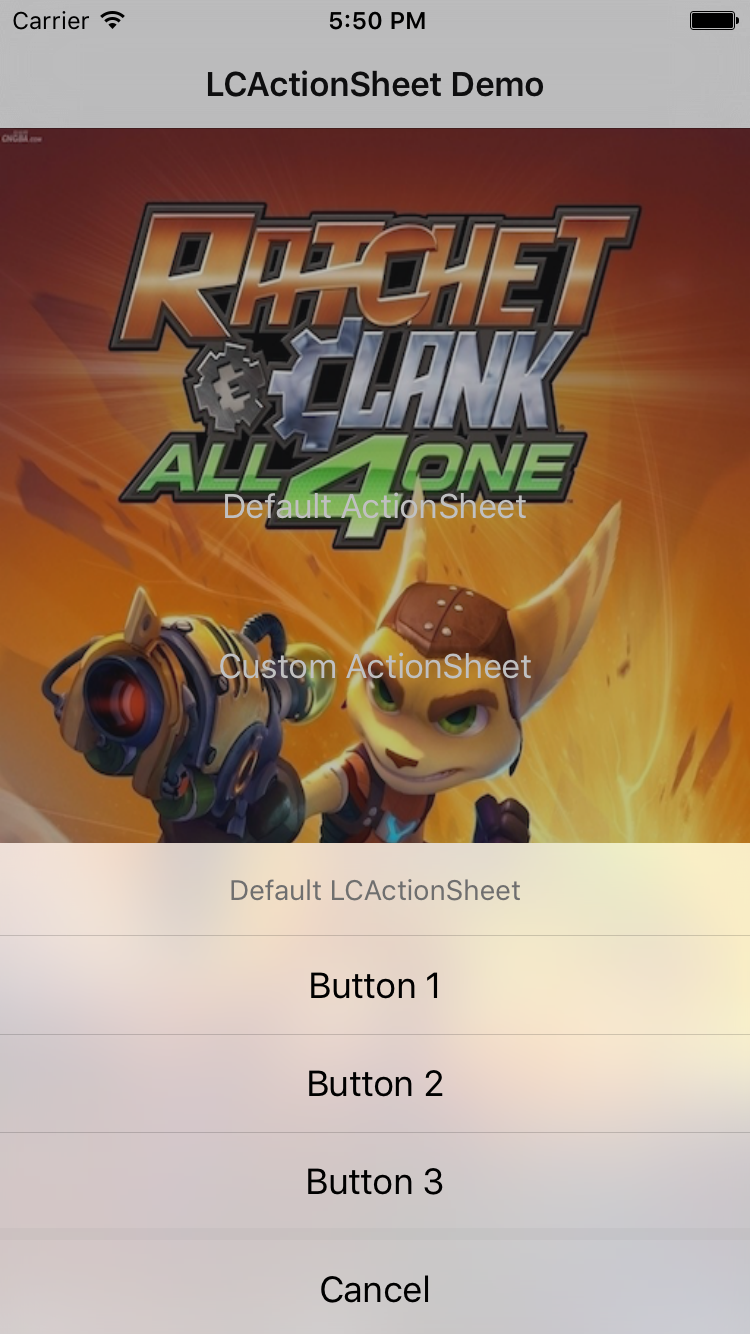
- 默认样式,初始化 +
show,两行搞定
LCActionSheet *actionSheet = [LCActionSheet sheetWithTitle:@"Default LCActionSheet"
 delegate:self
 cancelButtonTitle:@"Cancel"
 otherButtonTitles:@"Button 1", @"Button 2", @"Button 3", nil];
[actionSheet show];
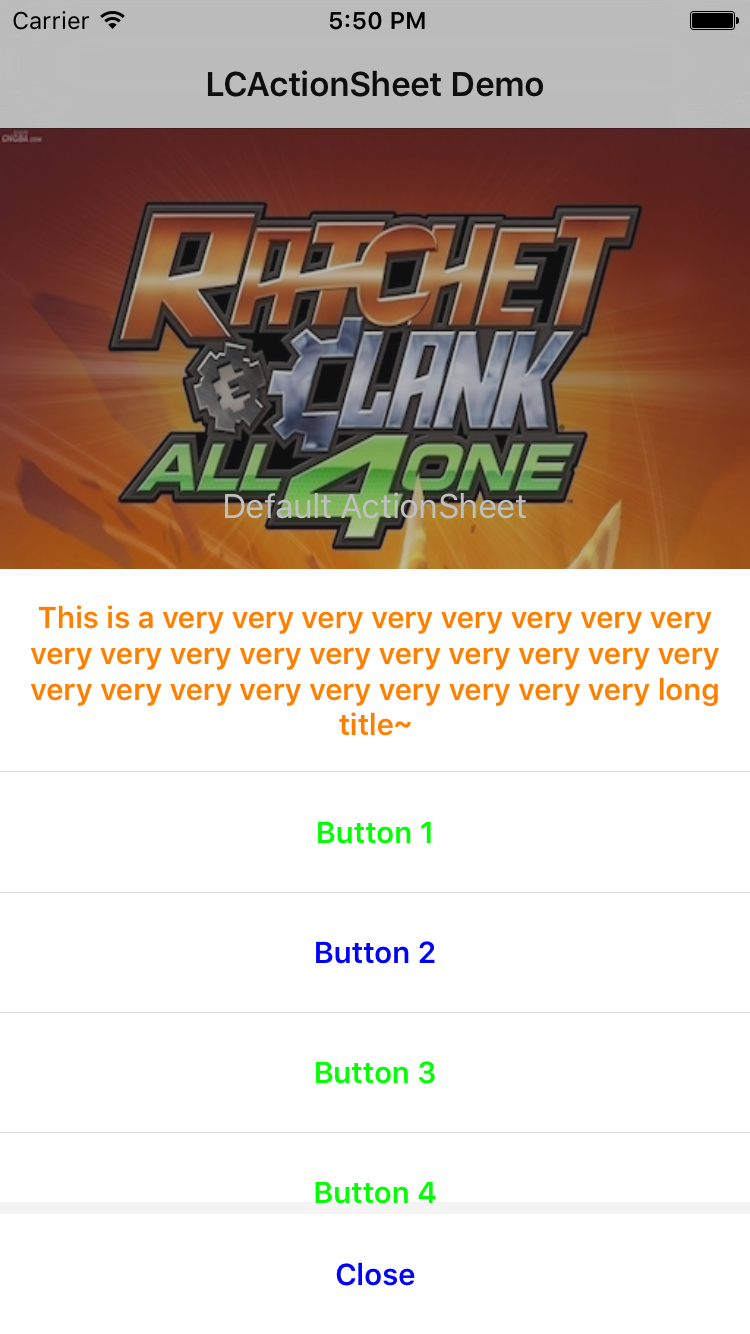
- 其他可自定义项,LCActionSheet.h 中有完整注释
LCActionSheet *actionSheet = [[LCActionSheet alloc] initWithTitle:nil
 delegate:self
 cancelButtonTitle:@"Cancel"
 otherButtonTitles:@"Button 1", @"Button 2", @"Button 3", @"Button 4", @"Button 5", nil];
actionSheet.title = @"This is a very very very very very very very very very very very very very very very very very very very very very very very very very very very long title~";
actionSheet.cancelButtonTitle = @"Close";
[actionSheet appendButtonTitles:@"Button 6", @"Button 7", nil];
actionSheet.titleColor = [UIColor orangeColor];
actionSheet.buttonColor = [UIColor greenColor];
actionSheet.titleFont = [UIFont boldSystemFontOfSize:15.0f];
actionSheet.buttonFont = [UIFont boldSystemFontOfSize:15.0f];
actionSheet.buttonHeight = 60.0f;
actionSheet.scrolling = YES;
actionSheet.visibleButtonCount = 3.6f;
actionSheet.darkViewNoTaped = YES;
actionSheet.unBlur = YES;
actionSheet.blurEffectStyle = UIBlurEffectStyleLight;
NSMutableIndexSet *indexSet = [[NSMutableIndexSet alloc] init];
[indexSet addIndex:0];
[indexSet addIndex:2];
actionSheet.destructiveButtonIndexSet = indexSet;
actionSheet.destructiveButtonColor = [UIColor blueColor];
// V 2.7.0+
actionSheet.titleEdgeInsets = UIEdgeInsetsMake(10, 20, 30, 40);
// V 2.7.1+
actionSheet.separatorColor = [UIColor orangeColor];
// V 3.1.0+
actionSheet.autoHideWhenDeviceRotated = YES;
dispatch_after(dispatch_time(DISPATCH_TIME_NOW, 2 * NSEC_PER_SEC), dispatch_get_main_queue(), ^{
 // [actionSheet appendButtonWithTitle:@"WoW" atIndex:7];

 NSMutableIndexSet *set = [[NSMutableIndexSet alloc] init];
 [set addIndex:1];
 [set addIndex:2];
 [actionSheet appendButtonsWithTitles:@[@"Hello", @"World"] atIndexes:set];
});
[actionSheet show];
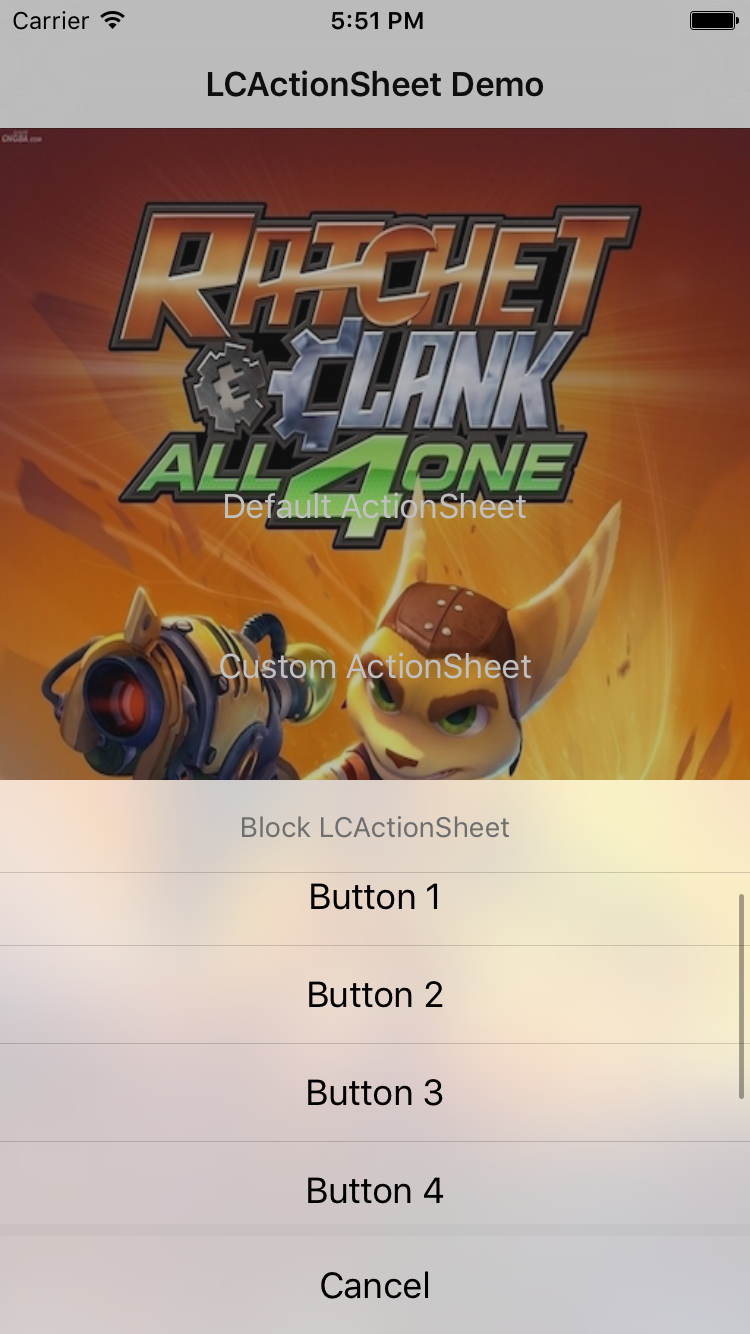
- Block
// Clicked callback
LCActionSheet *actionSheet = [LCActionSheet sheetWithTitle:@"Block LCActionSheet" cancelButtonTitle:@"Cancel" clicked:^(LCActionSheet *actionSheet, NSInteger buttonIndex) {

 NSLog(@"clickedButtonAtIndex: %d", (int)buttonIndex);

} otherButtonTitles:@"Button 1", @"Button 2", @"Button 3", @"Button 4", @"Button 5", @"Button 6", nil];
// Did dismiss callback
LCActionSheet *actionSheet = [LCActionSheet sheetWithTitle:@"Block LCActionSheet" cancelButtonTitle:@"Cancel" didDismiss:^(LCActionSheet *actionSheet, NSInteger buttonIndex) {

 NSLog(@"didDismissWithButtonIndex: %d", (int)buttonIndex);

} otherButtonTitles:@"Button 1", @"Button 2", @"Button 3", @"Button 4", @"Button 5", @"Button 6", nil];
// actionSheet.blurEffectStyle = UIBlurEffectStyleLight;
actionSheet.scrolling = YES;
actionSheet.visibleButtonCount = 3.6f;
actionSheet.willPresentBlock = ^(LCActionSheet *actionSheet) {
 NSLog(@"willPresentActionSheet");
};
actionSheet.didPresentBlock = ^(LCActionSheet *actionSheet) {
 NSLog(@"didPresentActionSheet");
};
actionSheet.willDismissBlock = ^(LCActionSheet *actionSheet, NSInteger buttonIndex) {
 NSLog(@"willDismissWithButtonIndex: %d", (int)buttonIndex);
};
actionSheet.didDismissBlock = ^(LCActionSheet *actionSheet, NSInteger buttonIndex) {
 NSLog(@"didDismissWithButtonIndex: %d", (int)buttonIndex);
};
[actionSheet show];
- Delegate,可选实现
#pragma mark - LCActionSheet Delegate
- (void)actionSheet:(LCActionSheet *)actionSheet clickedButtonAtIndex:(NSInteger)buttonIndex {
 NSLog(@"clickedButtonAtIndex: %d", (int)buttonIndex);
}
- (void)willPresentActionSheet:(LCActionSheet *)actionSheet {
 NSLog(@"willPresentActionSheet");
}
- (void)didPresentActionSheet:(LCActionSheet *)actionSheet {
 NSLog(@"didPresentActionSheet");
}
- (void)actionSheet:(LCActionSheet *)actionSheet willDismissWithButtonIndex:(NSInteger)buttonIndex {
 NSLog(@"willDismissWithButtonIndex: %d", (int)buttonIndex);
}
- (void)actionSheet:(LCActionSheet *)actionSheet didDismissWithButtonIndex:(NSInteger)buttonIndex {
 NSLog(@"didDismissWithButtonIndex: %d", (int)buttonIndex);
}
- 默认样式,初始化 +
-
V 2.7.0+ 新增 LCActionSheetConfig 类,用来统一配置 LCActionSheet 的样式(参数)。LCActionSheetConfig 提供一个单例,你应该在首次初始化 LCActionSheet 之前配置该单例以统一配置 LCActionSheet,当然,你初始化单个 LCActionSheet 实例后,还可以对其进行可覆盖的属性设置,并且不会影响到 LCActionSheetConfig。示例代码如下:
// 统一配置 Config 作用于全局样式, 每个属性的默认值可以在 LCActionSheetConfig 中查看
LCActionSheetConfig *config = LCActionSheetConfig.config;
config.title = @"Common Title";
config.cancelButtonTitle = @"Close";
config.titleColor = [UIColor orangeColor];
config.buttonColor = [UIColor greenColor];
config.titleFont = [UIFont boldSystemFontOfSize:15.0f];
config.buttonFont = [UIFont boldSystemFontOfSize:15.0f];
config.buttonHeight = 60.0f;
config.scrolling = YES;
config.visibleButtonCount = 3.6f;
config.darkViewNoTaped = YES;
config.unBlur = YES;
config.blurEffectStyle = UIBlurEffectStyleDark;
NSMutableIndexSet *indexSet = [[NSMutableIndexSet alloc] init];
[indexSet addIndex:0];
[indexSet addIndex:2];
config.destructiveButtonIndexSet = indexSet;
config.destructiveButtonColor = [UIColor blueColor];
// 初始化 LCActionSheet, 与之前的初始化没有区别, 框架内会根据 Config 初始化
LCActionSheet *sheet =
[[LCActionSheet alloc] initWithTitle:nil
 delegate:self
 cancelButtonTitle:@"Cancel"
 otherButtonTitles:@"Button 1", @"Button 2", @"Button 3", nil];
// 如果当前样式与全局样式不同, 可以继续修改参数...
sheet.titleColor = [UIColor orangeColor];
[sheet show];
-
Using LCActionSheet in Swift:
LCActionSheet(title: "Sign Out", cancelButtonTitle: "Cancel", clicked: { (actionSheet, buttonIndex) in
 if buttonIndex != actionSheet.cancelButtonIndex {
 // TODO: Enter login page...
 }
}, otherButtonTitleArray: ["Sign Out"]).then {
 0ドル.destructiveButtonIndexSet = [1]
}.show()
Syntactic sugar: Then
你可以在这里查看本框架的部分集成统计:CocoaPods 统计。
下表列举了集成本框架的部分项目:
| 名称 | 简介 |
|---|---|
| 造物国 | 与世界分享你的眼光 |
| 咕咕 | 短视频社交 |
| 见信 | 视频共享社交 |
| PrPr直播 | 二次元直播平台 |
| 德玛西亚 | 英雄联盟© 周边 App |
| 揽梦云签 | 考勤打卡 + 移动办公 |
| ... | ... |
注:本框架开源且不含任何信息上传功能代码,上表仅用作统计和效果参考,如果你的项目中使用了本框架并希望加入上表,请发邮件到 leodaxia@gmail.com 或者 New Issue 告诉我你的应用名称和应用链接,我会尽快添加 :)
V 3.2.2 (2017年05月12日)
V 3.2.1 (2017年04月28日)
- 修复 UIWindow 引起的横屏适配问题。#36 by MourinhoLove。
V 3.2.0 (2017年04月27日)
-
思来想去,还是恢复了"黑"状态栏的样式。现在 LCActionSheet 实例将会在调用
show方法时,新建一个 UIWindow 实例并makeKeyAndVisible,然后把 LCActionSheet 实例添加到该 UIWindow 实例之上。之前的逻辑是直接把 LCActionSheet 实例添加到 AppDelegate 的 keyWindow 上面。显然的,现在状态栏将会被灰色背景一块"黑"掉。
-
新增下列方法,
didDismiss回调能很方便地满足在 LCActionSheet hide 时,需要在原 keyWindow 上操作的需求:@interface LCActionSheet : UIView // Initialize an instance of LCActionSheet (Block). + (instancetype)sheetWithTitle:(nullable NSString *)title cancelButtonTitle:(nullable NSString *)cancelButtonTitle didDismiss:(nullable LCActionSheetDidDismissHandler)didDismissHandler otherButtonTitles:(nullable NSString *)otherButtonTitles, ... NS_REQUIRES_NIL_TERMINATION; // Initialize an instance of LCActionSheet with title array (Block). + (instancetype)sheetWithTitle:(nullable NSString *)title cancelButtonTitle:(nullable NSString *)cancelButtonTitle didDismiss:(nullable LCActionSheetDidDismissHandler)didDismissHandler otherButtonTitleArray:(nullable NSArray<NSString *> *)otherButtonTitleArray; // Initialize an instance of LCActionSheet (Block). - (instancetype)initWithTitle:(nullable NSString *)title cancelButtonTitle:(nullable NSString *)cancelButtonTitle didDismiss:(nullable LCActionSheetDidDismissHandler)didDismissHandler otherButtonTitles:(nullable NSString *)otherButtonTitles, ... NS_REQUIRES_NIL_TERMINATION; // Initialize an instance of LCActionSheet with title array (Block). - (instancetype)initWithTitle:(nullable NSString *)title cancelButtonTitle:(nullable NSString *)cancelButtonTitle didDismiss:(nullable LCActionSheetDidDismissHandler)didDismissHandler otherButtonTitleArray:(nullable NSArray<NSString *> *)otherButtonTitleArray; @end
V 3.1.1 (2017年04月26日)
-
新增属性:
@interface LCActionSheetConfig : NSObject
// LCActionSheetConfig shared instance.
@property (class, nonatomic, strong, readonly) LCActionSheetConfig *config;
@end
-
下列方法已不推荐使用,建议使用新的属性代替:
@interface LCActionSheetConfig : NSObject
// LCActionSheetConfig shared instance.
+ (instancetype)shared __deprecated_msg("Method deprecated. Use property `config` instead.");
@end
V 3.1.0 (2017年04月26日) (⚠️ API Updated)
-
新增属性和方法:
@interface LCActionSheet : UIView
// Auto hide when the device rotated. Default is NO, won't auto hides.
@property (nonatomic, assign) BOOL autoHideWhenDeviceRotated;
// Append button at index with title.
- (void)appendButtonWithTitle:(nullable NSString *)title atIndex:(NSInteger)index;
// Append buttons at indexes with titles.
- (void)appendButtonsWithTitles:(NSArray<NSString *> *)titles atIndexes:(NSIndexSet *)indexes;
@end
-
修改属性类型:
@interface LCActionSheet : UIView
@property (nullable, nonatomic, strong) NSSet<NSNumber *> *destructiveButtonIndexSet;
// ->
@property (nullable, nonatomic, strong) NSIndexSet *destructiveButtonIndexSet;
@end
-
修改方法命名:
@interface LCActionSheet : UIView
- (void)appendButtonTitles:(nullable NSString *)buttonTitles, ... NS_REQUIRES_NIL_TERMINATION;
// ->
- (void)appendButtonsWithTitles:(nullable NSString *)titles, ... NS_REQUIRES_NIL_TERMINATION;
@end
V 3.0.0 (2017年04月24日) (⚠️ API Updated)
-
修改方法命名:
*Handle -> *Handler如:
LCActionSheetClickedHandle -> LCActionSheetClickedHandler
-
调整警示按钮默认颜色:
RGB(255, 10, 10) -> RGB(254, 67, 37)
V 2.7.6 (2017年04月16日)
-
修复 UIImage 类别中的方法名可能与其他库冲突的潜在问题。#33 by cwwise。
@interface UIImage (LCActionSheet)
+ (nullable instancetype)imageWithColor:(UIColor *)color;
// ->
+ (nullable instancetype)lc_imageWithColor:(UIColor *)color;
@end
-
修正 LCActionSheet 中部分方法的注释。
V 2.7.4 (2017年04月13日)
V 2.7.3 (2017年04月07日)
-
Nullability
参考:Nullability and Objective-C - Swift Blog - Apple Developer
-
Lightweight Generics
-
得益于 Nullability & Lightweight Generics,现在 LCActionSheet 将会更安全地完全融入 Swift。
V 2.7.2 (2017年01月06日)
V 2.7.1 (2017年01月03日)
-
新年快乐~
-
添加
separatorColor属性,默认值RGBA(170/255.0f, 170/255.0f, 170/255.0f, 0.5f),#30 by Abel94:@interface LCActionSheet : UIView @property (nonatomic, strong) UIColor *separatorColor; @end
V 2.7.0 (2016年11月29日)
-
新增 LCActionSheetConfig 类,用来统一配置 LCActionSheet 的样式(参数),使用方式见 Usage。#29 by Abel94。
-
添加
titleEdgeInsets属性,默认值UIEdgeInsetsMake(15.0f, 15.0f, 15.0f, 15.0f),#29 by Abel94:@interface LCActionSheet : UIView @property (nonatomic, assign) UIEdgeInsets titleEdgeInsets; @end
-
重写 LCActionSheet 初始化逻辑。
-
重写线条和阴影效果,采用加载颜色而不是加载图片的方式。
V 2.6.3 (2016年11月28日)
V 2.6.2 (2016年11月23日)
- 修复更换按钮颜色对取消按钮失效的 Bug。
V 2.6.1 (2016年11月22日)
- 优化标题为空时的效果。
V 2.6.0 (2016年10月22日)
-
修复取消按钮不显示时 UI 上的一个 Bug。另外你可以通过设置
cancelButtonTitle为nil或@""来不显示取消按钮,这是一个 Tip,并不是一个 Feature。。。 -
修正一些逻辑:
-
cancelButtonIndex始终返回0。 -
除取消按钮以外的按钮自上而下 Index 从 1 递增。也就是说,无论取消按钮是否显示,Index 0 始终会被取消按钮占有。
-
V 2.5.2 (2016年09月23日)
-
(削除) 注: 因 CocoaPods 对 Xcode 8 的一些问题(Issue 5661、Issue 5843...),暂时无法推到 CocoaPods Repo,你需要在 Podfile 进行如下的修改,直接指向当前版本即可: (削除ここまで)# 不需要了,作者借了个带 Xcode 7 的电脑去更新了。。。 pod 'LCActionSheet' # , :git => 'https://github.com/iTofu/LCActionSheet.git'
-
修复一个影响用户体验的效果,详见:Issue 25。
-
完善剩下的部分注释,主要是 Block 部分。
V 2.5.1 (2016年09月08日)
- 修复一个更换字体失效的 Bug。
V 2.5.0 (2016年09月05日 ⚠️ 属性名变化)
-
添加
cancenButtonIndex属性,始终返回0:@interface LCActionSheet : UIView @property (nonatomic, assign, readonly) NSInteger cancelButtonIndex; @end
-
修改 Block 属性命名:
@interface LCActionSheet : UIView
@property (nonatomic, copy) LCActionSheetClickedBlock clickedBlock;
@property (nonatomic, copy) LCActionSheetWillPresentBlock willPresentBlock;
@property (nonatomic, copy) LCActionSheetDidPresentBlock didPresentBlock;
@property (nonatomic, copy) LCActionSheetWillDismissBlock willDismissBlock;
@property (nonatomic, copy) LCActionSheetDidDismissBlock didDismissBlock;
// ->
@property (nonatomic, copy) LCActionSheetClickedHandle clickedHandle;
@property (nonatomic, copy) LCActionSheetWillPresentHandle willPresentHandle;
@property (nonatomic, copy) LCActionSheetDidPresentHandle didPresentHandle;
@property (nonatomic, copy) LCActionSheetWillDismissHandle willDismissHandle;
@property (nonatomic, copy) LCActionSheetDidDismissHandle didDismissHandle;
@end
V 2.3.3 (2016年08月16日)
-
修复设置
actionSheet.unBlur = YES;后背景透明的 Bug。 -
完善注释,移除无用类。
V 2.3.2 (2016年08月16日)
-
可以自定义 blurEffectStyle:
@interface LCActionSheet : UIView
@property (nonatomic, assign) UIBlurEffectStyle blurEffectStyle;
@end
V 2.3.1 (2016年08月15日)
- 静态渲染模糊改为模糊蒙板。
V 2.3.0 (2016年08月11日)
-
重新实现 V 1.x 的方法,允许使用数组而不必须是多参数来设置按钮标题:
#pragma mark Delegate
+ (instancetype)sheetWithTitle:(NSString *)title
 delegate:(id<LCActionSheetDelegate>)delegate
 cancelButtonTitle:(NSString *)cancelButtonTitle
 otherButtonTitleArray:(NSArray *)otherButtonTitleArray;
- (instancetype)initWithTitle:(NSString *)title
 delegate:(id<LCActionSheetDelegate>)delegate
 cancelButtonTitle:(NSString *)cancelButtonTitle
 otherButtonTitleArray:(NSArray *)otherButtonTitleArray;
#pragma mark Block
+ (instancetype)sheetWithTitle:(NSString *)title
 cancelButtonTitle:(NSString *)cancelButtonTitle
 clicked:(LCActionSheetClickedBlock)clickedBlock
 otherButtonTitleArray:(NSArray *)otherButtonTitleArray;
- (instancetype)initWithTitle:(NSString *)title
 cancelButtonTitle:(NSString *)cancelButtonTitle
 clicked:(LCActionSheetClickedBlock)clickedBlock
 otherButtonTitleArray:(NSArray *)otherButtonTitleArray;
-
优化一些 UI 效果,主要是高亮状态的效果。
V 2.2.0 (2016年07月27日)
- 添加高斯模糊效果(可选),Issue 19 by guanzhendong。
V 2.1.1 (2016年07月19日)
- 完善部分注释,注明需要注明的属性的默认值。
V 2.1.0 (2016年07月19日)
-
destructiveButtonColor // 警示按钮颜色 -
修改一个属性命名:
// 与 UIActionSheet 命名保持一致,便于顺手敲出
// V 2.1.0 给予 redButtonIndexSet 过期警告,下一版本将会移除该属性
redButtonIndexSet -> destructiveButtonIndexSet
V 2.0.0 (2016年07月16日, ⚠️ Important)
V 1.2.3 (2016年04月05日)
- 更新 CocoaPods 源地址。
V 1.2.0 (2016年03月07日)
-
合并 PR by apache2046,致谢!
Swift bug fixed
mainBundle 这种方法无法在将 LCActionSheet 作为 Framework 时正确找到资源包路径
V 1.1.5 (2016年02月17日)
V 1.1.3 (2015年12月16日)
-
合并 PR by zachgenius,致谢!
增加了一些功能实现,如增加自定义添加按钮的方法,增加按钮本地化,增加自定义按钮颜色,并且优化逻辑。
-
V 1.1.2 被怪物吃掉了!👹
V 1.1.1 (2015年12月09日)
- 标题支持最多两行。两行时会适当调整标题的背景高度。
V 1.1.0 (2015年12月07日)
-
要 Block?满足你!
-
优化逻辑:创建 ActionSheet 时,不再添加到 window 上。
V 1.0.6 (2015年11月09日)
-
添加对 CocoaPods 的支持:
pod 'LCActionSheet'
V 1.0.0 (2015年07月21日)
-
修复:新添加的 _backWindow 在某些情况下导致界面无反应的BUG。——by kuanglijun312
-
修复:当 StatusBarStyle 为 UIStatusBarStyleLightContent 时,背景不会遮挡 statusBar 的问题。——by 陈威
-
增加了类方法,可以通过类方法实例化 actionSheet。
-
完善部分注释。
-
LCActionSheet 会被添加到新建的 UIWindow 实例之上,已适配横屏。
-
可自定义 title、buttons、destructiveButtons、cancelButton、titleColor、titleFont、buttonColor、buttonFont、canScrolling 等等,详见 LCActionSheet.h。
-
cancelButtonIndex始终返回0,除取消按钮以外的按钮自上而下 Index 从 1 递增。也就是说,无论取消按钮是否显示,Index 0 始终会被取消按钮占有。 -
scrolling 属性控制按钮过多时,是否可以滚动,默认 NO,不可滚动。visibleButtonCount 属性控制可见的按钮个数,可以是小数,必须先设置 scrolling = YES 才生效。tableView 的 scrollsToTop 属性依然可用,可点击状态栏快速滚回顶部。
LCActionSheet LCActionSheet LCActionSheet
-
有疑问或建议请 New Issue,谢谢 :)
-
Mail:
echo bGVvZGF4aWFAZ21haWwuY29tCg== | base64 -D -
Blog: https://LeoDev.me
-
捐赠:
-
PayPal:
-
支付宝或微信:
Donate with Alipay or Wechat Pay
注:(一本正经状)捐赠并不会解锁额外功能。
-
LCActionSheet is released under the MIT License.