- Go 99.6%
- Shell 0.3%
- Makefile 0.1%
Fern
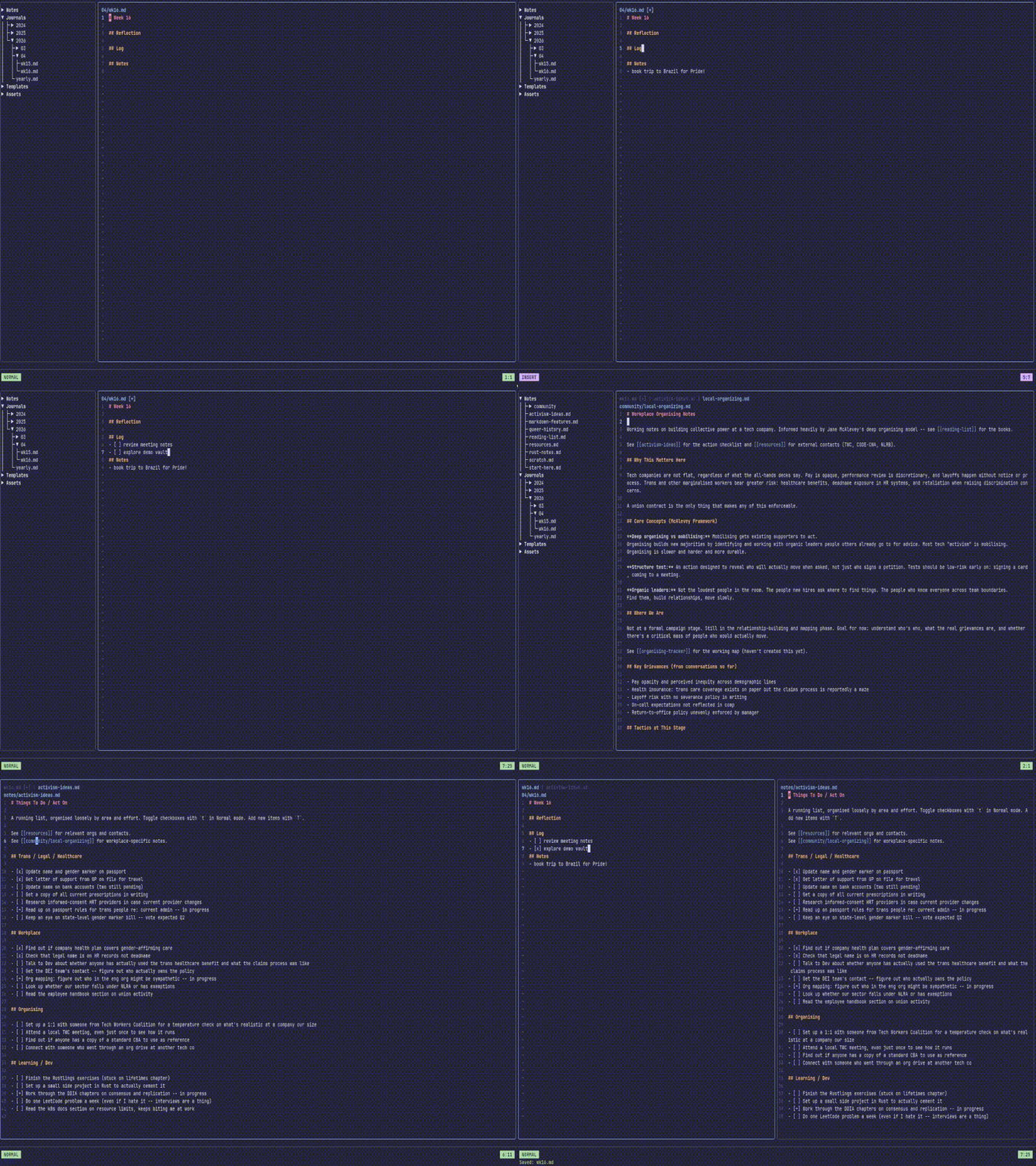
A vim-style markdown notebook for the terminal. Create and manage notes, daily journals, and templates in a local vault with full-text search, wikilinks, and a keyboard-driven interface, all without leaving your shell. Your data stays private on your machine. No cloud. No account required.
Features
- Vim-like editing modes: Normal, Insert, Replace, and Visual modes with an indicator in the command bar
- Notes, Journals & Templates: daily, weekly, monthly, and yearly journal entries; templates to keep new notes consistent
- Wikilinks & Markdown links: links are automatically rewritten when notes are renamed. No more dead links!
- Full-text search: regex-compatible search across your entire vault (
/) - Command palette: fuzzy-searchable palette for quick access to all commands (
ctrl+p) - Collapsible sidebar tree: tree directory over Notes, Journals, and Templates subfolders (
ctrl+b) - Tabs & split panes: open multiple notes side-by-side or in tabs, move tabs between panes
- Bookmarks: save and re-open important tabs quickly
- Themes: comes with a set of popular themes, pride flag themes, & support for your own custom JSON themes. Add them in a PR for others to enjoy too!
- Configurable keybindings: remap any action shortcuts in User config file
- Multiple vaults: create and switch between vaults on the fly
- Local-first: no telemetry, no cloud sync service; runs well on resource-constrained systems
- UI Supports Multiple Languages: Use Fern in the language you're most comfortable with. Don't see your language? Help out with translations or open a ticket.
Installation
Binary Releases
For Windows, Mac OS(10.12+) or Linux, you can download a pre-built binary release here.
Homebrew (macOS and Linux)
brew tap InodeLabs/tap https://codeberg.org/InodeLabs/homebrew-tap
brew install --cask fern
Scoop (Windows)
scoop bucket add InodeLabs https://codeberg.org/InodeLabs/scoop-bucket
scoop install fern
Linux packages (DEB / RPM)
Pre-built .deb and .rpm packages are available on the releases page.
# Debian / Ubuntu
sudo dpkg -i fern_*.deb
# Fedora / RHEL / openSUSE
sudo rpm -i fern_*.rpm
# or with dnf:
sudo dnf install fern_*.rpm
Go
go install codeberg.org/InodeLabs/fern@latest
NOTE: If you get an error that fern cannot be found or that it is not defined, you may need to add ~/go/bin to your $PATH (for macOS/Linux). On Windows, add %HOME%\go\bin, not to be confused with C:\Go\bin, which is for Go's own binaries, not apps like fern.
Manual
You will need to have Go installed first.
git clone https://codeberg.org/InodeLabs/fern
cd fern
go install
Using Fern
Run fern in your terminal to launch the TUI. On first run you will be prompted to set up a new vault or point Fern at an existing one.
Try the Demo Vault!
Meet Fern(she/her). She's a transfem 🏳️⚧️, tech worker 👩🏽💻 who is just trying to keep her head above water and get organised in today's crazy world. Good thing she has Fern! Her vault* contains some example notes (cross-linked), along with sample journals, templates, and bookmarks. This demo vault can be found in the demo folder (I'm not so creative in names, sorry). For an orientation to the Vault and a tour of some of Fern's main features, open the start-here.md in the sidebar, under the Notes section! Have fun and explore all of Fern's features without needing to set up a new vault or touch any of your existing notes.
After installing Fern, you can load it:
- From the CLI: by running
fern open ./demo - From inside Fern: by running the
vaultLoadcommand::vaultLoad ./demo
*All notes, journals, etc are purely fictional. McBoatface is not a real politician, to my knowledge!
Command Bar
Press : from anywhere outside of Insert/Replace mode to open the command bar. Commands support tab-completion and do the same things as their palette equivalents. New command features usually land here first.
Notes
| Command | Action |
|---|---|
:noteOpen <name> |
Open a note |
:noteAdd <name> |
Create a new note |
:noteRename <name> |
Rename the current note |
:noteDelete |
Delete the current note |
Journals
| Command | Action |
|---|---|
:journalOpen <ref> |
Open a journal entry (today, yesterday, tomorrow, this-week, last-week, next-week, this-month, last-month, this-year, last-year, or a date like 2025年03月15日) |
:journalReview day|week|month|year |
Open a period's journal entries |
:journalDelete <ref> |
Delete a journal entry |
Templates
| Command | Action |
|---|---|
:templateAdd <name> |
Create a new template |
:templateOpen <name> |
Open a template |
:templateRename <name> |
Rename a template |
:templateDelete <name> |
Delete a template |
Bookmarks
| Command | Action |
|---|---|
:bookmarkAdd <name> |
Bookmark the current tab |
:bookmarkEdit |
Edit all bookmarks |
:bookmarkOpen <name> |
Open a bookmarked tab |
Vaults
| Command | Action |
|---|---|
:vaultLoad <name> |
Load a vault |
:vaultCreate <path> |
Create a new vault |
File & Search
| Command | Action |
|---|---|
:search <query> |
Full-text search vault (regex compatible) |
:w |
Save |
:wq |
Save and quit |
:q / :q! |
Quit / force quit |
:reload |
Reload file from disk |
:recover |
Recover from swap file after a crash |
Configuration
Fern reads its config from ~/.config/fern/config (or$XDG_CONFIG_HOME/fern/config). The file is created automatically on first run with every option present and commented out. Uncomment and edit any line to override the default. Additionally, there are vault-level configuration files (stored in a folder .fern/config inside each vault) that overrides global user settings, allowing for vault-specific configurations that travel with your vault.
Keybindings
All bindings are customisable in the user config file. The defaults are shown below. If they are too vim-y, make them emacs-y. Hate both those? Do something totally different! Got an idea for a shortcut? Please reach out!
Navigation
| Key | Action |
|---|---|
Tab / Shift+Tab |
Cycle focus between sidebar and viewer |
ctrl+b |
Toggle sidebar |
ctrl+p |
Command palette |
ctrl+e |
Toggle Mode View <--> Edit(Normal) |
/ |
Search vault |
: |
Open command bar |
? |
Help (keybinding reference in-app) |
ctrl+q |
Quit |
Sidebar
| Key | Action |
|---|---|
j / k |
Move cursor down / up |
l / → / Space |
Expand directory |
h / ← |
Collapse directory or jump to parent |
Enter |
Toggle directory / open file |
1 |
Jump to Notes section |
2 |
Jump to Journals section |
3 |
Jump to Templates section |
View Mode
| Key | Action |
|---|---|
j / k |
Scroll down / up |
ctrl+d / ctrl+u |
Half-page down / up |
gg |
Go to top |
G |
Go to bottom |
l / → |
Expand fold |
h / ← |
Collapse fold |
Normal Mode (edit)
| Key | Action |
|---|---|
h / j / k / l or arrow keys |
Move cursor left / down / up / right |
ctrl+← / ctrl+→ |
Word backward / forward |
0 / $ |
Start / end of line |
gg / G |
Top / bottom |
ctrl+d / ctrl+u |
Half-page down / up |
i |
Insert mode (before cursor) |
a |
Insert mode (after cursor) |
I |
Insert mode at first non-blank character |
A |
Insert mode at end of line |
R |
Replace mode (overwrite characters) |
o / O |
New line below / above, enter Insert mode |
r |
Replace single character |
x |
Delete character under cursor |
dd / dw |
Delete line / word |
cw / cW |
Change word |
u / ctrl+z |
Undo |
ctrl+r / ctrl+y |
Redo |
v / V |
Visual / Visual-line mode |
p / ctrl+v |
Paste from register |
t |
Toggle checkbox state |
T |
Insert a new checkbox |
gf |
Open link under cursor |
ctrl+e |
Back to View mode |
Insert Mode
| Key | Action |
|---|---|
Insert |
Toggle to Replace mode |
Tab |
Insert tab (respects tab_spaces config) |
Enter |
New line (auto-continues lists) |
ctrl+s |
Save and return to Normal mode |
Esc |
Return to Normal mode (without saving) |
Replace Mode
Replace mode overwrites characters in place as you type, like pressing
Insert in most editors.
| Key | Action |
|---|---|
Insert |
Toggle to Insert mode |
Backspace |
Delete previous character |
ctrl+s |
Save and return to Normal mode |
Esc |
Return to Normal mode |
Visual Mode
| Key | Action |
|---|---|
y / ctrl+c |
Yank (copy) selection |
d / x |
Cut selection |
c |
Change (cut and enter Insert mode) |
r |
Replace selection with next typed character |
s |
Search vault for selected text |
v / V |
Switch between character / line selection |
Esc |
Cancel (return to Normal mode) |
Tabs & Split Panes
Tabs
| Key | Action |
|---|---|
[ / ] |
Previous / next tab |
{ / } |
Move tab left / right |
ctrl+w |
Close active tab |
Split Panes
| Key | Action |
|---|---|
ctrl+w v |
Split pane vertically |
ctrl+w s |
Split pane horizontally |
ctrl+w q / ctrl+w c |
Close the active pane |
ctrl+h / j / k / l |
Move focus to pane left / down / up / right |
alt+h / j / k / l |
Move active tab to adjacent pane |
Project Roadmap
Here's a near-term list of things, and very-rough release plan, for features I'm hoping to work on adding to Fern:
v1.2
- Update Settings in-app: No more fiddling with configuration files (if you don't want to that is). Thinking a modal with two tabs for Global(user) & Vault settings.
- Improved Templating Engine: Templating engine should support incrementing values/dates when building a note from a template
- Expand Language Support: Get starting translations of basic nouns/verbs for all existing "stub" languages (add German) from Google Translate, so that they are semi-usable
v1.3
- Copy Note Command: Copy an existing Note to a new Note
- Intelligent Indenting: All sub-items change indentation as well in the same direction as the parent item/bullet (optional setting)
v1.4
- Visualize your Vault's Graph: Have a way to export your vault's notes/journals connections graph.
- Right sidebar: could hold note/vault stats, outbound and inbound links for the active note, etc. I'm all ears if you have ideas for what could/should live in this space!
v1.5
And mor! Open an issue for any features you want to see!
To Contributors
We use golangci-lint and gocyclo as part of our Git pre-commit hook
flow and for formatting and linting via the Makefile.
Please ensure you have both installed:
# golanci-lint Docs: https://golangci-lint.run/docs/welcome/install/local/
curl -sSfL https://golangci-lint.run/install.sh | sh -s -- -b $(go env GOPATH)/bin latest
# gocyclo Docs: https://github.com/fzipp/gocyclo
go install github.com/fzipp/gocyclo/cmd/gocyclo@latest
Found a bug? Got an idea for a new feature?
Please open a ticket at https://codeberg.org/InodeLabs/fern/issues.