- GDScript 100%
| addons/inputty | Rebinding UI now prompts user before quitting with unsaved changes, added signal for exiting, hid actions beginning with underscore, fixed rebind ui showing previously unapplied changes | |
| .gitattributes | minor changes to prep for submitting to the godot asset library | |
| .gitignore | Initial commit | |
| icon.svg | Adjustments to conform to godot asset library standards | |
| LICENSE | Initial commit | |
| README.md | Update README.md | |

Inputty
An input wrapper for Godot (4.2.1+) to add some useful features
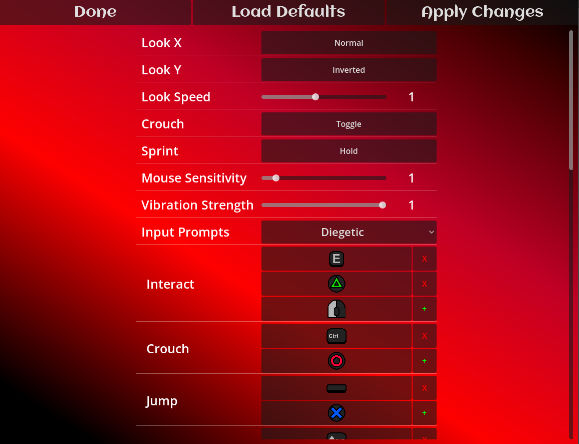
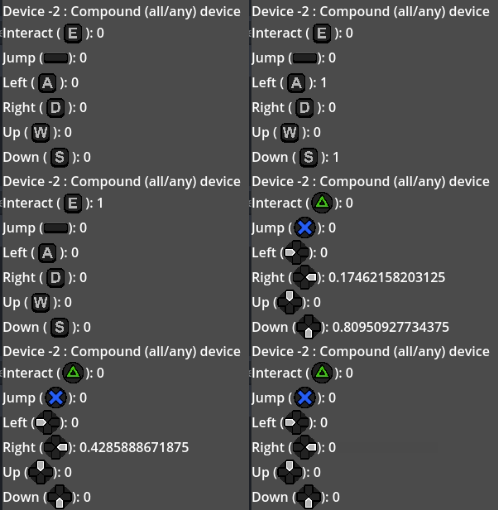
View of default Inputty Rebind UI, with various property settings and action inputs Gif showing alternating inputs from keyboard and gamepad, with prompt icons changing to match
Setup
- Copy the addons/inputty directory into your project folder
- Close and reopen your project
- Use 'Inputty' instead of 'Input' where appropriate in your scripts (or don't; the custom bindings will work either way)
Custom Binding
Add the Inputty/Rebind/InputtyRebindScene.tscn to your game, edit the InputRemap node's properties to change which actions are rebindable.
The InputRebind node has an "exit_requested" signal which is emitted when the user tries to leave the rebind scene, connect this to hide the rebinding UI and return the user to your game.
Custom Properties
Inputty Properties are user-customisable (in the rebind scene) properties that you can get in code with Inputty.get_property(). There are three types:
- InputtyPropertyBool for booleans (eg, toggle crouch, invert X)
- InputtyPropertyFloat for numbers (eg, look deadzone, mouse sensitivity)
- InputtyPropertyEnum for enumerations (eg, cam position left/center/right)
Create whatever property resources you want for your game, and add them to inputty_resources.tres so Inputty will work with them.
Slot/Device-based action input
You can optionally pass a device integer to all applicable action functions to mask out other devices. eg: Inputty.get_action_strength("Brake", 2) will give ONLY the brake input for the joypad in slot index 2.
You can also use Inputty.which_device_just_pressed("Join") as a way to get the input slot that just pressed the Join action.
For local multiplayer games, your player scripts can all be the same, but with a different slot passed to the input functions on each instance.
For reference, device slots are:
- -2 = any/all devices
- -1 = Keyboard & Mouse
- 0+ = connected joypads
Input display
For simple input prompts, attach the addons/inputty/Display/UI/InputtyPromptTextureRect.gd script to TextureRect nodes in your UI and specify which action to prompt.
To get a prompt from code, use Inputty.get_action_icon() or Inputty.get_action_prompt() to get an icon texture or text string for any given action.
If you want to use your own icons, check the inputty/Display/Sets/ directory, and make sure you update inputty_resources.tres if you change what sets are available.
Tick/Echo inputs
The function Inputty.is_action_just_ticked() works much like is_action_just_pressed(), however when held it will return true repeatedly after a delay. You can set the Inputty.gd script's tickDelayTime and tickRepeatTime properties to adjust this behaviour Note that keyboard inputs will likely already have echoed inputs so this is mostly for joypads.
Note
This system is provided as-is and I will probably be too busy to offer any support or maintain this beyond my own usage.
That said, it's CC0 so you're welcome to do literally whatever you like with it so feel free. I hope it's useful at least!
If you'd like to support me, please check out my patreon or Ko-fi
- Sophie