- C++ 66.3%
- Lua 29.1%
- Python 2.6%
- CMake 1%
- Shell 0.5%
- Other 0.4%
Widelands
Build Status AppVeyor Code Quality Build Mirrored on Launchpad
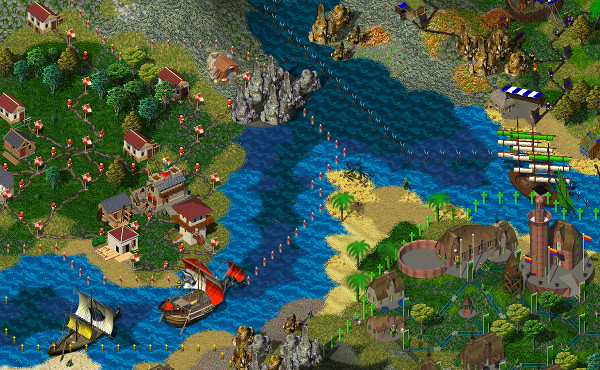
Widelands is a free, open source real-time strategy game with singleplayer campaigns and a multiplayer mode. The game was inspired by Settlers IITM (© Bluebyte) but has significantly more variety and depth to it.
License License
GPL v2+. Some assets are released under various Creative Commons licenses – see the respective folders.
Download
On how to download Widelands, see https://www.widelands.org/wiki/Download/
Compiling
We support compiling Widelands for Linux, Windows under MSys2 and MSVC, and MacOS with GCC >= 8 or Clang/LLVM >= 7, though it might work with other compilers too. We have more detailed documentation available at: https://www.widelands.org/wiki/BuildingWidelands/
Dependencies
You will need to install the following dependencies:
- libSDL >=2.0
- libSDL_image
- libSDL_mixer >= 2.0
- libSDL_ttf >= 2.0
- gettext
- libiconv (on same mirrors as gettext)
- zlib
- libpng
- Asio
- Python >= 1.5.2
- libglew or glbinding
Compiling with our convenience script
You can then compile by running our convenience script.
| Command | Purpose |
|---|---|
./compile.sh |
Full debug build |
./compile.sh -r -w |
Release build |
./compile.sh -e -w |
Release build with debugging symbols |
./compile.sh -h |
List available options |
When compiling has finished, you can call Widelands with
./widelands
Compiling with CMake
You can also call CMake manually:
mkdir build
cd build
cmake ..
make
When compiling has finished, you can call Widelands with
cd ..
mv build/src/widelands .
./widelands
We have various CMake options available. For example, to create a release build, call
cmake -DCMAKE_BUILD_TYPE=Release ..
For using the Ninja build system, call
mkdir build
cd build
cmake -G Ninja ..
ninja
Depending on the Ninja installation, the last line can also be ninja-build.
CMake options
Note that CMake options are prefixed with -D. These are the available options:
| Name | Values | Default | Function |
|---|---|---|---|
CMAKE_BUILD_TYPE |
Debug/Release/RelWithDebInfo |
Debug |
Create a release or debug build |
OPTION_ASAN |
ON/OFF |
ON for Debug builds /OFF for Release builds |
Use AddressSanitizer. Switching this off only works once. You will have to clear the build directory if you want to switch this off again in a later build. |
OPTION_TSAN |
ON/OFF |
OFF |
Use ThreadSanitizer. Mutually exclusive with OPTION_ASAN. |
OPTION_BUILD_CODECHECK |
ON/OFF |
ON |
Build codecheck. Only available in Debug builds. |
OPTION_BUILD_WEBSITE_TOOLS |
ON/OFF |
ON |
Build website-related tools |
OPTION_BUILD_TESTS |
ON/OFF |
ON |
Build unit tests |
CMAKE_INSTALL_PREFIX |
A directory | See CMake documentation | Define the target directory for the "install" target, e.g. -DCMAKE_INSTALL_PREFIX=~/widelands-install. |
WL_INSTALL_BINDIR |
A directory | ${CMAKE_INSTALL_PREFIX}/games |
Define the destination of executables files (if installing) |
WL_VERSION |
A version string | Autodetected from git/bzr, or set by adding a VERSION file |
Define the Widelands version |
USE_XDG |
ON/OFF |
ON |
Follow XDG-Basedir specification. Only available on Linux. |
OPTION_USE_GLBINDING |
ON/OFF |
OFF |
Use glbinding instead of GLEW |
OPTION_GLEW_STATIC |
ON/OFF |
OFF |
Use static GLEW Library |
OPTION_BUILD_WINSTATIC |
ON/OFF |
OFF |
Build a static linked .exe on windows |
OPTION_FORCE_EMBEDDED_MINIZIP |
ON/OFF |
OFF |
Used embedded minizip sources (skip checking for installed minizip library) |
NEEDS_EXTERNAL_FILESYSTEM |
ON/OFF |
Autodetected from compiler version | Whether std::filesystem needs to be linked against an extra library |
make/ninja targets
You can add targets to the make or ninja command, e.g. make codecheck to only run the code check suite. These are the available targets:
| Name | Function |
|---|---|
ALL or no target |
Compile everything, up to executable with the settings from the cmake call |
codecheck |
Run the codechecks |
doc |
Generate Doxygen documentation. Currently only with Build Type Debug, but this is easily changed if necessary. |
install |
Install into the target dir, this is /usr/local per default (you need root privileges!) unless you change it (see CMake options above) |
Contributing
We have some instructions on how to use Git to help you if you're new to Git: https://www.widelands.org/wiki/GitPrimer/
Code
The master branch and all issues and pull requests are mirrored bidirectionally between our developer environments on Codeberg and GitHub by bunnybot. Bunnybot also formats the code (C++, Lua, and Python) in all mirrored branches.
We follow the Google Styleguide.
Scenarios
For scripting scenarios, see https://www.widelands.org/documentation/lua_index/
Art
For contributing art, see https://www.widelands.org/wiki/GraphicsDevelopment/
Translations
For contributing translations, see https://www.widelands.org/wiki/TranslatingWidelands/
Testing
For helping with testing, see https://www.widelands.org/wiki/TestingBranches/
Triaging Issues
For helping with issue management, see https://www.widelands.org/wiki/TriagingBugs/
Directory Structure
| Directory | Contents |
|---|---|
| cmake | Build system and codecheck rules |
| data | The game's data files. Images, sounds, music, scripting, maps, campaigns, tribes, ... |
| debian | Packaging for Debian-based Linux distributions |
| doc | Sphinx documentation |
| src | C++ source code |
| test | Scripted maps for our regression test suite |
| utils | Diverse utilities: Building translations, code formatting, packaging Mac & Windows, ... |
| xdg | Files related to X Desktop Group Base Directory Specification |
Obtaining MacOS and MS-Windows builds and testsuite runs
All pushes to master will be built on AppVeyor. Pull request branches are deployed for MS-Windows using a GitHub action. To obtain MS-Windows builds if you do not wish to open a pull request, temporarily add the name of your branch to the branches section in appveyor.yml. This will not work if the branch is in a fork though.
All pull request branches as well as master are additionally deployed for MacOS, and a testsuite checks them under various compilers. To obtain MacOS builds or testsuite results, temporarily add the name of your branch to the branches section in .github/workflows/build.yaml. This does work for branches in forks as well.