- Rust 65.5%
- JavaScript 21.8%
- HTML 9.3%
- Dockerfile 1.9%
- CSS 1.5%
Yeetlight
Yeetlight is a lightweight Yeelight smartlights web control panel.
It was created as a way so that I wouldn't yeet my lights when interacting with their official smartphone app.
Features
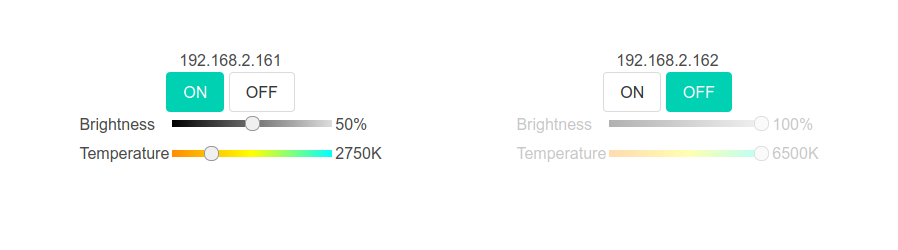
Remote control of the Yeelight/Xiaomi smartlights including:
- power on/off
- brightness
- color temperature
- RGB support (albeit ugly)
- multiple lights linked to each other and acting as a larger setup
Additional features:
- simple UI
- self-contained
- full controls of multiple smartlights in a single panel; no subpanels per light as in the official app
- responsive web design
Dependencies
A reasonably new Rust compiler is needed to build the application.
Usage
Before running the build you may want to edit public/config.json
according to the intended smartlight setup. This file will get
embedded into the resulting binary, though it's possible to override
it with --config some/path/config.json.
Build and run with:
$ cargo build --release
$ ./target/release/yeetlight --iface 0.0.0.0:8080
The --iface ... argument may be omitted if the above example is the
intended value, i.e. exposing the control panel on all network
interfaces on 8080 TCP port.
Open http://localhost:8080 in a web browser.
Configuration
config.json should contain a JSON object with a bulbs key contain
a list of bulbs. Each bulb has one of the following forms:
-
named bulb
"Bulb name": { "addr": "192.168.xxx.xxx" } -
anonymous bulb (the address is also the name)
"192.168.xxx.xxx": {}
If a bulb is a part of a larger setup, it may contain a linked key
with a list of names of other bulbs that will follow its state
(controlled with a checkbox):
"192.168.xxx.xxx": {
 "linked": [ "Bulb name" ]
}
...or more verbosely (and with the checkbox pre-checked):
"192.168.xxx.xxx": {
 "linked": [
 {
 "name": "Bulb name",
 "enable": true
 }
 ]
}
To enable the RGB capabilities, add "rgb": true to the
bulb's config.
Security considerations
Yeetlight was written with the assumption it's being run inside a fully trusted network on a device like Raspberry Pi, so no authentication is used at all. The bulbs themselves are not protected either so as long as Yeetlight is accessible only from the same network the bulbs are, it shouldn't create any additional security risks.