No description provided.
Feature: voice input/output #29
Merged
peterwwillis
merged 19 commits from 2026年03月21日 17:55:02 +01:00
feature/voice-output into main Summary of Changes
Hello, I'm Gemini Code Assist1 ! I'm currently reviewing this pull request and will post my feedback shortly. In the meantime, here's a summary to help you and other reviewers quickly get up to speed!
This pull request significantly expands the application's voice interaction capabilities by introducing text-to-speech (TTS) functionality and enhancing existing voice input with wake and stop word detection. These changes enable a more natural and interactive conversational experience, allowing users to receive spoken responses and control the application hands-free. The underlying build system has been updated to seamlessly integrate the new TTS dependencies, ensuring a consistent development and deployment workflow.
Highlights
- Voice Output (Text-to-Speech): Introduced Text-to-Speech (TTS) capabilities, allowing the application to speak responses using an offline Piper model via sherpa-onnx. This feature is enabled by a new
--ttsflag in the CLI and a toggle in the mobile UI. - Enhanced Voice Input with Wake/Stop Words: Implemented interactive voice input with configurable wake words and stop words, enabling a hands-free conversational mode. The application can now listen for a specific phrase to activate and another to pause listening.
- Build System Integration for TTS: Updated the Makefile to automatically fetch and build the sherpa-onnx library, similar to how whisper.cpp is handled. New build tags (
tts) and targets (tts-fetch,tts-clean,build-static) were added to manage the TTS dependencies and build process. - Configuration and Documentation Updates: Added a new
[tts]section toconfigs/default.tomlfor TTS settings (speed, safety delay, model paths). TheREADME.mdand a newGEMINI.mddocument were updated to reflect the new voice features, build instructions, and architectural context.
Ignored Files
- Ignored by pattern:
.github/workflows/**(2)- .github/workflows/release.yml
- .github/workflows/test.yml
Using Gemini Code Assist
The full guide for Gemini Code Assist can be found on our documentation page, here are some quick tips.
Invoking Gemini
You can request assistance from Gemini at any point by creating a comment using either /gemini <command> or @gemini-code-assist <command>. Below is a summary of the supported commands on the current page.
| Feature | Command | Description |
|---|---|---|
| Code Review | /gemini review |
Performs a code review for the current pull request in its current state. |
| Pull Request Summary | /gemini summary |
Provides a summary of the current pull request in its current state. |
| Comment | @gemini-code-assist | Responds in comments when explicitly tagged, both in pull request comments and review comments. |
| Help | /gemini help |
Displays a list of available commands. |
Customization
To customize Gemini Code Assist for GitHub experience, repository maintainers can create a configuration file and/or provide a custom code review style guide (such as PEP-8 for Python) by creating and adding files to a .gemini/ folder in the base of the repository. Detailed instructions can be found here.
Limitations & Feedback
Gemini Code Assist may make mistakes. Please leave feedback on any instances where its feedback is incorrect or counter productive. You can react with 👍 and 👎 on @gemini-code-assist comments. If you're interested in giving your feedback about your experience with Gemini Code Assist for GitHub and other Google products, sign up here.
-
Review the Privacy Notices, Generative AI Prohibited Use Policy, Terms of Service, and learn how to configure Gemini Code Assist in GitHub here. Gemini can make mistakes, so double check it and use code with caution. ↩︎
## Summary of Changes
Hello, I'm Gemini Code Assist[^1]! I'm currently reviewing this pull request and will post my feedback shortly. In the meantime, here's a summary to help you and other reviewers quickly get up to speed!
This pull request significantly expands the application's voice interaction capabilities by introducing text-to-speech (TTS) functionality and enhancing existing voice input with wake and stop word detection. These changes enable a more natural and interactive conversational experience, allowing users to receive spoken responses and control the application hands-free. The underlying build system has been updated to seamlessly integrate the new TTS dependencies, ensuring a consistent development and deployment workflow.
### Highlights
* **Voice Output (Text-to-Speech)**: Introduced Text-to-Speech (TTS) capabilities, allowing the application to speak responses using an offline Piper model via sherpa-onnx. This feature is enabled by a new `--tts` flag in the CLI and a toggle in the mobile UI.
* **Enhanced Voice Input with Wake/Stop Words**: Implemented interactive voice input with configurable wake words and stop words, enabling a hands-free conversational mode. The application can now listen for a specific phrase to activate and another to pause listening.
* **Build System Integration for TTS**: Updated the Makefile to automatically fetch and build the sherpa-onnx library, similar to how whisper.cpp is handled. New build tags (`tts`) and targets (`tts-fetch`, `tts-clean`, `build-static`) were added to manage the TTS dependencies and build process.
* **Configuration and Documentation Updates**: Added a new `[tts]` section to `configs/default.toml` for TTS settings (speed, safety delay, model paths). The `README.md` and a new `GEMINI.md` document were updated to reflect the new voice features, build instructions, and architectural context.
<details>
<summary><b>Ignored Files</b></summary>
* **Ignored by pattern:** `.github/workflows/**` (2)
* .github/workflows/release.yml
* .github/workflows/test.yml
</details>
<details>
<summary><b>Using Gemini Code Assist</b></summary>
<br>
The full guide for Gemini Code Assist can be found on our [documentation page](https://developers.google.com/gemini-code-assist/docs/review-github-code), here are some quick tips.
<b>Invoking Gemini</b>
You can request assistance from Gemini at any point by creating a comment using either `/gemini <command>` or `@gemini-code-assist <command>`. Below is a summary of the supported commands on the current page.
Feature | Command | Description
--- | --- | ---
Code Review | `/gemini review` | Performs a code review for the current pull request in its current state.
Pull Request Summary | `/gemini summary` | Provides a summary of the current pull request in its current state.
Comment | @gemini-code-assist | Responds in comments when explicitly tagged, both in pull request comments and review comments.
Help | `/gemini help` | Displays a list of available commands.
<b>Customization</b>
To customize Gemini Code Assist for GitHub experience, repository maintainers can create a configuration file and/or provide a custom code review style guide (such as PEP-8 for Python) by creating and adding files to a `.gemini/` folder in the base of the repository. Detailed instructions can be found [here](https://developers.google.com/gemini-code-assist/docs/customize-gemini-behavior-github).
<b>Limitations & Feedback</b>
Gemini Code Assist may make mistakes. Please leave feedback on any instances where its feedback is incorrect or counter productive. You can react with :thumbsup: and :thumbsdown: on @gemini-code-assist comments. If you're interested in giving your feedback about your experience with Gemini Code Assist for GitHub and other Google products, sign up [here](https://google.qualtrics.com/jfe/form/SV_2cyuGuTWsEw84yG).
</details>
[^1]: Review the [Privacy Notices](https://policies.google.com/privacy), [Generative AI Prohibited Use Policy](https://policies.google.com/terms/generative-ai/use-policy), [Terms of Service](https://policies.google.com/terms), and learn how to configure Gemini Code Assist in GitHub [here](https://developers.google.com/gemini-code-assist/docs/customize-gemini-behavior-github). Gemini can make mistakes, so double check it and [use code with caution](https://support.google.com/legal/answer/13505487).
gemini-code-assist[bot]
(Migrated from github.com)
reviewed 2026年03月21日 07:22:56 +01:00
gemini-code-assist[bot]
(Migrated from github.com)
left a comment
Code Review
This pull request introduces a significant new feature: voice output (TTS) using sherpa-onnx and malgo, along with wake-word and stop-word capabilities for hands-free interaction. The changes are extensive, touching the Makefile, configuration, CLI, controller, and mobile UI, and adding a new tts package. The implementation is well-structured, with good use of build tags to keep the feature optional. The documentation in README.md and the new GEMINI.md file is clear and thorough. I've identified a few areas for improvement, mainly concerning error handling and hardcoded values, to make the implementation more robust.
## Code Review
This pull request introduces a significant new feature: voice output (TTS) using `sherpa-onnx` and `malgo`, along with wake-word and stop-word capabilities for hands-free interaction. The changes are extensive, touching the Makefile, configuration, CLI, controller, and mobile UI, and adding a new `tts` package. The implementation is well-structured, with good use of build tags to keep the feature optional. The documentation in `README.md` and the new `GEMINI.md` file is clear and thorough. I've identified a few areas for improvement, mainly concerning error handling and hardcoded values, to make the implementation more robust.
gemini-code-assist[bot]
(Migrated from github.com)
commented 2026年03月21日 07:22:57 +01:00

The error returned by tts.NewSpeaker is being ignored. If the speaker fails to initialize (for example, due to a model download failure or invalid configuration), the controller will be created with a nil speaker, but the error will be silently dropped. This could lead to unexpected behavior later. It's better to handle this error and fail the controller's creation if the speaker cannot be initialized.
speaker,err:=tts.NewSpeaker(cfg.TTS)iferr!=nil{// It's better to return the error, but if you want to allow operation// without TTS on failure, you could log it as a warning instead.returnnil,fmt.Errorf("initializing TTS speaker: %w",err)}
The error returned by `tts.NewSpeaker` is being ignored. If the speaker fails to initialize (for example, due to a model download failure or invalid configuration), the controller will be created with a `nil` speaker, but the error will be silently dropped. This could lead to unexpected behavior later. It's better to handle this error and fail the controller's creation if the speaker cannot be initialized.
```go
speaker, err := tts.NewSpeaker(cfg.TTS)
if err != nil {
// It's better to return the error, but if you want to allow operation
// without TTS on failure, you could log it as a warning instead.
return nil, fmt.Errorf("initializing TTS speaker: %w", err)
}
```
gemini-code-assist[bot]
(Migrated from github.com)
commented 2026年03月21日 07:22:57 +01:00
Similar to the constructor, the error from tts.NewSpeaker is ignored here. If re-initializing the speaker fails during a config reload, the error should be propagated to the caller instead of being silently ignored. This ensures that the caller is aware that the reload operation was not fully successful.
ifc.speaker!=nil{_=c.speaker.Close()}speaker,err:=tts.NewSpeaker(c.cfg.TTS)iferr!=nil{returnfmt.Errorf("re-initializing TTS speaker: %w",err)}c.speaker=speaker
Similar to the constructor, the error from `tts.NewSpeaker` is ignored here. If re-initializing the speaker fails during a config reload, the error should be propagated to the caller instead of being silently ignored. This ensures that the caller is aware that the reload operation was not fully successful.
```go
if c.speaker != nil {
_ = c.speaker.Close()
}
speaker, err := tts.NewSpeaker(c.cfg.TTS)
if err != nil {
return fmt.Errorf("re-initializing TTS speaker: %w", err)
}
c.speaker = speaker
```
@ -124,0 +129,4 @@
#model_url="https://github.com/k2-fsa/sherpa-onnx/releases/download/tts-models/vits-piper-en_US-amy-low.tar.bz2"
#model_name="vits-piper-en_US-amy-low"
#piper_model="en_US-amy-low.onnx"
speed=1.5
gemini-code-assist[bot]
(Migrated from github.com)
commented 2026年03月21日 07:22:57 +01:00

The default value for safety_delay_ms is set to 10. This seems very low for a safety delay between speaking and listening, and is likely a typo for 1000. Other parts of the codebase (like README.md and configs/default.toml) suggest a value of 1000ms. A 10ms delay is probably ineffective.
safety_delay_ms = 1000

The default value for `safety_delay_ms` is set to `10`. This seems very low for a safety delay between speaking and listening, and is likely a typo for `1000`. Other parts of the codebase (like `README.md` and `configs/default.toml`) suggest a value of 1000ms. A 10ms delay is probably ineffective.
```suggestion
safety_delay_ms = 1000
```
@ -0,0 +1,269 @@
//go:build tts
gemini-code-assist[bot]
(Migrated from github.com)
commented 2026年03月21日 07:22:57 +01:00
The audio player is initialized with a hardcoded sample rate of 16000. As the comment notes, this is specific to one model. If a user configures a different TTS model with a different sample rate, the audio playback will be distorted (wrong speed/pitch).
A more robust approach would be to initialize the audioPlayer lazily. The SherpaOnnxOfflineTtsGeneratedAudio struct, available inside the Speak method, contains the correct sample_rate for the generated audio. You could check if s.player is nil in Speak, and if so, create it using the sample rate from the just-generated audio. This would ensure correct playback for any model.

The audio player is initialized with a hardcoded sample rate of 16000. As the comment notes, this is specific to one model. If a user configures a different TTS model with a different sample rate, the audio playback will be distorted (wrong speed/pitch).
A more robust approach would be to initialize the `audioPlayer` lazily. The `SherpaOnnxOfflineTtsGeneratedAudio` struct, available inside the `Speak` method, contains the correct `sample_rate` for the generated audio. You could check if `s.player` is `nil` in `Speak`, and if so, create it using the sample rate from the just-generated audio. This would ensure correct playback for any model.
Mobile UI Screenshot
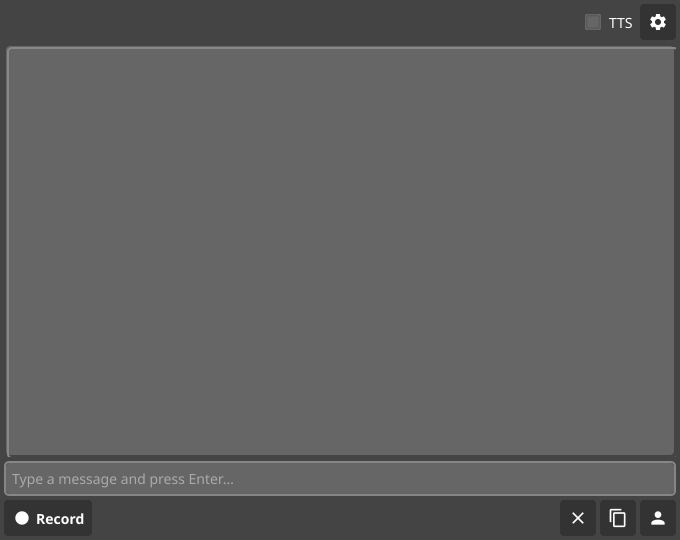
### Mobile UI Screenshot

<!-- Sticky Pull Request Commentzop-mobile-ui -->
Sign in to join this conversation.
No reviewers
Labels
Clear labels
bug
Something isn't working
dependencies
Pull requests that update a dependency file
documentation
Improvements or additions to documentation
duplicate
This issue or pull request already exists
enhancement
New feature or request
go
Pull requests that update go code
good first issue
Good for newcomers
help wanted
Extra attention is needed
invalid
This doesn't seem right
question
Further information is requested
wontfix
This will not be worked on
No labels
bug
dependencies
documentation
duplicate
enhancement
go
good first issue
help wanted
invalid
question
wontfix
Milestone
Clear milestone
No items
No milestone
Projects
Clear projects
No items
No project
Assignees
Clear assignees
No assignees
1 participant
Notifications
Due date
The due date is invalid or out of range. Please use the format "yyyy-mm-dd".
No due date set.
Dependencies
No dependencies set.
Reference
mutablecc/zop!29
Loading...
Add table
Add a link
Reference in a new issue
No description provided.
Delete branch "feature/voice-output"
Deleting a branch is permanent. Although the deleted branch may continue to exist for a short time before it actually gets removed, it CANNOT be undone in most cases. Continue?