- Assembly 80.3%
- Makefile 17.6%
- Shell 2.1%
|
|
||
|---|---|---|
| devices | dev.REU 1.09 | |
| experimentals | AutoBalance 1.02 | |
| extras | exfox | |
| libraries | Update godotlib.lib | |
| loaders | PFoxResample 1.01 | |
| modifiers | ReadMe 1.01 | |
| old_or_deprecated | Moved Stuff | |
| savers | PostScript 1.09 (EPS) | |
| scripts | Automatisches Compilieren via TravisCI | |
| system | upmem 1.16 | |
| templates | Updates to the templates | |
| .gitignore | Update .gitignore | |
| .travis.yml | Automatisches Compilieren via TravisCI | |
| LICENSE | Update LICENSE | |
| Makefile | Makefile 1.00 | |
| README.md | Update README.md | |
GoDot - C64 Image Processing
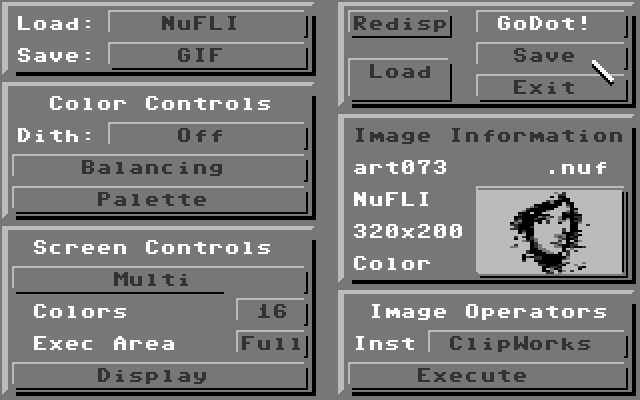
What is it?
If you like, you can say GoDot is something like a Photoshop for the Commodore 64, a SixtyPhourtoshop, the only one on the Commodore, by the way. GoDot is a modular system which consists of loaders (for particular graphics file formats), savers (for particular graphics file formats respectively, so you can convert formats one into another, see the Table of Supported Formats), and modifiers (which do what their typename says, they modify the loaded data, so you can manipulate images in many, many ways using GoDot; see our Table of Modifiers).
How to use it?
GoDot has a mouse driven GUI (can also be controlled by joystick or keyboard) which was derived from Amiga's Art Department Professional II (another Photoshop-like program). On this page you can see how this was achieved. It runs on any device that is able to work like a C-64 (which includes emulators like VICE).
What do you need?
You need nothing more than a stock Commodore 64 and a disk drive. Of course, the more peripheral hardware you have, the better. The best performance can be achieved when you use an REU RAM expansion together with three or four (CMD) disk drives or even a SuperCPU. GoDot also supports graphics delivering devices like the Scanntronik Handyscanner or several video digitizers (see an overview).
How do you get it?
All source code files available from here are written using the ACME cross assembler. So first you have to download ACME and probably a facility to edit, run and thus test out the code you write, like Relaunch64. Following this link you will have both of them.
Then just clone this GoDot repository to your computer, add a path to ACME (and to VICE if you want to use an emulator), add a MAKE utility to your system (Make for Windows if you run Windows), and run this repository's makefile.
You have several options:
- make d81
will build a D81 disk image filled with all necessary GoDot modules to have a running system, the D81 is placed in the build folder of the repository. - make files
will let ACME assemble the repository files into the build folder, resulting in all GoDot modules, ready to transfer them into two or more D64 disk images of your wishes. - make start
will assemble the whole repository into one D81 disk image, run it in VICE, and autostart GoDot. - make clean
tidy up the build folder. - make rebuild
will end up in a running GoDot on VICE, just like "make start", but doesn't care if you have previously used MAKE already.
How to GoDot?
Go to GoDot's website: https://www.godot64.de. It's German, but Google Translate or even better DeepL will do. You'll find a most elaborate manual of GoDot's modifiers there, and some intensive tutorials.
Additional material can be found in the downloads section of godot64.de. On four D64 disk images you find the complete GoDot system, together with convolution filters, dither patterns, mouse pointers and more.
Have fun using GoDot!
Arndt