- Rust 62%
- Shell 17.2%
- PowerShell 10.2%
- Elvish 5%
- CSS 1.4%
- Other 4.2%
wallust - Generate colors from an image
crates-io downloads license dependency-status status-badge CodeBerg MatrixChat
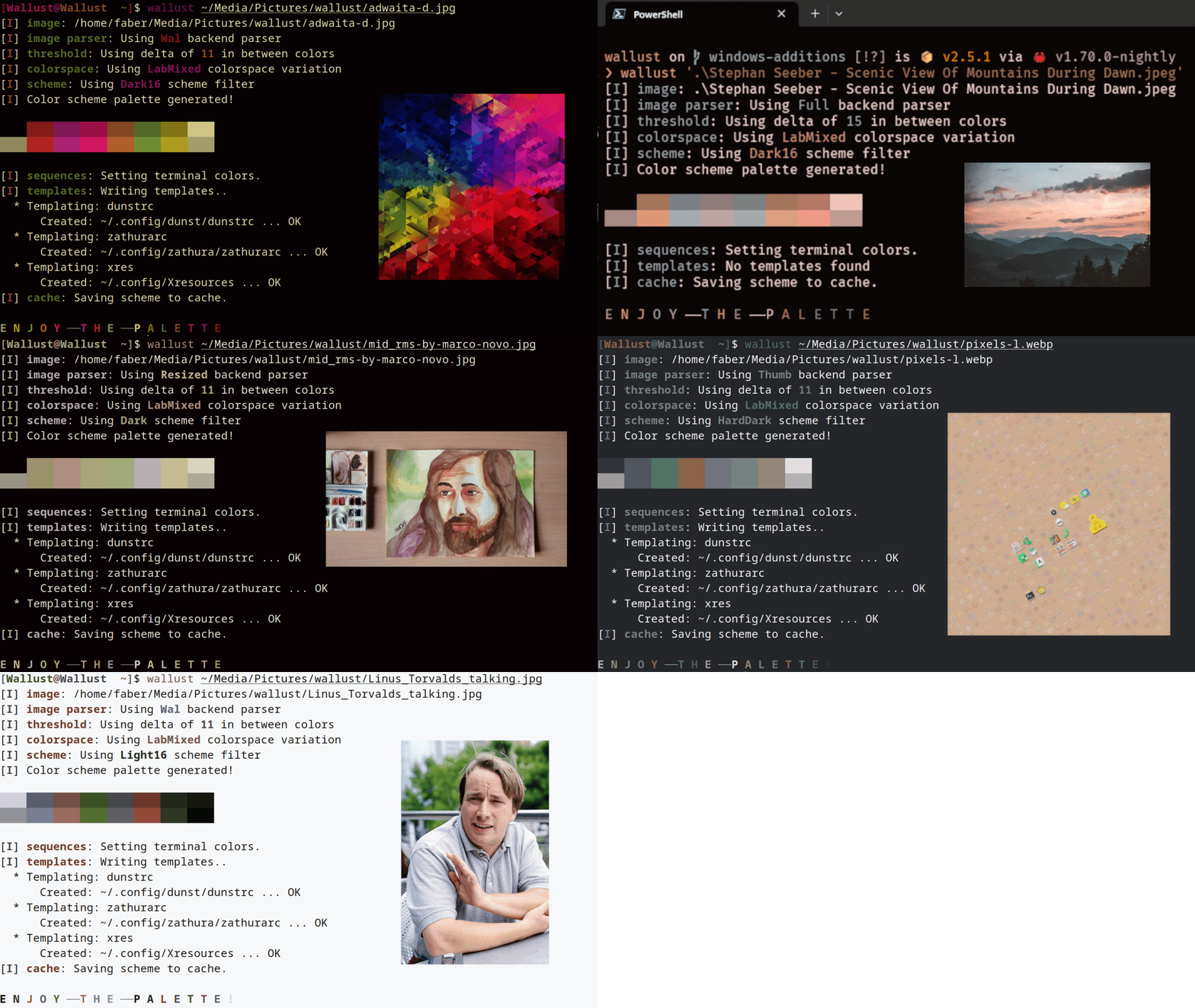
sources: adwaita - scenic view of mountains - rms by marco novo - pixels - linus talking


This is a pre-release of the v4-alpha including many changes and new features, any discussions/issues are welcome.
If coming from v2, please check v3 breaking changes. If coming from v3, please check v4 ALPHA breaking changes.
Usage
wallust run my_wallpaper.png
use wallust -h for an overview and wallust --help for a more detailed explanation
Docs
For ease of use you can check detailed docs with man pages (rather than cmd -hing everytime):
man wallust, information about terminal colors and template syntax;man wallust.5, config docs;man wallust-subcommand, displays a man page for subcommand.
There is also a web page for documentation! It's based on plain markdown, so you could also read it locally at docs/ directory.
Why
I've started this tool mainly for speed reasons given that I use a keybinding that runs pywal with a random wallpaper image, this resulted in a noticeable delay in between, which was really annoying as I changed my wallpaper.
Now I know that pywal uses image magick convert to gather the colors, which
caused the slowness in pywal, since convert takes some time by itself to
gather the colors.
Wallust can also use convert with the wal backend, but it's even more
powerful since it brings up integrated native methods (no need for external
commands, like convert, but are nice if you have it), and even much more
sofisticated algorithms like kmeans or the SIMD backend fast_resize. This
made the need to let the user decide what fit best, instead of a raw hardcode.
While the goal was focused on speed, the use case move on to upgrade functionality that both wallust and the archived python tool shared.
I use rust given the great wide library (crates) that it offered and it's native capabilities. I also tried rewriting pywal in C after watching a tsoding video where he implmements a histogram in C for manipulating an image. That was the push I needed to start this journey on this rusty color theoryish codebase.
Features
- Includes man pages and completions!
- Feature rich templating:
- You can use a subset of Jinja2 (default).
- Alternatively, simply use the pywal syntax (requires selecting it on the config file).
- Sets terminal colors on all (or the current,
-u) active terminals:- Windows: Adds a
color scheme for the windows terminal
by updating
settings.jsonon Windows Terminal, to enable this scheme for the first time you will have to selected it manually - *NIX: ASCII escape sequences:
/dev/pts/on Linuxpsto search active terminals on OpenBSD
- MacOS: iTerm2 sequences,
/dev/ttys00on MacOS
- Windows: Adds a
color scheme for the windows terminal
by updating
- Cache scheme palettes, overwritten by
-w:- Linux:
$XDG_CACHE_HOMEor$HOME/.cache - MacOs:
$HOME/Library/Caches - Windows:
{FOLDERID_LocalAppData}
- Linux:
- Read pywal/terminal-sexy colorschemes with
wallust cs. - Built-in themes with
wallust theme(compile time feature). - Configuration file at
wallust.toml(but wallust can work without one!):- wallust checks for
~/.config/wallust/wallust.tomlfor the config file, if not found it will use default implementations. - Configuration variables are avaliable as cli flags.
- Configurable methods for backends, palettes and threshold.
- OS dependant path:
- Linux:
$XDG_CONFIG_HOMEor$HOME/.config - MacOs:
$HOME/Library/Application Support - Windows:
{FOLDERID_RoamingAppData}
- Linux:
- wallust checks for
| Methods | Description |
|---|---|
| Backends | How to extract the colors from the image. (e.g pywal uses convert) |
| Palette | Makes a scheme palette with the gathered colors, configurable by a threshold (e.g. sets light or dark background) |
Installation
You can see if your distro has wallust in their repos by the following chart. For detail information you can check some distro installation instruction that the maintainers have left.
With cargo
cargo install wallust
This will use the lastest (non pre-release) version.
With git
Simply git clone https://codeberg.org/explosion-mental/wallust.
Recommended way is to use the Makefile, since this will install man pages and completions.
- Edit
Makefileto meet your local setup (should be fine as is for most linux distros). - Build it with
make - Install wallust (if necessary as root):
make install
Optionally, installing only the binary can be done with the following,
which moves the binary into your $CARGO_HOME/bin:
cargo install --path .
or build it and copy the binary to one folder present in your $PATH like
/usr/local/bin
cargo build --release
cp -f ./target/release/wallust /usr/local/bin
Related
- wallust-themes - built in wallust colorschemes
- wallust-templates - some templates for known programs
- pywal - 🎨Generate and change color-schemes on the fly
- pywal16 - 16 colors fork of pywal
- wpgtk - 🎴a colorscheme, wallpaper and template manager for *nix
- wal-theme-picker - pick the best theme for the image (rather than generating one)
- pigmnts - 🎨Color palette generator from an image using WebAssesmbly and Rust
- Chameleon - 🦎Theme your linux system to match any image
- lule_bash - Genretare all 255 colors from wallpapers
- lule -
lule_bashrewriten for efficiency - using vscode-wal-theme with
wallust - base16 - Framework for Tomorrow styled themes
- flavours - 🎨💧An easy to use base16 scheme manager that integrates with any workflow
- oxidec - Eye-candy manager written in Rust
- raventhemer - A theme manager and switcher for desktop linux
- rose-pine Issue #2 - Ideas with using the whole 15 color palette