- Rust 98.8%
- CSS 0.6%
- Meson 0.2%
- Nix 0.2%
- Shell 0.1%
- Other 0.1%
Gitte
A GTK4/libadwaita Git client for the GNOME desktop, written in Rust. It is heavily inspired by Git Tower and Magit. The name Gitte is a play on words. It is the diminutive form of the German female first name Brigitte and is pronounced "Git-ty" in English (with a hard G like in GIF).
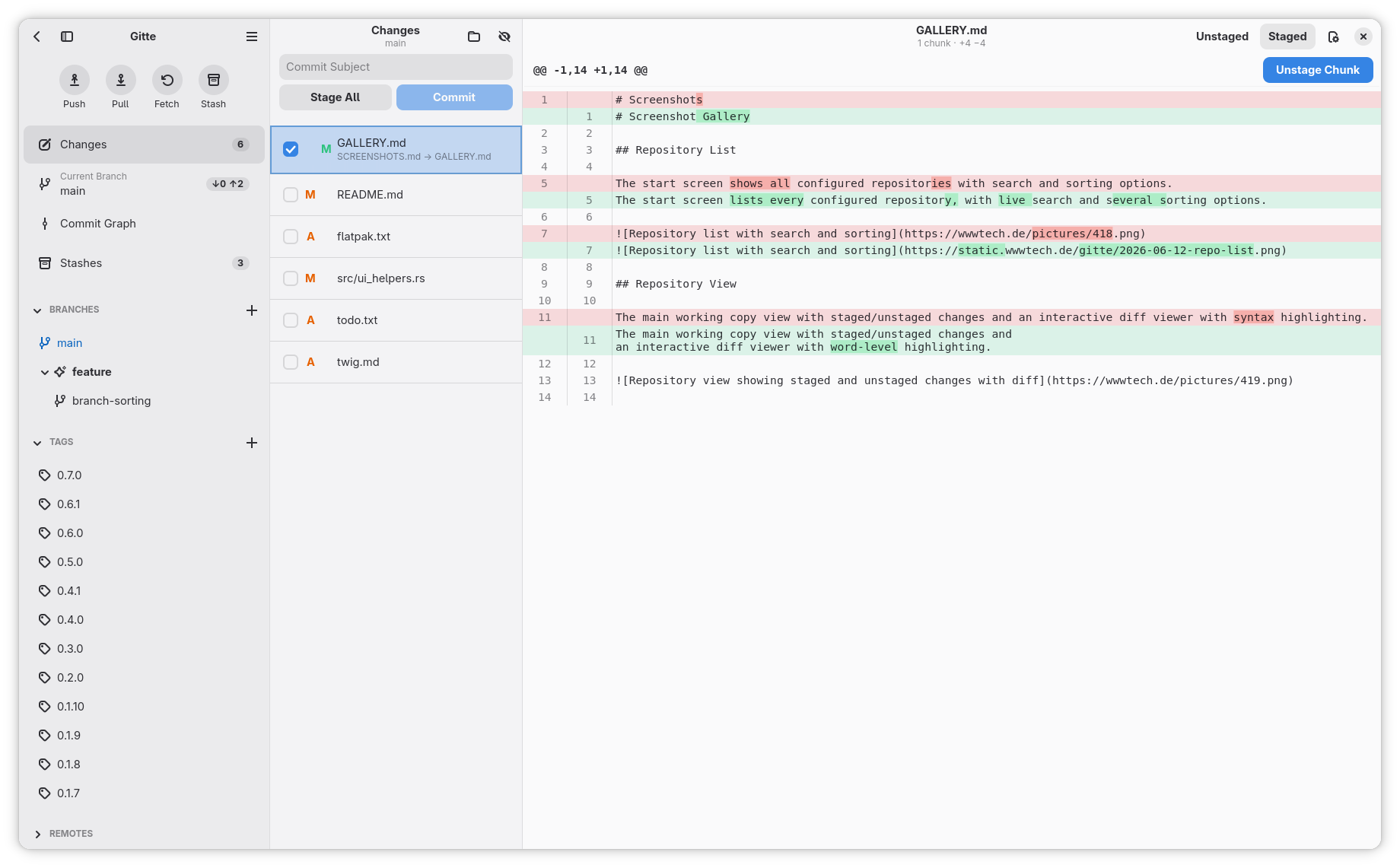
See SCREENSHOTS.md for more screenshots.
Features
Repositories
- Add, rename, and remove repositories; initialize new Git repos
- Clone repositories with a live progress dialog
- Search and configurable sort order (manual, by name, by last opened) on the start screen
- Copy paths or open them in the file manager
- Multi-window support with per-window state
- Open a repository from the command line:
gitte <path>focuses an existing window for that repo, or opens a new one
Changes & Diffs
- Working copy view with file status (modified, added, deleted, renamed) and split or unified layout
- Stage, unstage, and discard at file, hunk, or individual line level
- Color-coded diff viewer (additions/deletions) with sticky hunk headers
- Binary-file detection
- Inspect diffs for commits and stashes alongside the working copy
- Add files to
.gitignoredirectly from the changes list
Commits & History
- Write commit messages with subject and body; configurable maximum line length (global or per repo)
- Amend the last commit
- Paginated history with tag and upstream markers
- Search commits by message, author, or date
- Interactive rebase: squash/fixup, reorder via drag & drop, reword, and drop commits
Branches & Tags
- Branches: create (including "create from here" on any commit), rename, delete, checkout local and remote
- Upstream tracking with ahead/behind counts and stash-before-switch for dirty working trees
- Merge another branch into the current one with strategy selection (fast-forward, merge commit, rebase, or squash)
- Collapsible branch groups in the sidebar
- Tags: lightweight and annotated, delete, push (with force option)
- Tag sorting by semver, alphabetical, or date, ascending or descending
Syncing
- Pull with branch selection, fast-forward / merge / rebase strategies, auto-stash, prune, fetch tags, and conflict detection
- Push with branch selection, automatic upstream setup, force push (with visual warning), tag push, and no-op detection
- Remote list with per-remote tracking branches; fetch from a single remote or all at once
- Configurable auto-fetch interval (global or per repo)
- Export archives from any ref as
tar.gz,tar.xz, orzip
Stashes
- Create stashes with or without untracked files
- Apply, pop, and drop stashes
- Inspect stash diffs
Authentication
- SSH key agent support with optional per-remote SSH key
- HTTP basic auth with secure keychain storage via Secret Service (D-Bus)
- Built-in askpass helper for password and SSH-passphrase prompts
Customization
Available in Preferences (most settings have a per-repository override):
- Auto-fetch interval
- Diff font and compact-mode spacing
- Working-copy layout (split or unified)
- Per-repository Git identity (
user.name/user.email) - Tag sort method and direction
- Bypass local Git config (relevant for Flatpak, see below)
Updates
- In-app notification banner when a new release is available, with per-version dismiss
- "What's new" release-notes dialog shown after upgrades
Localization
Built with gettext. Available languages: English (source), Cornish, German, Ukrainian. Contributions for other locales are welcome.
UI
- Built on libadwaita for a native GNOME look and feel
- Resizable split panes with persistent positions and window-size persistence
Keyboard Shortcuts
| Action | Shortcut |
|---|---|
| New Window | Ctrl+N |
| Close Window | Ctrl+W |
| Search | Ctrl+F |
| Add Repository | Ctrl+Shift+A |
| Preferences | Ctrl+, |
| Keyboard Shortcuts | Ctrl+? |
| Quit | Ctrl+Q |
| Toggle Sidebar | F9 |
| Fetch | Ctrl+Shift+F |
| Pull | Ctrl+P |
| Push | Ctrl+Shift+P |
| Stash | Ctrl+Shift+S |
| Stash Including Untracked | Ctrl+Shift+U |
| Pop Latest Stash | Ctrl+Shift+O |
| Create Branch | Ctrl+Shift+B |
| Create Tag | Ctrl+Shift+T |
| Focus Commit Message | Ctrl+Shift+C |
| Commit | Ctrl+Return |
| Stage/Unstage | Space / Return |
| Discard Changes | Delete |
Building
Dependencies
- Rust toolchain (stable)
- GTK 4 (>= 4.20)
- libadwaita (>= 1.8)
- libgit2
- Meson
- Ninja
On Fedora:
sudo dnf install gtk4-devel libadwaita-devel libgit2-devel meson ninja-build
On Arch Linux:
sudo pacman -S gtk4 libadwaita libgit2 meson ninja
or use the community-maintained AUR package.
yay -S gitte-git
On NixOS (or with Nix):
nix develop
This enters a dev shell with all dependencies provided via flake.nix.
On FreeBSD:
# cd /usr/ports/deskutils/gitte
# pkg install --automatic $(make build-depends-list run-depends-list)
Build & Install
meson setup builddir
meson compile -C builddir
meson install -C builddir
With just
just run
## see available commands
just --list
Note:
src/config.rsis generated by Meson fromsrc/config.rs.in. You need to runmeson compileat least once beforecargo checkorcargo buildwill work.
Flatpak
The Flatpak version of Gitte uses the --filesystem=home permission to access Git repositories in your home directory. This means that system-wide configuration files like /etc/gitconfig cannot be read from within the sandbox.
If you need settings from /etc/gitconfig, you can override the Flatpak permissions:
flatpak override --user --filesystem=/etc/gitconfig:ro de.wwwtech.gitte
Alternatively, you can copy the relevant settings into your user-specific ~/.gitconfig.
Sandbox limitations
When Gitte shells out to git from inside the Flatpak sandbox, a few features are disabled by default. Not as a policy decision, but because the helpers they rely on simply aren't reachable from inside the sandbox:
- Git hooks are bypassed (
core.hooksPathis pointed at/dev/null). Hook scripts typically need interpreters (bash,python,node, project-specific tooling) and tools from your$PATHthat don't exist inside the sandbox, so running them would mostly produce confusing failures rather than the behavior you configured on the host. - Credential helpers (
credential.helper, including anycredential.<url>.helperoverrides) are neutralized. Helpers likelibsecret,manager, or custom scripts live on the host and can't be invoked from inside the sandbox. Gitte ships its own askpass helper so password and SSH-passphrase prompts still work; only the cached-credential helpers are unavailable.
These bypasses can be toggled in Preferences → Bypass local Git config, but flipping that switch alone does not make hooks or credential helpers start working. It only stops Gitte from suppressing them. To actually get hooks and host credential helpers to run, you need to invoke the host's git instead of the sandboxed one (see below).
Using the host's git binary
History-rewriting operations shell out to git. By default Gitte invokes the bundled git inside the sandbox; user and system Git config files are bridged in via env vars so this normally Just Works.
If you want hooks, host credential helpers, a custom git build, or any other host-side tooling to participate, you can have Gitte run the git installed on the host. This requires two steps:
-
Grant the Flatpak permission to spawn host commands:
flatpak override --user --talk-name=org.freedesktop.Flatpak de.wwwtech.gitte⚠️ This permission effectively allows the app to escape the sandbox by spawning arbitrary host processes. Only enable it if you trust the application and understand the implications.
-
Point Gitte at
flatpak-spawnvia dconf (there is no UI for this on purpose):dconf write /de/wwwtech/gitte/git-command "'flatpak-spawn --host git'"The setting takes a single shell-style command line. It's split by
shell-wordsrules. Common values:'git': default, sandbox-internal git'flatpak-spawn --host git': host's git via the Flatpak portal'/path/to/some/custom/git': absolute path to a specific binary
To revert to the default:
dconf reset /de/wwwtech/gitte/git-command
With flatpak-spawn --host git in effect, you'll typically also want to turn Bypass local Git config off in the preferences, otherwise Gitte will still pass core.hooksPath=/dev/null and credential.helper= to the host git, defeating the point of routing through the host.
Opening files in an external editor
The file context menus (changes list, diff, and file header) offer Open with External Editor. With the External Editor Command in Preferences → System left empty, Gitte opens the file with your system's default application through the OpenURI portal. This works inside the sandbox out of the box and launches the host's default handler.
If you set an explicit command, it runs inside the sandbox, where host editors like gedit or Kate aren't reachable. To launch a host editor, prefix the command with flatpak-spawn --host and grant the same talk-name permission used for host git and signing:
flatpak override --user --talk-name=org.freedesktop.Flatpak de.wwwtech.gitte
⚠️ This permission effectively allows the app to escape the sandbox by spawning arbitrary host processes. Only enable it if you trust the application and understand the implications.
Then set a command using the {file} (absolute path) and {line} (line number) placeholders, for example:
flatpak-spawn --host gedit +{line} {file}
The preferences entry shows this Flatpak hint automatically when Gitte runs inside a sandbox. If the command contains no {file} placeholder, the path is appended as the final argument.
Commit & tag signing
Signing relies on gpg (OpenPGP), gpgsm (X.509), or ssh-keygen (SSH signatures), whichever matches your gpg.format setting. None of these tools are bundled in the Flatpak. Gitte calls them via flatpak-spawn --host, which means the same talk-name permission used for host git is also what makes signing work.
Without that permission, the sign toggles in the commit, tag, merge, pull, and revert dialogs stay hidden, and the in-app signature verification can't reach your keyring either. If your repo's git config has commit.gpgsign = true (or tag.gpgsign / tag.forceSignAnnotated), Gitte silently produces unsigned commits/tags instead of failing. The sandbox can't reach your signing tool, and a hard failure would leave you with no good recovery path. Grant the permission below if you do want signing:
flatpak override --user --talk-name=org.freedesktop.Flatpak de.wwwtech.gitte
⚠️ This permission effectively allows the app to escape the sandbox by spawning arbitrary host processes. Only enable it if you trust the application and understand the implications.
With this enabled, signing works against the host's gpg-agent and keyring, both for direct commits/tags initiated by Gitte and for the commits that git rebase --gpg-sign produces during squash/reword/merge-via-rebase. Verification (the colored ✓/✗ next to a signed commit) likewise hits host gpg.
If the permission is granted but the relevant tool (gpg, gpgsm, or ssh-keygen depending on gpg.format) isn't installed on the host, the sign toggles will stay hidden anyway and signing falls back to unsigned the same way. Gitte probes the host tool's --version before showing the toggle.
Note: this silent fallback applies only inside the Flatpak sandbox. With a native build, a broken signing configuration remains a real user-side misconfiguration and will fail visibly.
FreeBSD port
To install Gitte on FreeBSD using precompiled binary packages:
# pkg install deskutils/gitte
macOS app
The macOS version of Gitte comes packaged as native application bundles for both Apple Silicon and Intel architectures. They are built by and hosted at a separate project on GitLab due to the macOS infrastructure that is kindly being provided there.
Contributing
Contributions are welcome! Please make sure your code passes cargo clippy without warnings before submitting a pull request. However, code generated fully or partially by Large Language Models (LLMs) such as ChatGPT, Copilot, or similar tools is not accepted. Please ensure that all submitted code is written and understood by you, so it can be properly reviewed and maintained.
Code of Conduct
This project follows the GNOME Code of Conduct.
License
Gitte is licensed under the AGPL-3.0-or-later.