Submitted by: mtxadmin
Submitted at: 2020年01月28日T11:55:12Z
Prerequisites
- I performed a cursory search of the issue tracker to avoid opening a duplicate issue
- Your issue may already be reported.
- I also searched the existing issues at https://github.com/gorhill/uMatrix/issues
- This is not a support issue or a question
- Support issues and questions are handled at /r/uMatrix
- I tried to reproduce the issue when...
- uMatrix is the only extension
- uMatrix with default lists/settings
- using a new, unmodified browser profile
- I am running the latest version of uMatrix
- I checked the documentation to understand that the issue I report is not a normal behavior
- I used the logger to rule out that the issue is caused by my ruleset
Description
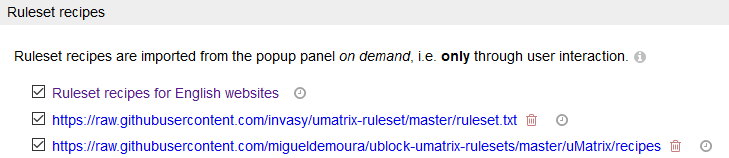
When adding a ruleset subscription, its title does not change (like it does in uBlock Origin).
For example:
https://raw.githubusercontent.com/invasy/umatrix-ruleset/master/ruleset.txt
https://raw.githubusercontent.com/migueldemoura/ublock-umatrix-rulesets/master/uMatrix/recipes
A specific URL where the issue occurs
Steps to Reproduce
- Open uMatrix dashboard
- Go to Assets tab
- In "Ruleset recipes" check "Import..." checkbox. A field for URLs appears with comment:
"Import external assets here:
One URL per line; invalid URLs will be silently ignored."
(this field is very similar to uBlock Origin) - Paste URL of ruleset subscription
- Ruleset is imported
- Despite having Title directive in the text, the title of imported recipeset is not changing from bare URL format
Ruleset
https://raw.githubusercontent.com/invasy/umatrix-ruleset/master/ruleset.txt
https://raw.githubusercontent.com/migueldemoura/ublock-umatrix-rulesets/master/uMatrix/recipes
Supporting evidence
Your environment
- uMatrix version: 1.4.0
- Browser Name and version: Firefox
- Operating System and version: Windows 10
Submitted by: [mtxadmin](https://github.com/mtxadmin)
Submitted at: [2020年01月28日T11:55:12Z](https://github.com/uBlockOrigin/uMatrix-issues/issues/220)
-----
<!-- Do NOT delete this template or any part of it when submitting your issue -->
### Prerequisites
<!-- Check the appropriate boxes after you submit your issue -->
<!-- Speculated performance issues will be marked as invalid and closed if they do not come with actual profiling data + analysis supporting the claim -->
- [x] I performed a cursory search of the issue tracker to avoid opening a duplicate issue
- Your issue may already be reported.
- [x] I also searched the existing issues at <https://github.com/gorhill/uMatrix/issues>
- [x] This is not a support issue or a question
- Support issues and questions are handled at [/r/uMatrix](https://old.reddit.com/r/uMatrix/)
- I tried to reproduce the issue when...
- [x] uMatrix is the only extension
- [x] uMatrix with default lists/settings
- [x] using a new, unmodified browser profile
- [x] I am running the latest version of uMatrix
- [x] I checked the [documentation](https://github.com/gorhill/uMatrix/wiki) to understand that the issue I report is not a normal behavior
- [x] I used the logger to rule out that the issue is caused by my ruleset
### Description
<!-- Description of the bug or feature -->
When adding a ruleset subscription, its title does not change (like it does in uBlock Origin).
For example:
https://raw.githubusercontent.com/invasy/umatrix-ruleset/master/ruleset.txt
https://raw.githubusercontent.com/migueldemoura/ublock-umatrix-rulesets/master/uMatrix/recipes
### A specific URL where the issue occurs
<!-- This is mandatory for issue happening on a web page -->
### Steps to Reproduce
1. Open uMatrix dashboard
2. Go to Assets tab
3. In "Ruleset recipes" check "Import..." checkbox. A field for URLs appears with comment:
"Import external assets here:
One URL per line; invalid URLs will be silently ignored."
(this field is very similar to uBlock Origin)
4. Paste URL of ruleset subscription
5. Ruleset is imported
6. Despite having Title directive in the text, the title of imported recipeset is not changing from bare URL format
### Ruleset
<!--
You MUST provide ALL rules which are directly or indirectly relevant
to the specific reproducible case you provide: uMatrix can be
configured myriad ways and it is not possible to investigate properly
without ALL the rules involved in the specific issue you report.
-->
https://raw.githubusercontent.com/invasy/umatrix-ruleset/master/ruleset.txt
https://raw.githubusercontent.com/migueldemoura/ublock-umatrix-rulesets/master/uMatrix/recipes
### Supporting evidence
<!--
You MUST provide supporting evidence: screenshots of logger,
browser console, dashboard/popup panel settings, etc -- i.e. all
the necessary information which objectively demonstrate there
is an issue.
-->
### Your environment
* uMatrix version: 1.4.0
* Browser Name and version: Firefox
* Operating System and version: Windows 10