Minimal web browser that loads pages from a config file
|
|
||
|---|---|---|
| assets | README | |
| cmake | profiles | |
| packaging | profiles | |
| src | profiles | |
| .gitignore | config.cpp | |
| CMakeLists.txt | profiles | |
| config-noproxy.json | proxy | |
| config.json | README | |
| LICENSE | Initial commit | |
| Makefile | config.cpp | |
| README.md | README | |
| resources.qrc | rename, icon | |
JellyTab
This app is created for personal use. I may add a proper documentation and install packages later, but there is no guarantee.
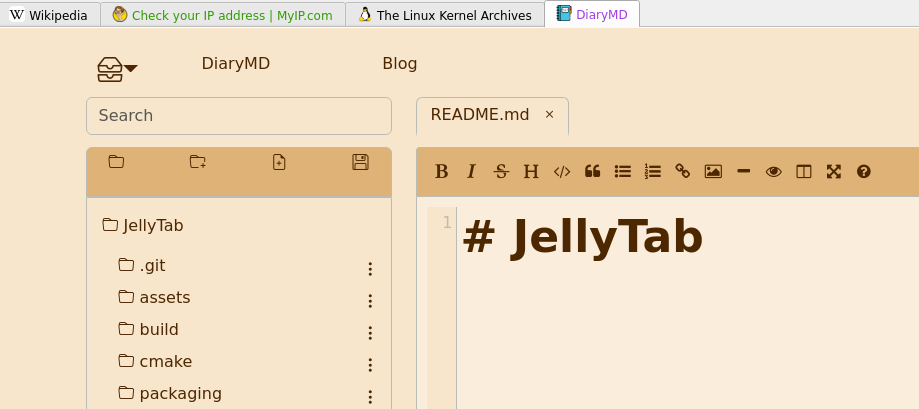
Config
Minimal config.json should have tabs. By default, the app will look in ~/.config/JellyTab/config.json. The path could be changed with -c option.
{
 "tabs": [
 { "title": "Wikipedia", "url": "https://www.wikipedia.org" },
 { "title": "Check IP", "url": "https://www.myip.com/"}
 ]
}
Full config file. To run several instances of JellyTab, set different app: name for each.
Only socks5 proxy is supported right now.
{
 "app": {
 "name": "dev",
 "icon": "/usr/share/icons/hicolor/48x48/apps/org.xfce.webbrowser.png",
 "height": 500,
 "width": 1000
 },
 "proxy": {
 "type": "socks5",
 "host": "127.0.0.1",
 "port": 1084
 },
 "tabs": [
 { "title": "Wikipedia", "url": "https://www.wikipedia.org" },
 { "title": "Check IP", "url": "https://www.myip.com/", "color": "#319c00" },
 { "title": "Linux Kernel", "url": "https://www.kernel.org/", "color": "#a13de3" }
 ]
}