- Go 53.3%
- HTML 44.4%
- Makefile 1.5%
- Dockerfile 0.5%
- Shell 0.3%
|
|
||
|---|---|---|
| .github | Android Termux binary | |
| android | Android Termux binary | |
| assets | Release 0.1.1 | |
| cmd/ForAuth | Single user auth | |
| configs | Dockerfile: scratch -> alpine | |
| docs | Empty login/pw fix | |
| internal | Username in Headers | |
| .gitignore | Single user auth | |
| .goreleaser.yaml | Android Termux binary | |
| .version | Notify on login | |
| CHANGELOG.md | Username in Headers | |
| Dockerfile | Dockerfile: scratch -> alpine | |
| go.mod | Username in Headers | |
| go.sum | Username in Headers | |
| LICENSE | Initial commit | |
| Makefile | Single user auth | |
| README.md | Release 0.2.1 | |
Main-Docker Go Report Card Docker Image Size (latest semver)
ForAuth
ForAuth (Forward Auth) - simple auth app (session-cookie) with notifications on login and multiple targets and users option

Screenshot 2
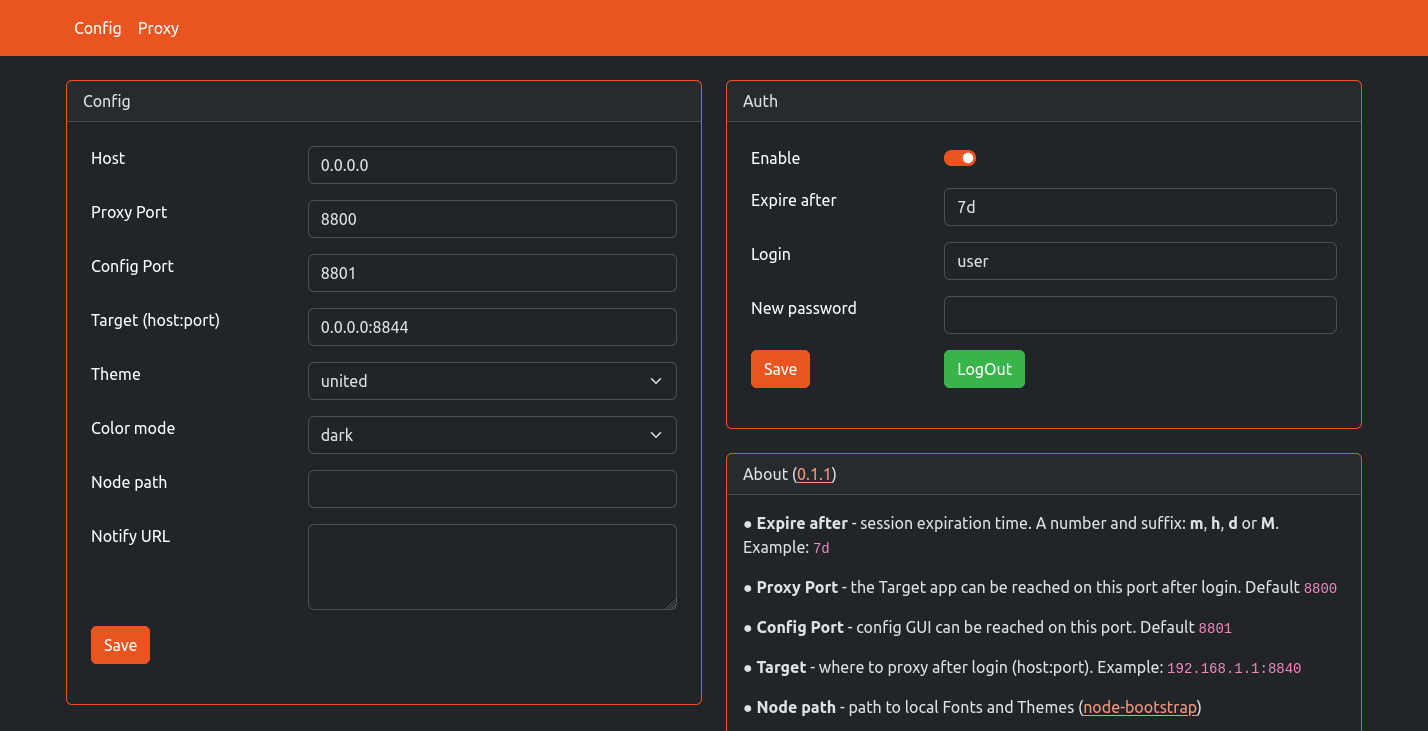
Securuty
- This app is only safe when used with
https - Use strong password
- Make sure direct access to Target app is closed with firewall or other measures
Quick start
docker run --name forauth \
 -v ~/.dockerdata/ForAuth:/data/ForAuth \
 -p 8800:8800 \ # Proxy port
 -p 8801:8801 \ # Config port
 aceberg/forauth
Then open Config page in browser and set up Auth and Target app.
Example docker-compose-auth.yml for WatchYourPorts. This should work with other apps too.
Config
Configuration can be done through config file, GUI or environment variables. Variable names is config.yaml file are the same, but in lowcase.
| Variable | Description | Default |
|---|---|---|
| FA_AUTH | Enable Session-Cookie authentication | false |
| FA_AUTH_EXPIRE | Session expiration time. A number and suffix: m, h, d or M. | 7d |
| FA_AUTH_USER | Main user username | |
| FA_AUTH_PASSWORD | Encrypted password (bcrypt). How to encrypt password with bcrypt? |
| Variable | Description | Default |
|---|---|---|
| FA_HOST | Listen address for both Config and Proxy | 0.0.0.0 |
| FA_PORT | Port for Proxy | 8800 |
| FA_PORTCONF | Port for Config page | 8801 |
| FA_TARGET | Where to proxy after login (host:port). Example: 192.168.1.1:8840 |
|
| FA_THEME | Any theme name from https://bootswatch.com in lowcase or additional (emerald, grass, grayscale, ocean, sand, wood) | united |
| FA_COLOR | Background color: light or dark | dark |
| FA_NODEPATH | Path to local JS and Themes (node-bootstrap) | |
| FA_NOTIFY | Shoutrrr URL. ForAuth uses Shoutrrr to send notifications. It is already integrated, just needs a correct URL. Examples for Discord, Email, Gotify, Matrix, Ntfy, Pushover, Slack, Telegram, Generic Webhook and etc are here | |
| FA_NOTIFY2 | Second Shoutrrr URL. The app will send notifications to both, if they are not empty | |
| FA_IPINFO | Get client IP info (from https://ipinfo.io) on login | false |
| TZ | Set your timezone for correct time |
Options
| Key | Description | Default |
|---|---|---|
| -d | Path to config dir | /data/ForAuth |
| -n | Path to local JS and Themes (node-bootstrap) |
Multiple Targets and Users
Multiple Targets and Users for each target can be configured from Advanced page or in targets.yaml file inside the config dir. Main user (FA_AUTH_USER) has access to all targets and config.
Example:
0.0.0.0:8854:# where proxy will listenname:DiaryMD # nametarget:127.0.0.1:8754# where an app listensusers:# users of this targetuser1:# usernameenabled:true# must be true for user to loginusername:user1# username (same as above)password:2ドルa10ドル$bPH6208LpuJFos3x1VhFA.PxzygaAhT056uPxspJxwccgP4n.AnEeexpire:14d # session expiration timeuser3:enabled:trueusername:user3password:2ドルa10ドル$eZp3I0A9ojT32gTXvPscHec9e7cHHYtb6M6phl2mUdHXyhFosLW.Cexpire:1d0.0.0.0:8855:name:AnyAppStarttarget:127.0.0.1:8755# users: # users section is optional# without it only Main user can loginLocal network only
By default, this app pulls themes, icons and fonts from the internet. But, in some cases, it may be useful to have an independent from global network setup. I created a separate image with all necessary modules and fonts.
docker run --name node-bootstrap \
 -p 8850:8850 \
 aceberg/node-bootstrap
docker run --name forauth \
 -v ~/.dockerdata/ForAuth:/data/ForAuth \
 -p 8800:8800 \
 -p 8801:8801 \
 aceberg/forauth -n "http://$YOUR_IP:8850"
CURL
To access Target app with curl:
curl -X POST http://localhost:8800 -H "Content-Type: application/x-www-form-urlencoded" -d "username=user&password=pw" -c fileCookie
curl http://localhost:8800 -b fileCookie
Thanks
- All go packages listed in dependencies
- Bootstrap
- Themes: Free themes for Bootstrap
- Favicon and logo: Flaticon